
試験CKAD トピック3 問題82 スレッド
Linux Foundation CKADのリアル試験問題集
問題 #: 82
トピック #: 3
問題 #: 82
トピック #: 3
You have a Deployment running a container image for a web application. The application's configuration files are currently stored within the image itself. you want to move the configuration files to a ConfigMap so that they can be updated independently or the application image. Describe the steps involved in modifying the Deployment and creating a ConfigMap to achieve this separation.
おすすめの解答:
See the solution below with Step by Step Explanation.
Explanation:
Solution (Step by Step) :
1. Create a ConfigMap:
- Create a ConfigMap using 'kubectl create configmap' with the configuration files. For example:
kubectl create configmap webapp-config -from-literal=config.json='{"port": 8080, "database_url": "mongodb://localhost27017"}'
- Replace 'config_json' with the name of your configuration file and the JSON content with your actual configuration values.
2. Modify the Deployment:
- Modify your Deployment YAML file to mount the ConfigMap as a volume. Here's an example:
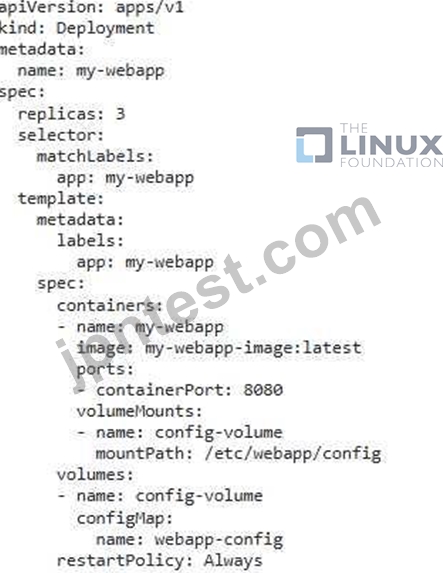
- Modify your application code to read configuration files from '/etctwebapp/config' 3. Apply the Changes: - Apply the updated Deployment using 'kubectl apply -f deployment_yamr 4. Verify the Update: - Check the logs of the pods using 'kubectl logs -f You should see the application loading configuration values from the ConfigMap. 5. Update the Configuration: - You can now update the configuration files within the ConfigMap without rebuilding the image. For example.

- This will update the ConfigMap and trigger a rolling update of the Deployment, effectively updating the application configuration without rebuilding the image.
Explanation:
Solution (Step by Step) :
1. Create a ConfigMap:
- Create a ConfigMap using 'kubectl create configmap' with the configuration files. For example:
kubectl create configmap webapp-config -from-literal=config.json='{"port": 8080, "database_url": "mongodb://localhost27017"}'
- Replace 'config_json' with the name of your configuration file and the JSON content with your actual configuration values.
2. Modify the Deployment:
- Modify your Deployment YAML file to mount the ConfigMap as a volume. Here's an example:
- Modify your application code to read configuration files from '/etctwebapp/config' 3. Apply the Changes: - Apply the updated Deployment using 'kubectl apply -f deployment_yamr 4. Verify the Update: - Check the logs of the pods using 'kubectl logs -f You should see the application loading configuration values from the ConfigMap. 5. Update the Configuration: - You can now update the configuration files within the ConfigMap without rebuilding the image. For example.
- This will update the ConfigMap and trigger a rolling update of the Deployment, effectively updating the application configuration without rebuilding the image.
重泉** 2026-07-23 03:24:04
コメント
他人の解答コメントを賛成するのも、その解答に一票を入れることになります。したがって、すでに同じ意見の投票コメントが存在する場合、新規コメントをする代わりに賛成することもできます。
コメントを通報する
コメント中
今すぐ 新規登録 / ログイン (無料です)。