
試験GH-600 トピック1 問題33 スレッド
Microsoft GH-600のリアル試験問題集
問題 #: 33
トピック #: 1
問題 #: 33
トピック #: 1
Hotspot Question
You have a GitHub Enterprise organization that uses GitHub Copilot.
You discover that GitHub Copilot Chat responses in Microsoft Visual Studio Code are influenced by earlier, unrelated troubleshooting prompts from the same conversation.
You need to ensure that the Copilot Chat conversation context is limited to information relevant to the current work item. The solution must minimize effort.
What should you do? To answer, select the appropriate options in the answer area.
NOTE: Each correct selection is worth one point.
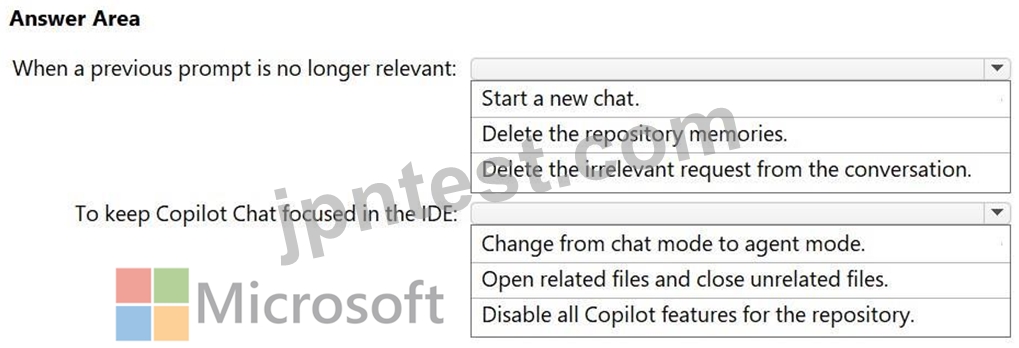
You have a GitHub Enterprise organization that uses GitHub Copilot.
You discover that GitHub Copilot Chat responses in Microsoft Visual Studio Code are influenced by earlier, unrelated troubleshooting prompts from the same conversation.
You need to ensure that the Copilot Chat conversation context is limited to information relevant to the current work item. The solution must minimize effort.
What should you do? To answer, select the appropriate options in the answer area.
NOTE: Each correct selection is worth one point.
おすすめの解答:
Explanation:
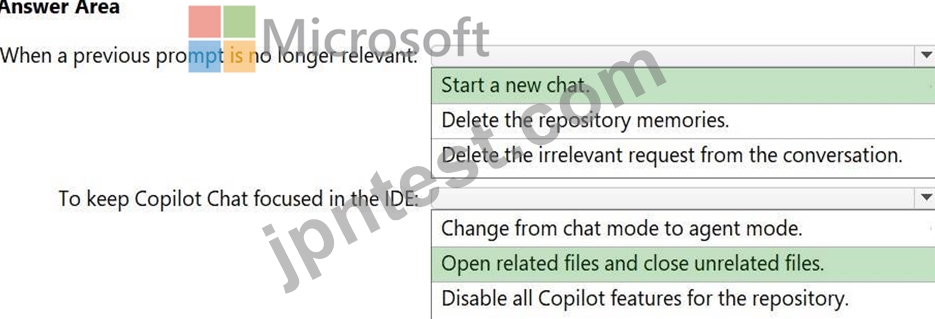
Box 1: Start a new chat.
Clear the chat session or start a new conversation thread.
Context Reset: Erases the short-term conversation history completely.
Zero Overhead: Requires no configuration changes or administrative interventions.
Fresh State: Forces Copilot to focus only on newly provided code and prompts.
Box 2: Open related files and close unrelated files.
To keep GitHub Copilot Chat focused on the current work item with the minimum amount of effort, you should open related files and close unrelated files.
GitHub Copilot Chat automatically uses the open files and active tabs in your IDE as its immediate context. By closing unrelated files and keeping only relevant code files open, you instantly clean up the context window and force Copilot to focus solely on your current task without needing to modify complex settings.
Reference:
https://docs.github.com/en/copilot/how-tos/troubleshoot-copilot/troubleshoot-common-issues
Koike 2026-09-08 08:47:39
コメント
他人の解答コメントを賛成するのも、その解答に一票を入れることになります。したがって、すでに同じ意見の投票コメントが存在する場合、新規コメントをする代わりに賛成することもできます。
コメントを通報する
コメント中
今すぐ 新規登録 / ログイン (無料です)。