
試験TDS-C01-JPN トピック1 問題90 スレッド
Tableau TDS-C01-JPNのリアル試験問題集
問題 #: 90
トピック #: 1
問題 #: 90
トピック #: 1
次のうち、Tableau でセットを作成する有効な方法はどれですか?
おすすめの解答:A 解答を投票する
There are two types of sets: dynamic sets and fixed sets. The members of a dynamic set change when the underlying data changes. Dynamic sets can only be based on a single dimension.
To create a dynamic set:
1) In the Data pane, right-click a dimension and select Create > Set.
2) In the Create Set dialog box, configure your set. You can configure your set using the following tabs:
General: Use the General tab to select one or more values that will be considered when computing the set.
You can alternatively select the Use all option to always consider all members even when new members are added or removed.
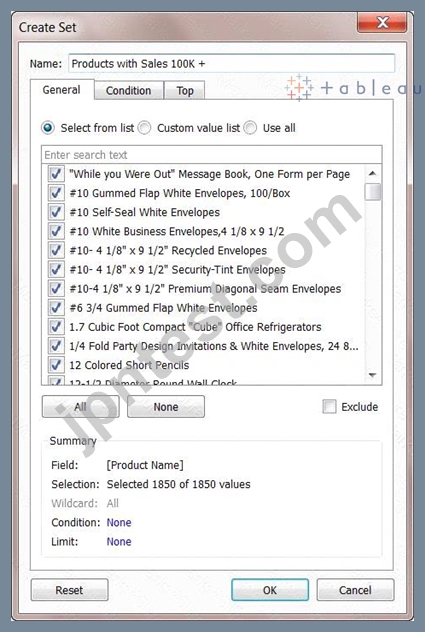
None of the other options exist, and therefore are incorrect answers.
To create a dynamic set:
1) In the Data pane, right-click a dimension and select Create > Set.
2) In the Create Set dialog box, configure your set. You can configure your set using the following tabs:
General: Use the General tab to select one or more values that will be considered when computing the set.
You can alternatively select the Use all option to always consider all members even when new members are added or removed.
None of the other options exist, and therefore are incorrect answers.
笹冈** 2026-06-28 06:38:23
コメント
他人の解答コメントを賛成するのも、その解答に一票を入れることになります。したがって、すでに同じ意見の投票コメントが存在する場合、新規コメントをする代わりに賛成することもできます。
コメントを通報する
コメント中
今すぐ 新規登録 / ログイン (無料です)。