

検証済みXK0-005問題集と解答100%合格はここにJPNTest
合格させるXK0-005試験一発合格保証2025問題集!
質問 # 149
A user is asking the systems administrator for assistance with writing a script to verify whether a file exists.
Given the following: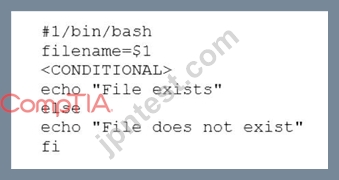
Which of the following commands should replace the <CONDITIONAL> string?
- A. if [ -f "$filename" ] then
- B. if [ -d "$filename" ]; then
- C. if [ -f "$filename" ]; while
- D. if [ -f "$filename" ]; then
正解:D
解説:
The command if [ -f "$filename" ]; then checks if the variable $filename refers to a regular file that exists.
The -f option is used to test for files. If the condition is true, the commands after then are executed. This is the correct way to replace the <CONDITIONAL> string. The other options are incorrect because they either use the wrong option (-d tests for directories), the wrong syntax (missing a semicolon after the condition), or the wrong keyword (while is used for loops, not conditions). References: CompTIA Linux+ (XK0-005) Certification Study Guide, Chapter 16: Writing and Executing Bash Shell Scripts, page 493.
質問 # 150
A Linux administrator booted up the server and was presented with a non-GUI terminal. The administrator ran the command systemctl isolate graphical.target and rebooted the system by running systemctl reboot, which fixed the issue. However, the next day the administrator was presented again with a non-GUI terminal. Which of the following is the issue?
- A. The administrator did not set the default target to graphical.target.
- B. The administrator did not shut down the server properly.
- C. The administrator did not set the default target to basic.target.
- D. The administrator did not reboot the server properly.
正解:A
質問 # 151
Which of the following tools is commonly used for creating CI/CD pipelines?
- A. Chef
- B. Ansible
- C. Puppet
- D. Jenkins
正解:D
解説:
The tool that is commonly used for creating CI/CD pipelines is Jenkins. Jenkins is an open-source automation server that enables continuous integration and continuous delivery (CI/CD) of software projects. Jenkins allows developers to build, test, and deploy code changes automatically and frequently using various plugins and integrations. Jenkins also supports distributed builds, parallel execution, pipelines as code, and real-time feedback.
質問 # 152
Users are experiencing high latency when accessing a web application served by a Linux machine. A systems administrator checks the network interface counters and sees the following:
Which of the following is the most probable cause of the observed latency?
- A. A connection problem exists on the network interface.
- B. The network interface is disconnected.
- C. No IP address is assigned to the interface.
- D. The gateway is unreachable.
正解:A
解説:
The high number of errors and dropped packets in the output of the network interface counters indicate a connection problem on the network interface.
References:
* CompTIA Linux+ (XK0-005) Certification Study Guide, Chapter 10: Managing Networking, Section:
Troubleshooting Network Issues, Page 359.
* Linux+ (Plus) Certification, Exam Objectives: 4.3 Given a scenario, troubleshoot and resolve basic network configuration and connectivity issues.
質問 # 153
A user is unable to log on to a Linux workstation. The systems administrator executes the following command:
cat /etc/shadow | grep user1
The command results in the following output:
user1 :! $6$QERgAsdvojadv4asdvaarC/9dj34GdafGVaregmkdsfa:18875:0:99999:7 :::
Which of the following should the systems administrator execute to fix the issue?
- A. sed -i '/ ::: / :: /g' /etc/shadow
- B. chgrp user1:user1 /home/user1
- C. chown -R userl:user1 /home/user1
- D. passwd -u user1
正解:D
解説:
The output shows that the user1 account has a locked password, indicated by the exclamation point (!) in the second field of the /etc/shadow file1. To unlock the password and allow the user to log in, the systems administrator should use the passwd command with the -u (unlock) option2.
質問 # 154
Which of the following enables administrators to configure and enforce MFA on a Linux system?
- A. PKI
- B. PAM
- C. SELinux
- D. Kerberos
正解:B
解説:
Pluggable Authentication Modules allow Linux to work with Google Authenticator and other OTP tools to add two-factor security to your system.
https://www.redhat.com/sysadmin/mfa-linux
質問 # 155
A non-privileged user is attempting to use commands that require elevated account permissions, but the commands are not successful. Which of the following most likely needs to be updated?
- A. /etc/passwd
- B. /etc/bashrc
- C. /etc/shadow
- D. /etc/sudoers
正解:D
解説:
Explanation
The /etc/sudoers file is used to configure the sudo command, which allows non-privileged users to execute commands that require elevated account permissions1. The file contains a list of users and groups that are allowed to use sudo, and the commands they can run with it. The file also defines the security policy for sudo, such as whether a password is required, how long the sudo session lasts, and what environment variables are preserved or reset.
The /etc/passwd file is used to store information about the user accounts on the system, such as their username, user ID, home directory, and login shell. The /etc/shadow file is used to store the encrypted passwords for the user accounts, along with other information such as password expiration and aging. These files are not directly related to the sudo command, and updating them will not grant a user elevated account permissions.
The /etc/bashrc file is used to set up the environment for the bash shell, such as aliases, functions, variables, and options. This file is executed whenever a new bash shell is started, and it affects all users on the system.
However, this file does not control the sudo command or its configuration, and updating it will not allow a user to use commands that require elevated account permissions.
質問 # 156
A systems engineer is adding a new 1GB XFS filesystem that should be temporarily mounted under /ops/app.
Which of the following is the correct list of commands to achieve this goal?
- A.

- B.

- C.

- D.

正解:A
解説:
Explanation
The list of commands in option D is the correct way to achieve the goal. The commands are as follows:
fallocate -l 1G /ops/app.img creates a 1GB file named app.img under the /ops directory.
mkfs.xfs /ops/app.img formats the file as an XFS filesystem.
mount -o loop /ops/app.img /ops/app mounts the file as a loop device under the /ops/app directory. The other options are incorrect because they either use the wrong commands (dd or truncate instead of fallocate), the wrong options (-t or -f instead of -o), or the wrong order of arguments (/ops/app.img
/ops/app instead of /ops/app /ops/app.img). References: CompTIA Linux+ (XK0-005) Certification Study Guide, Chapter 10: Managing Storage, pages 323-324.
質問 # 157
A server is experiencing intermittent connection issues. Some connections to the Internet work as intended, but some fail as if there is no connectivity. The systems administrator inspects the server configuration: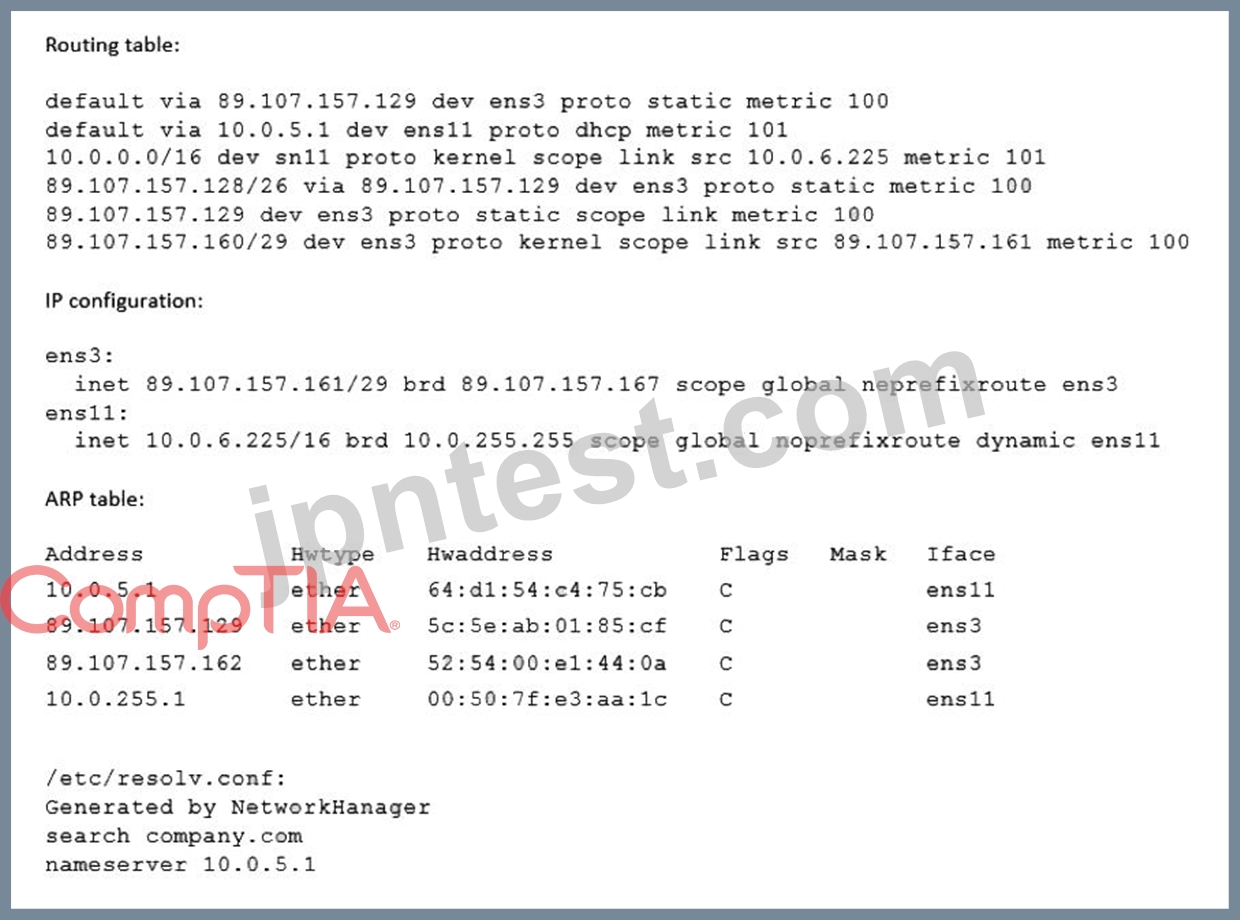
Which of the following is MOST likely the cause of the issue?
- A. An internal-only DNS server is configured.
- B. Two default routes are configured.
- C. The IP netmask is wrong for ens3.
- D. The ARP table contains incorrect entries.
正解:B
質問 # 158
A Linux administrator is scheduling a system job that runs a script to check available disk space every hour.
The Linux administrator does not want users to be able to start the job. Given the following: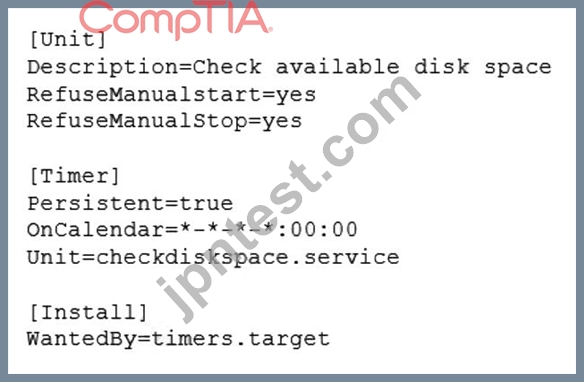
The Linux administrator attempts to start the timer service but receives the following error message:
Which of the following is MOST likely the reason the timer will not start?
- A. The checkdiskspace.timer should be configured to allow manual starts.
- B. The checkdiskspace.timer unit should be enabled via systemct1.
- C. The checkdiskspace.timer should be started using the sudo command.
- D. The timers.target should be reloaded to get the new configuration.
正解:A
解説:
Explanation
The most likely reason the timer will not start is that the checkdiskspace.timer should be configured to allow manual starts. By default, systemd timers do not allow manual activation via systemct1 start, unless they have RefuseManualStart=no in their [Unit] section. This option prevents users from accidentally starting timers that are meant to be controlled by other mechanisms, such as calendar events or dependencies. To enable manual starts for checkdiskspace.timer, the administrator should add RefuseManualStart=no to its [Unit] section and reload systemd.
The other options are not correct reasons for the timer not starting. The checkdiskspace.timer unit does not need to be enabled via systemct1 enable, because enabling a timer only makes it start automatically at boot time or after a system reload, but does not affect manual activation. The timers.target does not need to be reloaded to get the new configuration, because reloading a target only affects units that have a dependency on it, but does not affect manual activation. The checkdiskspace.timer does not need to be started using the sudo command, because the administrator is already running systemct1 as root, as indicated by the # prompt. References: systemd.timer(5) - Linux manual page; systemct1(1) - Linux manual page
質問 # 159
Employees in the finance department are having trouble accessing the file /opt/work/file. All IT employees can read and write the file. Systems administrator reviews the following output:
Which of the following commands would permanently fix the access issue while limiting access to IT and finance department employees?
- A. setfacl -m g:finance:rw file
- B. chattr +i file
- C. chmod 666 file
- D. chown it:finance file
正解:A
解説:
Explanation
The command setfacl -m g:finance:rw file will permanently fix the access issue while limiting access to IT and finance department employees. The setfacl command is a tool for modifying the access control lists (ACLs) of files and directories on Linux systems. The ACLs are a mechanism that allows more fine-grained control over the permissions of files and directories than the traditional owner-group-others model. The -m option specifies the modification to the ACL. The g:finance:rw means that the group named finance will have read and write permissions on the file. The file is the name of the file to modify, in this case /opt/work/file. The command setfacl -m g:finance:rw file will add an entry to the ACL of the file that will grant read and write access to the finance group. This will fix the access issue and allow the finance employees to access the file.
The command will also preserve the existing permissions of the file, which means that the IT employees will still have read and write access to the file. This will limit the access to IT and finance department employees and prevent unauthorized access from other users. This is the correct command to use to accomplish the task.
The other options are incorrect because they either do not fix the access issue (chattr +i file or chown it:finance file) or do not limit the access to IT and finance department employees (chmod 666 file). References: CompTIA Linux+ (XK0-005) Certification Study Guide, Chapter 11: Managing File Permissions and Ownership, page 352.
質問 # 160
A Linux system is having issues. Given the following outputs:
# dig @192.168.2.2 mycomptiahost
; << >> DiG 9.9.4-RedHat-9.9.4-74.el7_6.1 << >> @192.168.2.2 mycomptiahost
; (1 server found)
;; global options: +cmd
;; connection timed out; no servers could be reached
# nc -v 192.168.2.2 53
Ncat: Version 7.70 ( https://nmap.org/ncat )
Ncat: Connection timed out.
# ping 192.168.2.2
PING 192.168.2.2 (192.168.2.2) 56(84) bytes of data.
64 bytes from 192.168.2.2: icmp_seq=1 ttl=117 time=4.94 ms
64 bytes from 192.168.2.2: icmp_seq=2 ttl=117 time=10.5 ms
Which of the following best describes this issue?
- A. The DNS host is down.
- B. The Linux engineer is using the wrong DNS port.
- C. The DNS service is currently not available or the corresponding port is blocked.
- D. The name mycomptiahost does not exist in the DNS.
正解:C
解説:
The ping command shows that the Linux system can reach the DNS server at 192.168.2.2, so the DNS host is not down. The dig and nc commands show that the Linux system cannot connect to the DNS server on port 53, which is the standard port for DNS queries. This means that either the DNS service is not running on the DNS server, or there is a firewall or network device blocking the port 53 traffic. Therefore, the DNS service is currently not available or the corresponding port is blocked.
Reference
1: How To Troubleshoot DNS Client Issues in Linux - RootUsers
2: 6 Best Tools to Troubleshoot DNS Issues in Linux - Tecmint
3: How To Troubleshoot DNS in Linux - OrcaCore
4: Fixing DNS Issues in Ubuntu 20.04 | DeviceTests
質問 # 161
A systems administrator requires that all files that are created by the user named web have read-only permissions by the owner. Which of the following commands will satisfy this requirement?
- A. chown web:web /home/web
- B. echo "umask 377" >> /home/web/.bashrc
- C. setfacl read /home/web
- D. chmod -R 400 /home/web
正解:B
解説:
The command that will satisfy the requirement of having all files that are created by the user named web have read-only permissions by the owner is echo "umask 377" >> /home/web/.bashrc. This command will append the umask 377 command to the end of the .bashrc file in the web user's home directory. The .bashrc file is a shell script that is executed whenever a new interactive shell session is started by the user. The umask command sets the file mode creation mask, which determines the default permissions for newly created files or directories by subtracting from the maximum permissions (666 for files and 777 for directories). The umask 377 command means that the user does not want to give any permissions to the group or others (3 = 000 in binary), and only wants to give read permission to the owner (7 - 3 = 4 = 100 in binary). Therefore, any new file created by the web user will have read-only permission by the owner (400) and no permission for anyone else. Reference: CompTIA Linux+ (XK0-005) Certification Study Guide, Chapter 8: Managing Users and Groups; Umask Command in Linux | Linuxize
質問 # 162
A systems administrator is receiving tickets from users who cannot reach the application app that should be listening on port 9443/tcp on a Linux server.
To troubleshoot the issue, the systems administrator runs netstat and receives the following output:
Based on the information above, which of the following is causing the issue?
- A. The application is not running.
- B. The application is listening on port 1234.
- C. The IP address 0.0.0.0 is not valid.
- D. The application is listening on the loopback interface.
正解:D
解説:
The server is in a "Listen" state on port 9943 using its loopback address. The "1234" is a process-id The cause of the issue is that the application is listening on the loopback interface. The loopback interface is a virtual network interface that is used for internal communication within the system. The loopback interface has the IP address 127.0.0.1, which is also known as localhost. The netstat output shows that the application is listening on port 9443 using the IP address 127.0.0.1. This means that the application can only accept connections from the same system, not from other systems on the network. This can prevent the users from reaching the application and cause the issue. The administrator should configure the application to listen on the IP address 0.0.0.0, which means all available interfaces, or on the specific IP address of the system that is reachable from the network. This will allow the application to accept connections from other systems and resolve the issue. The cause of the issue is that the application is listening on the loopback interface. This is the correct answer to the question. The other options are incorrect because they are not supported by the outputs. The IP address 0.0.0.0 is valid and means all interfaces, the application is not listening on port 1234, and the application is running as shown by the process ID 1234. References: CompTIA Linux+ (XK0-005) Certification Study Guide, Chapter 12: Managing Network Connections, page 383.
質問 # 163
The group named support is unable to make changes to the config file. An administrator is reviewing the permissions and sees the following:
S Is -1 config
-rw-rw----. 1 root app 4682 02-15 11:25 config
Which of the following should the administrator execute in order to give the support group access to modify the file while preserving the current ownership?
- A. chown :support config
- B. chmod g+s config
- C. chmod 664 config
- D. setfacl -m g:support:rw- config
正解:C
解説:
To give the support group access to modify the config file while preserving the current ownership, the administrator can execute the command chmod 664 config . This will change the permissions of the config file to read and write for the owner and group, and read only for others. The owner and group of the file will remain as root and app respectively. The other commands will not achieve this task, but either change the group ownership, set an access control list, or set a setgid bit. References:
* [CompTIA Linux+ Study Guide], Chapter 3: Working with Files, Section: Changing File Permissions
* [How to Use chmod Command in Linux]
質問 # 164
Users have been unable to save documents to /home/tmp/temp and have been receiving the following error:
Path not found
A junior technician checks the locations and sees that /home/tmp/tempa was accidentally created instead of /home/tmp/temp. Which of the following commands should the technician use to fix this issue?
- A. cp /home/tmp/tempa /home/tmp/temp
- B. mv /home/tmp/tempa /home/tmp/temp
- C. cd /temp/tmp/tempa
- D. ls /home/tmp/tempa
正解:B
解説:
The mv /home/tmp/tempa /home/tmp/temp command will fix the issue of the misnamed directory. This command will rename the directory /home/tmp/tempa to /home/tmp/temp, which is the expected path for users to save their documents. The cp /home/tmp/tempa /home/tmp/temp command will not fix the issue, as it will copy the contents of /home/tmp/tempa to a new file named /home/tmp/temp, not a directory. The cd /temp/tmp/tempa command will not fix the issue, as it will change the current working directory to /temp/tmp/tempa, which does not exist. The ls /home/tmp/tempa command will not fix the issue, as it will list the contents of /home/tmp/tempa, not rename it. Reference: CompTIA Linux+ (XK0-005) Certification Study Guide, Chapter 12: Managing Files and Directories, page 413.
質問 # 165
Which of the following files holds the system configuration for journal when running systemd?
- A. /etc/systemd/systemd-journalctl.conf
- B. /etc/systemd/journald.conf
- C. /usr/lib/systemd/journalctl.conf
- D. /etc/systemd/systemd-journald.conf
正解:B
解説:
Explanation
The file that holds the system configuration for journal when running systemd is /etc/systemd/journald.conf.
This file contains various settings that control the behavior of the journald daemon, which is responsible for collecting and storing log messages from various sources. The journald.conf file can be edited to change the default values of these settings, such as the storage location, size limits, compression, and forwarding options of the journal files. The file also supports a drop-in directory /etc/systemd/journald.conf.d/ where additional configuration files can be placed to override or extend the main file. References: CompTIA Linux+ (XK0-005) Certification Study Guide, Chapter 18: Automating Tasks; journald.conf(5) - Linux manual page
質問 # 166
Employees in the finance department are having trouble accessing the file /opt/work/file. All IT employees can read and write the file. Systems administrator reviews the following output:
Which of the following commands would permanently fix the access issue while limiting access to IT and finance department employees?
- A. setfacl -m g:finance:rw file
- B. chattr +i file
- C. chmod 666 file
- D. chown it:finance file
正解:A
解説:
The command setfacl -m g:finance:rw file will permanently fix the access issue while limiting access to IT and finance department employees. The setfacl command is a tool for modifying the access control lists (ACLs) of files and directories on Linux systems. The ACLs are a mechanism that allows more fine-grained control over the permissions of files and directories than the traditional owner-group-others model. The -m option specifies the modification to the ACL. The g:finance:rw means that the group named finance will have read and write permissions on the file. The file is the name of the file to modify, in this case /opt/work/file. The command setfacl -m g:finance:rw file will add an entry to the ACL of the file that will grant read and write access to the finance group. This will fix the access issue and allow the finance employees to access the file. The command will also preserve the existing permissions of the file, which means that the IT employees will still have read and write access to the file. This will limit the access to IT and finance department employees and prevent unauthorized access from other users. This is the correct command to use to accomplish the task. The other options are incorrect because they either do not fix the access issue (chattr +i file or chown it:finance file) or do not limit the access to IT and finance department employees (chmod 666 file). Reference: CompTIA Linux+ (XK0-005) Certification Study Guide, Chapter 11: Managing File Permissions and Ownership, page 352.
質問 # 167
A Linux administrator encounters the following error in the Apache log files:
css
SQLSTATE[HY000] [2002] Permission denied
Which of the following commands should the administrator run to safely fix this issue?
- A. setsebool -F httpd_can_network_connect_db on
- B. chcon -c httpd_sys_content_t /home/apache
- C. touch /.autorelabel
- D. setenforce 0
正解:A
解説:
The error indicates that SELinux is preventing Apache from connecting to the database. The command setsebool -F httpd_can_network_connect_db on allows the Apache web server to make network connections to the database, resolving the permission denied error without disabling SELinux entirely.
質問 # 168
An administrator added the port 2222 for the SSH server on myhost and restarted the SSH server. The administrator noticed issues during the startup of the service. Given the following outputs: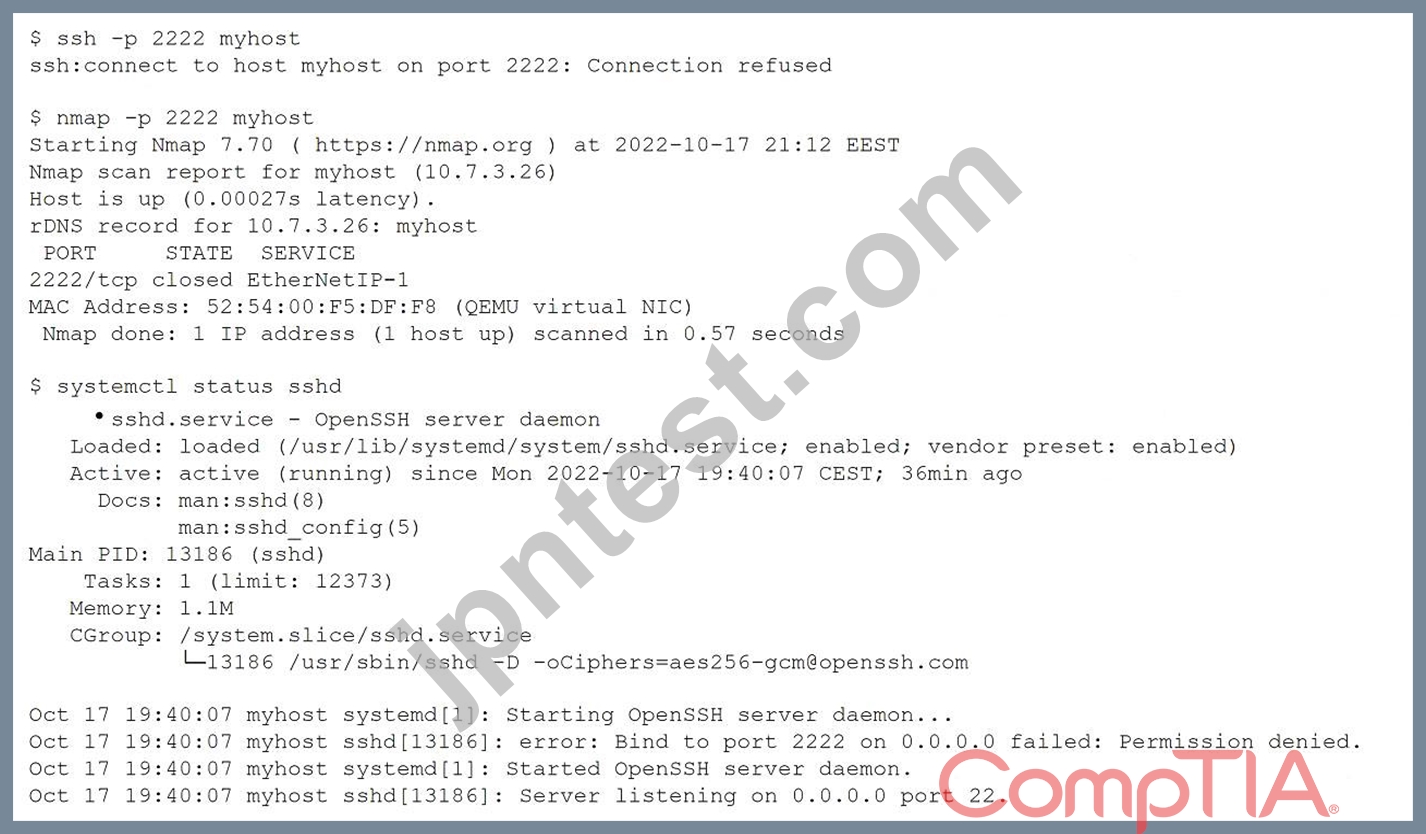
Which of the following commands will fix the issue?
- A. chcon system_u:object_r:ssh_home_t /etc/ssh/*
- B. iptables -A INPUT -p tcp -- dport 2222 -j ACCEPT
- C. firewall-cmd -- zone=public -- add-port=2222/tcp
- D. semanage port -a -t ssh_port_t -p tcp 2222
正解:D
解説:
The correct answer is A. semanage port -a -t ssh_port_t -p tcp 2222
This command will allow the SSH server to bind to port 2222 by adding it to the SELinux policy. The semanage command is a utility for managing SELinux policies. The port subcommand is used to manage network port definitions. The -a option is used to add a new record, the -t option is used to specify the SELinux type, the -p option is used to specify the protocol, and the tcp 2222 argument is used to specify the port number. The ssh_port_t type is the default type for SSH ports in SELinux.
The other options are incorrect because:
B: chcon system_u:object_r:ssh_home_t /etc/ssh/*
This command will change the SELinux context of all files under /etc/ssh/ to system_u:object_r:ssh_home_t, which is not correct. The ssh_home_t type is used for user home directories that are accessed by SSH, not for SSH configuration files. The correct type for SSH configuration files is sshd_config_t.
C: iptables -A INPUT -p tcp --dport 2222 -j ACCEPT
This command will add a rule to the iptables firewall to accept incoming TCP connections on port 2222.
However, this is not enough to fix the issue, as SELinux will still block the SSH server from binding to that port. Moreover, iptables may not be the default firewall service on some Linux distributions, such as Fedora or CentOS, which use firewalld instead.
D: firewall-cmd --zone=public --add-port=2222/tcp
This command will add a rule to the firewalld firewall to allow incoming TCP connections on port 2222 in the public zone. However, this is not enough to fix the issue, as SELinux will still block the SSH server from binding to that port. Moreover, firewalld may not be installed or enabled on some Linux distributions, such as Ubuntu or Debian, which use iptables instead.
References:
* How to configure SSH to use a non-standard port with SELinux set to enforcing
* Change SSH Port on CentOS/RHEL/Fedora With SELinux Enforcing
* How to change SSH port when SELinux policy is enabled
質問 # 169
A systems administrator receives reports that several virtual machines in a host are responding slower than expected. Upon further investigation, the administrator obtains the following output from one of the affected systems:
Which of the following best explains the reported issue?
- A. The physical host has enough CPU cores, leading to users running more processes to compensate for the slower response times.
- B. The virtual machine has enough CPU cycles, leading to the system use percentage being higher than expected.
- C. The virtual machine is running out of CPU resources, leading to users experiencing longer response times.
- D. The physical host is running out of CPU resources, leading to insufficient CPU time being allocated to virtual machines.
正解:C
解説:
Explanation
Based on the output from one of the affected systems, the best explanation for the reported issue is that the virtual machine is running out of CPU resources, leading to users experiencing longer response times (D). The output shows that the system use percentage is very high (57.85%), indicating that the virtual machine is using most of its CPU cycles for system processes. This leaves little CPU time for user processes, which results in slower performance. The other explanations are not supported by the output or are contradictory. References:
[CompTIA Linux+ Study Guide], Chapter 8: Optimizing Linux Performance, Section: Monitoring CPU Usage
[How to Interpret CPU Usage Statistics]
質問 # 170
Users are unable to create new files on the company's FTP server, and an administrator is troubleshooting the issue. The administrator runs the following commands: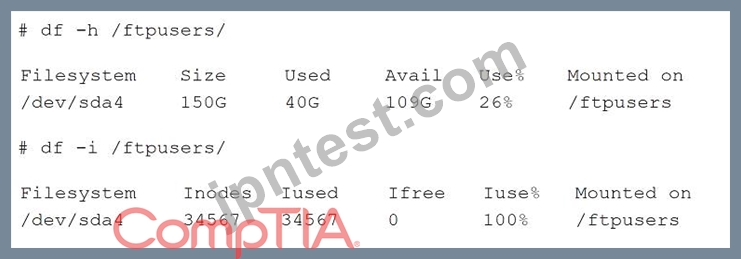
Which of the following is the cause of the issue based on the output above?
- A. The ftpusers filesystem does not have enough space.
- B. The users do not have the correct permissions to create files on the FTP server.
- C. The inodes is at full capacity and would affect file creation for users.
- D. ftpusers is mounted as read only.
正解:C
解説:
Explanation
The cause of the issue based on the output above is C. The inodes is at full capacity and would affect file creation for users.
An inode is a data structure that stores information about a file or directory, such as its name, size, permissions, owner, timestamps, and location on the disk. Each file or directory has a unique inode number that identifies it. The number of inodes on a filesystem is fixed when the filesystem is created, and it determines how many files and directories can be created on that filesystem. If the inodes are exhausted, no new files or directories can be created, even if there is enough disk space available.
The output for the second command shows that the /ftpusers/ filesystem has 0% of inodes available, which means that all the inodes have been used up. This would prevent users from creating new files on the FTP server. The administrator should either delete some unused files or directories to free up some inodes, or resize the filesystem to increase the number of inodes.
The other options are incorrect because:
A: The users do not have the correct permissions to create files on the FTP server.
This is not true, because the output for the first command shows that the /ftpusers/ filesystem has 26% of disk space available, which means that there is enough space for users to create files. The permissions of the files and directories are not shown in the output, but they are not relevant to the issue of inode exhaustion.
B: The ftpusers filesystem does not have enough space.
This is not true, because the output for the first command shows that the /ftpusers/ filesystem has 26% of disk space available, which means that there is enough space for users to create files. The issue is not related to disk space, but to inode capacity.
D: ftpusers is mounted as read only.
This is not true, because the output for the first command does not show any indication that the /ftpusers/ filesystem is mounted as read only. If it was, it would have an (ro) flag next to the mounted on column. A read only filesystem would prevent users from creating or modifying files on the FTP server, but it would not affect the inode usage.
質問 # 171
A systems administrator wants to download a package from a remote server.
Which of the following are the BEST commands to use for this task? (Choose two.)
- A. nc
- B. wget
- C. tar
- D. make
- E. curl
- F. zip
正解:B、E
解説:
NC is wrong because in order to use NC you need to setup the server first listening and then the client can transfer files once that is setup. CURL and WGET are correct.
質問 # 172
......
XK0-005問題集完全版解答試験学習ガイド:https://www.jpntest.com/shiken/XK0-005-mondaishu
リアルXK0-005は100%カバー率でリアル試験解答を試そう:https://drive.google.com/open?id=1g2HLKvDupjzSBZPApzFHR1qh1IPlyGDF