

2025年最新のNCP-CI-AWS試験解答最新版JPNTest NCP-CI-AWSのPDF問題集をダウンロードせよ(77問題と解答)
無料2025年最新のNutanix Certified Professional NCP-CI-AWS問題集を提供しております!JPNTest
質問 # 27
Which interface must be used to deploy NC2?
- A. NC2 Tile within the my.nutanix.com portal
- B. Cloud Provider portal
- C. Prism Central Dashboard
- D. Foundation running in a Cloud Virtual Machine
正解:A
解説:
The NC2 Tile within the my.nutanix.com portal is the correct interface to deploy NC2. This portal provides an integrated and user-friendly interface specifically designed for deploying and managing Nutanix Clusters on AWS.
NC2 Deployment Interface:
NC2 Tile within the my.nutanix.com portal: This portal provides the necessary tools and options to deploy and manage NC2 clusters. It includes functionalities for setting up the clusters, configuring network settings, and managing resources.
Advantages:
User-Friendly Interface: Simplifies the deployment process with a guided setup.
Integrated Tools: Provides access to all necessary tools for managing the deployment and monitoring of NC2 clusters.
Reference:
Nutanix Cloud Clusters on AWS Administration Guide
Nutanix my.nutanix.com Portal Documentation
Nutanix Best Practices for Cluster Deployment
質問 # 28
An administrator is creating and destroying multiple clusters daily for a test/dev environment. The administrator wants ensure that every NC2 on AWS cluster deployed will allow full access from the on-premises CVM subnet.
What is most-efficient way to achive this?
- A. Modify the UVM Network Security Group of each cluster by setting the outbound allow address of the on-premises subnet.
- B. Create a Custom AWS Network Security Group using a key value of tag:nutanix:clusters:external and set the inbound allow address of the on-premises subnet.
- C. Modify the UVM Network Security Group of each cluster by setting the inbound allow address of the on-premises subnet.
正解:B
解説:
D/ Create a Custom AWS Network Security Group using a key of tag:nutanix: clusters:external:cluster-uuid and set the value of the UUID for each deployed cluster. Set the inbound allow address of the on-premises subnet.
Explanation:
To ensure that every NC2 on AWS cluster deployed allows full access from the on-premises CVM subnet efficiently, the administrator should create a custom AWS Network Security Group.
Use a key value of tag:nutanix:clusters:external for the security group, and set the inbound allow address to the on-premises subnet.
This approach leverages AWS tags to manage security group rules dynamically and ensures that the necessary access permissions are applied automatically to all clusters with the specified tag.
This method reduces the need for manual configuration of each cluster's security group, streamlining the process for a test/dev environment where clusters are frequently created and destroyed.
Reference:
Refer to the AWS documentation on Network Security Groups and Nutanix documentation on best practices for securing NC2 clusters.
質問 # 29
A company has just adopted Nutanix as their technology of choice and is preparing to deploy Nutanix Cloud Clusters (NC2).
Which step must be taken first to again access to the CN2 console?
- A. Start a free trial via Billing Portal.
- B. Open a support case with Nutanix.
- C. Navigate to cloud.nutanix.com
- D. Create a My Nutanix account
正解:D
解説:
Before accessing the Nutanix Cloud Clusters (NC2) console, the first step is to create a My Nutanix account.
This account serves as the primary gateway for managing and accessing Nutanix services, including NC2.
Once the account is created, users can log in to the Nutanix portal, where they can manage their subscriptions, start trials, and access various Nutanix services, including the NC2 console.
Reference:
Refer to the Nutanix documentation on getting started with NC2 and the My Nutanix account creation process.
質問 # 30
An administrator is planning to leverage NC2 on AWS for an elastic DR scenario where the initial cluster is using 13en.metal.
Which two additional node types are supported for cluster expansion? (Choose two.)
- A. Z1d.metal
- B. I3.metal
- C. m5d.metal
- D. i4i.metal
正解:B、D
解説:
When planning to leverage NC2 on AWS for an elastic DR scenario where the initial cluster is using 13en.metal, the following additional node types are supported for cluster expansion:
I3.metal: These instances provide high IOPS and low latency with NVMe SSDs, making them suitable for storage-intensive applications.
i4i.metal: These instances offer higher performance with AWS Nitro SSDs, improved network bandwidth, and better compute performance compared to the I3.metal instances.
Reference:
Nutanix Cloud Clusters on AWS Documentation
Amazon EC2 I4i Instances - AWS
Amazon EC2 I3 Instances - AWS
質問 # 31
Which two features or services can an administrator ensure are protected by cluster protect within an NC2 environment? (Choose two.)
- A. Nutanix Files
- B. Flow Network Security
- C. Virtual Machine Disks
- D. VM Templates
正解:A、C
解説:
Within an NC2 environment, the Cluster Protect feature can ensure the protection of:
Nutanix Files: This provides file services within the Nutanix ecosystem, and Cluster Protect can safeguard the data stored in Nutanix Files.
Virtual Machine Disks: This ensures that the data stored on virtual machine disks is protected, providing backup and recovery options for the virtual machines running within the cluster.
Reference:
Nutanix Cloud Clusters on AWS Administration
Nutanix AOS 6.7 Documentation
質問 # 32
An administrator has deployed an NC2 on AWS cluster and doesn't have connectivity back to the on-premises environment yet. The administrator wants to SSH into a CVM to edit a security setting and has deployed a Jump Host into an existing public subnet.
What action must the administrator still take to gain access to the CVM?
- A. Create Custom Network Security Group at the subnet level and add the IP address of the Jump Host
- B. Edit the CVM iptables to allow SSH.
- C. Edit the UVM security group to allow SSH from the Jump Host IP and remove Cluster Lockdown.
- D. Edit the User Management Network Security Group to allow SSH from the Jump Host IP.
正解:D
解説:
To SSH into a Controller VM (CVM) in an NC2 on AWS cluster without on-premises connectivity, the administrator needs to ensure that the security settings allow SSH access from the Jump Host. This involves editing the User Management Network Security Group to permit SSH traffic from the Jump Host IP.
Deploy Jump Host:
Ensure the Jump Host is deployed in a public subnet with an Elastic IP (EIP) assigned for external access.
Edit User Management Network Security Group:
Locate the security group associated with the user management network.
Modify the inbound rules to allow SSH (port 22) from the Jump Host's IP address. This ensures that the Jump Host can establish an SSH connection to the CVM.
Steps to Edit Security Group:
Navigate to the EC2 dashboard in the AWS Management Console.
Select "Security Groups" under the "Network & Security" section.
Find and select the appropriate security group.
Edit the inbound rules to add a new rule:
Type: SSH
Protocol: TCP
Port Range: 22
Source: Custom IP (enter the Jump Host's public IP address)
Additional Configuration:
Ensure that the CVM itself allows SSH connections and that no internal firewall rules block the traffic.
Reference:
Nutanix Cloud Clusters on AWS Administration Guide
AWS Security Group Documentation
Nutanix Best Practices for Secure Access
質問 # 33
An administrator needs to understand which of the services implemented on their NC2 AWS deployment will be protected with Cluster protect.
Which service of feature is Cluster Protect able to both protect and recover its associated metadata?
- A. Categories
- B. Object
- C. VM templates
- D. Files
正解:C、D
解説:
Cluster Protect in an NC2 environment can protect and recover the following services and their associated metadata:
VM Templates: Ensures that templates used for creating virtual machines are backed up and recoverable.
Files: Protects data stored in Nutanix Files, ensuring that file services are backed up and can be restored as needed.
Reference:
Nutanix Support & Insights
Nutanix Cloud Clusters on AWS Administration
質問 # 34
An administrator is seeking help with an ongoing NC2 issue. After reaching out to Nutanix support, the administrator is introduced to NC2 specialist who can help troubleshoot the problem.
- A. Provide the specialist with the administrator's login credentials.
- B. Add the specialist as an admin user to the organizations.
- C. Ensure the specialist is assigned the RBAC role with proper permissions.
- D. Confirm the Support Authorization on the organization is set to Full Access.
正解:C、D
解説:
Ensure the specialist is assigned the RBAC role with proper permissions (Answer A):
Role-Based Access Control (RBAC) ensures that the specialist has the necessary permissions to troubleshoot and manage the NC2 environment. This avoids unnecessary privilege escalations and maintains security.
Confirm the Support Authorization on the organization is set to Full Access (Answer C):
Setting the Support Authorization to Full Access allows the Nutanix support specialist to have the required access to investigate and resolve issues in the environment. This is essential for effective troubleshooting.
Reference:
Nutanix RBAC Documentation
Nutanix Support Access Guide
質問 # 35
What role is needed to create a cluster?
- A. Cluster Super Admin
- B. Cluster Administrator
- C. Customer Security Administrator
- D. Customer Administrator
正解:A
解説:
To create a cluster in Nutanix Cloud Integration with AWS, the role needed is Cluster Super Admin.
The Cluster Super Admin role provides the highest level of privileges required to perform critical operations such as creating, managing, and deleting clusters.
This role is essential for overseeing the cluster setup and configuration processes, ensuring the user has full control over the cluster lifecycle.
Reference:
Refer to the Nutanix documentation on roles and permissions for NC2 on AWS for further details on the capabilities and required permissions for cluster creation.
質問 # 36
An administrator needs to recover a cluster protected using the Cluster Protect feature. The Prism Central instance was not on the failed cluster.
Which steps, in order, should the administrator perform to recover the cluster?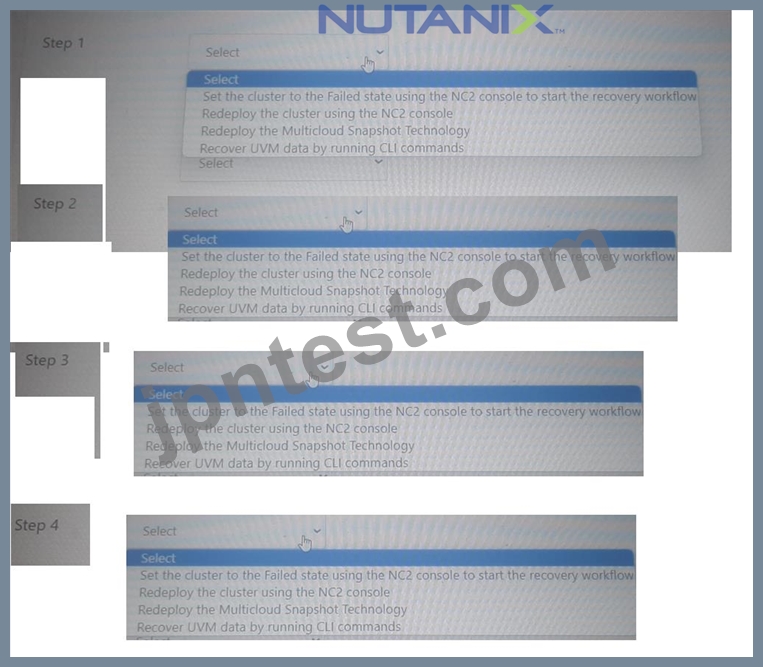
正解:
解説: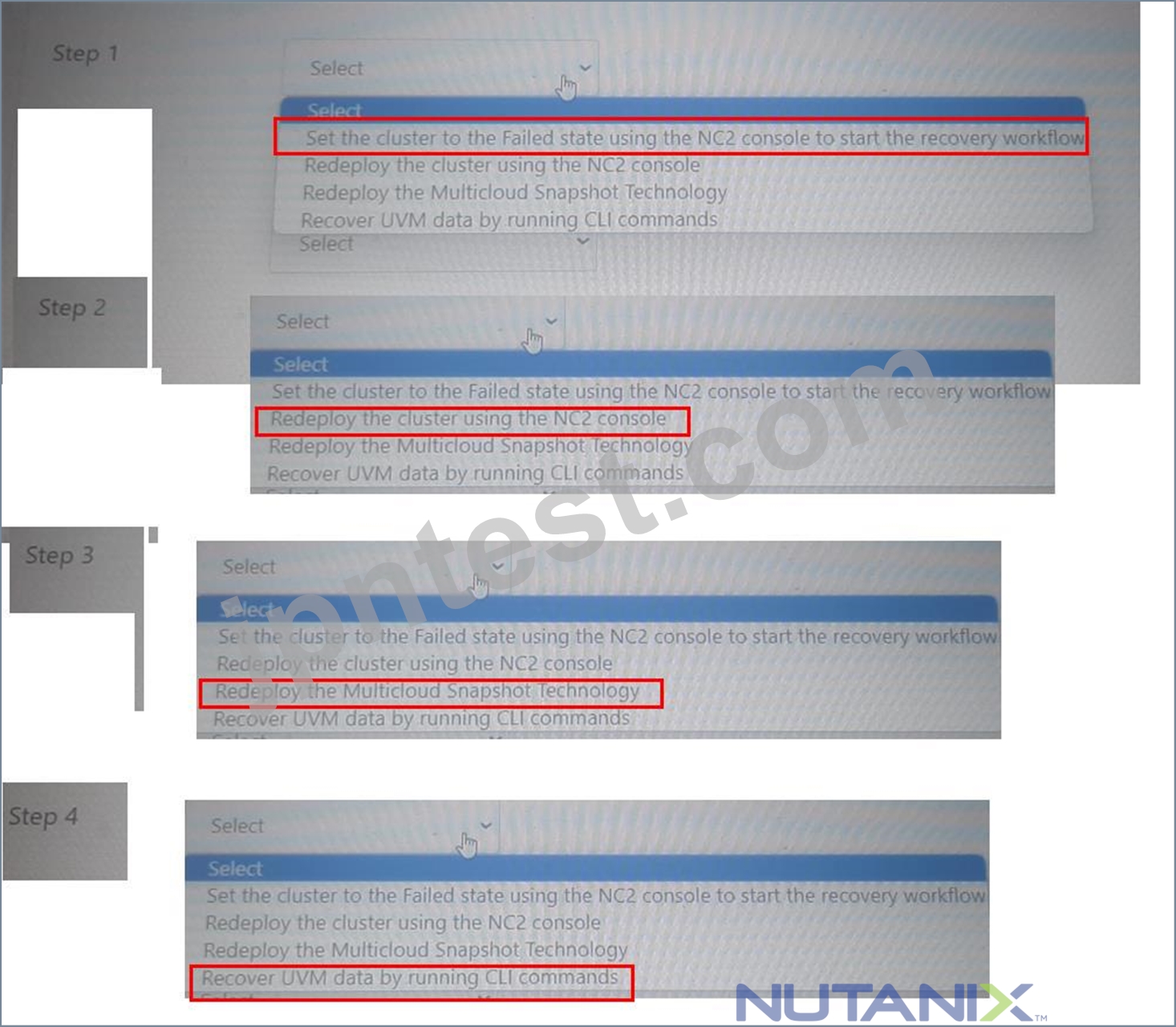
Reference:
Nutanix Documentation on Cluster Protect and Recovery Processes
Nutanix Support & Insights
Nutanix Cloud Clusters on AWS Administration
質問 # 37
When configuring an alert email in Prism Central deployed within an NC2 environment, what is required in order for the emails to be sent properly?
- A. A whitelisted public cloud console endpoint
- B. Name servers configured in Prism Central
- C. Cluster Super Admin permissions
- D. SMTP server configured in Prism Central settings
正解:D
解説:
To ensure that alert emails are sent properly from Prism Central within an NC2 environment, configuring an SMTP server in the Prism Central settings is required. The SMTP server facilitates the sending of email notifications for alerts and other communications.
SMTP Configuration:
Prism Central requires an SMTP server to send email alerts. This involves specifying the SMTP server address, port, and authentication details if needed.
The configuration must include the email address from which the alerts will be sent and the recipient addresses.
Steps to Configure SMTP Server in Prism Central:
Log in to Prism Central.
Navigate to the "Settings" menu.
Select "Email Server" under the "Alerts" section.
Enter the SMTP server details, including the server address, port, and authentication credentials.
Test the configuration to ensure emails are sent correctly.
Reference:
Nutanix Prism Central Administration Guide
Nutanix Support Documentation on Email Alert Configuration
Best Practices for Configuring SMTP Servers in Cloud Environments
質問 # 38
An administrator is tasked with adding an AWS account to the NC2 console. A requirement is to configure an AWS IAM user with the appropriate permissions.
Which permission must be assigned to the user?
- A. AmazonEC2ReadOnlyAccess
- B. AmazonEC2FullAccess
- C. lAMFullAccess
- D. lAMReadOnlyAccess
正解:B
解説:
To add an AWS account to the NC2 console, an AWS IAM user needs to be configured with the appropriate permissions to manage the EC2 resources. The required permission for the IAM user includes full access to manage EC2 instances, volumes, and related resources.
AmazonEC2FullAccess:
This permission grants full access to all EC2 resources, including the ability to create, modify, and delete instances, volumes, security groups, and more.
Essential for NC2 operations to manage the lifecycle of EC2 instances and associated components within the AWS environment.
Why Not Other Permissions:
IAMFullAccess: Grants full access to IAM resources but not specifically needed for EC2 operations.
IAMReadOnlyAccess: Only provides read access to IAM resources, insufficient for managing EC2 instances.
AmazonEC2ReadOnlyAccess: Provides read-only access to EC2 resources, insufficient for creating or modifying instances and other resources.
Reference:
AWS IAM Policies Documentation
Nutanix Cloud Clusters on AWS Administration Guide
Nutanix Best Practices for IAM User Permissions
質問 # 39
An administrator has deployed an NC2 cluster on AWS to an existing environment for VDI.
Afterwards, the corporate security teams direct the administrator to reuse an existing AWS subnet, 10.79.4.0/24 that has two EC2 instances: EC2-1 (10.79.4.200) and EC2-2 (10.79.4.201). The security team indicates that this directive is to avoid overlap with the AHV IPAM.
Which two configuration actions should the administrator take to ensure there are no configuration issues? (Choose two.)
- A. Configure the AHV JPAM to use DHCP range 10.79.4.2 -10.79.4.253.
- B. Deploy two VMs on the NC2 cluster and assign 10.79.4.200 and 10.79.4.201 as the assigned IPs in Prism Element
- C. aCLI > net.add_to_ip_bfacklist 10.79.4.200 aCLI > net.add_to_ip_blacklist 10.79.4.201
- D. aCLI > net.de/ete_from_ip_blacklist 10.79.4.200 aCLI > net.defete_fromjp_blacklist 10.79.4.201
正解:A、C
解説:
To avoid IP address conflicts and ensure there are no configuration issues when reusing an existing AWS subnet, the administrator should take the following actions:
aCLI > net.add_to_ip_blacklist 10.79.4.200 aCLI > net.add_to_ip_blacklist 10.79.4.201 (Answer A):
This command adds the specified IP addresses to the blacklist, preventing AHV IPAM from assigning these addresses to any VMs. This ensures that the existing EC2 instances with IPs 10.79.4.200 and 10.79.4.201 are not allocated to other VMs in the NC2 cluster.
Configure the AHV IPAM to use DHCP range 10.79.4.2 -10.79.4.253 (Answer D):
By configuring the AHV IPAM to use a specific DHCP range, you ensure that the IP addresses assigned to the EC2 instances (10.79.4.200 and 10.79.4.201) are not included in the DHCP pool. This prevents IP address conflicts within the subnet.
Reference:
Nutanix aCLI Reference
Nutanix NC2 on AWS Documentation
AWS VPC and Subnet Basics
質問 # 40
An administrator has been asked to create a cluster to support new workloads.
What are the maximum number of nodes supported in AWS?
- A. 28 nodes
- B. 14 nodes
- C. 24 nodes
- D. 18 nodes
正解:C
解説:
The maximum number of nodes supported in an NC2 cluster on AWS is 24 nodes. This limit ensures optimal performance and manageability within the AWS infrastructure while leveraging the benefits of the Nutanix architecture.
Reference:
Nutanix Clusters on AWS Deployment Guide
Nutanix Support & Insights
質問 # 41
Exhibit.
What does the exhibit indicate?
- A. Replication in error state
- B. Ongoing replication
- C. No ongoing replication
- D. Replication in paused state
正解:C
解説:
The exhibit indicates a replication operation with specific details about the protection domain, remote site, and snapshot. Key points to note are:
Bytes Completed: 0 bytes completed.
Complete Percent: 0.0%
Paused: false
Aborted: false
Given these details:
No ongoing replication: The operation has started, but there is no progress in terms of bytes completed or percentage completed. Since the status shows 0 bytes and 0 percent completed, it indicates that no data has been replicated yet.
Reference:
Nutanix Protection Domain and Replication Documentation
Nutanix Best Practices for Monitoring Replication
質問 # 42
An administrator seeks to ensure that the newly created NC2 organization named Finance can only deploy clusters into certain cloud regions.
What action should the administrator take to do this?
- A. Configure RBAC roles on the Finance NC2 organization to allow access to regions.
- B. Specify allowed regions when configuring a cloud account for the Finance NC2 organization.
- C. Configure IAM permission in cloud accounts to restrict access to certain regions.
- D. Open a support ticket with Nutanix to whitelist the allowed regions for the Finance NC2 organization.
正解:B
解説:
To ensure that the newly created NC2 organization named Finance can only deploy clusters into certain cloud regions, the administrator should specify the allowed regions during the cloud account configuration.
This action restricts the regions available for cluster deployment, ensuring compliance with organizational policies or regulatory requirements.
The allowed regions can be set in the cloud account settings associated with the Finance NC2 organization, defining the geographical scope of operations.
Reference:
Refer to the Nutanix documentation on NC2 cloud account configuration and region restrictions.
質問 # 43
In which two ways should an NC2 on AWS cluster be hibernated manually? (Choose two.)
- A. Select the cluster under NC2 console and Select Hibernate/Resume on the cluster sur page.
- B. Log into Prism, Central, navigate to Planning, find hibernate and resume.
- C. Log into Prism Element navigate to Settings and select Hibernate/Resume.
- D. Log into NC2 console, find the cluster name and select Hibernate/Resume from the ellipses.
正解:A、D
質問 # 44
An administrator has noticed the company's NC2 free trial expired 60 days ago.
What should the administrator do to continue using all of the NC2 features on existing clusters?
- A. Nothing. The clusters will have full feature support.
- B. Contact Nutanix support to redeploy the cluster.
- C. Contact the AWS cloud vendor.
- D. Switch to a paid subscription plan.
正解:D
質問 # 45
A company has a large scale AWS deployment and has just finished installing their first NC2 on AWS cluster. The new cluster is now running workloads in production.
The cluster is configured with:
* 16 Nodes
* 8 Subnets
* 200 User VMs per subnet
* Nutanix Files
An administrator has been tasked with installing an EC2 instance on one of the subnets that is also used by the Nutanix, When the EC2 instance is powered on, an IP conflict occurs.
What action should the administrator take to resolve this issue?
- A. The IP address used by the NC2 VM should be blocked /excluded from EC2.
- B. The Instance Metadata of the NC2 instance needs to have the address reserved.
- C. Assign an elastic IP to the EC2 instance and reboot.
- D. The IP address used by the EC2 instance should be blocked / excluded from IPAM.
正解:A
解説:
To resolve the IP conflict issue when an EC2 instance is powered on in a subnet also used by Nutanix NC2, the administrator should block or exclude the IP address used by the NC2 VM from being assigned to EC2 instances. This can be done by configuring the IP address management (IPAM) settings to ensure that the specific IP addresses allocated to the NC2 VMs are not used by EC2 instances, preventing IP conflicts and ensuring smooth operation of both environments.
Reference:
Nutanix Cloud Clusters on AWS Deployment Guide
Nutanix Support & Insights
質問 # 46
An administrator has deployed NC2 on AWS. The cluster deployment completed successfully.
After deployment, the administrator created a subnet in AWS, added it as a network in Prism Element, deployed Prism Central using the newly-configured network, and registered the cloud cluster with it.
The on-premises network and AWS are connected via a Site-to-Site VPN. Cluster nodes, CVM, and Prism Central can communicate with each other, but cannot be accessed from the on-premises network.
What two issues might be the cause of this problem? (Choose two.)
- A. The AHV firewall is blocking traffic from the on-premises network.
- B. The AWS VPC traffic is blocked by a firewall in the on-premises network.
- C. Traffic from the on-premises network is not permitted by VM and Management security groups.
- D. AWS Direct Connect must be used to establish connection between AWS and on-premises
正解:B、C
解説:
Traffic from the on-premises network is not permitted by VM and Management security groups:
Ensure that the security groups assigned to the VMs and management interfaces in AWS allow inbound traffic from the on-premises network. Without appropriate security group rules, the traffic will be blocked.
The AWS VPC traffic is blocked by a firewall in the on-premises network:
Check if the firewall on the on-premises network is configured to allow traffic from the AWS VPC. Firewalls may have restrictive rules that block incoming traffic, preventing communication.
Reference:
Refer to AWS documentation on security groups and firewalls and Nutanix documentation on configuring networking for NC2 clusters.
質問 # 47
An administrator is deploying an NC2 cluster into an existing AWS VPC.
The cluster deployment fails, with the following error message:
Why has the deployment failed?
- A. Outbound Internet access is not configured on the VPC.
- B. Shared subnets are not supported for Nutanix clusters.
- C. The administrator has not configured the Security Group to manage the shared subnet.
- D. The administrator has not created the necessary Security Group.
正解:D
解説:
The administrator has not created the necessary Security Group:
The error message indicates that the creation of network interfaces in a shared subnet requires specifying a security group. This means that the necessary security group has not been created or assigned to the network interfaces.
Creating the appropriate security group and ensuring it is associated with the network interfaces during cluster deployment should resolve this issue.
Reference:
Refer to AWS documentation on security groups and network interface configuration and Nutanix documentation on prerequisites for deploying NC2 clusters in an existing AWS VPC.
質問 # 48
An administrator is planning an NC2 deployment and wants to connect to AWS Services privately from the corporate VPC without going through the public internet.
Which connectivity solution should the administrator use?
- A. Site-to-Site VPN
- B. Point-to-Site VPN
- C. Gateway Endpoint
- D. VTEP Gateways
正解:C
解説:
Gateway Endpoint:
A Gateway Endpoint in AWS allows you to connect to supported AWS services privately without going through the public internet. This setup provides secure and efficient connectivity directly from the corporate VPC to the required AWS services.
Gateway Endpoints support services such as Amazon S3 and DynamoDB and are ideal for scenarios where private connectivity to these services is needed.
Reference:
Refer to the AWS documentation on VPC endpoints, specifically Gateway Endpoints, and the Nutanix documentation on configuring private connectivity for NC2 deployments.
質問 # 49
What is the purpose of an organization in the NC2 console?
- A. To map the on-premises Prism Central environment
- B. To Link with a Public Cloud account
- C. To segregate clusters based on specific requirements
- D. To link with NC2 subscription plans
正解:C
解説:
In the NC2 console, an organization is used to segregate clusters based on specific requirements. This segregation allows administrators to manage clusters more effectively by grouping them according to business units, projects, or other criteria. This organizational structure helps in maintaining clear boundaries and applying specific policies or permissions to different clusters within the same NC2 environment.
Reference:
Nutanix Cloud Clusters on AWS Administration
Nutanix Certified Professional - Cloud Integration - AWS
質問 # 50
An administrator is tasked with enabling inbound internet access to two Virtual Servers in an NC2 cluster on AWS for the HTTPs protocol.
The cluster is configured with:
* 8 nodes
* Prism Central
* 3 x User VM subnets
All subnets have been configured and can communicate with Internet-based resources as well as on-premises servers. The company d to allow Internet access, so the administrator must implement an AWS solution.
Which approach will enable the necessary communication?
- A. Create a AWS Network Load Balancer, configure the listener TCP port as 443, create a target group and register an HP as the endpoint.
- B. Create a AWS Network Load Balancer, configure the listener TCP port as 80, create a target group and register the servers as targets.
- C. Create a WS Network Load Balancer, configure the listener TCP port as 80, create a target groud and register the servers as the endpoint
- D. Create a AWS Network Load Balancer, configure the lister TCP port as 433, create a target group and register an EIP as the Endpoint.
正解:A
解説:
To enable inbound internet access to Virtual Servers in an NC2 cluster on AWS for the HTTPS protocol, the administrator should use an AWS Network Load Balancer (NLB).
Configure the NLB listener to listen on TCP port 443, which is the standard port for HTTPS traffic.
Create a target group in AWS, and register the servers (Virtual Servers in the NC2 cluster) as targets within this group.
Ensure the NLB is properly configured with an Elastic IP (EIP) if required, to provide a static IP address for the load balancer.
Verify that the security groups and network ACLs associated with the load balancer and the target group allow inbound traffic on port 443.
Reference:
Refer to AWS documentation on Network Load Balancers and Nutanix NC2 on AWS integration guides for step-by-step instructions on setting up and configuring the necessary components for enabling HTTPS access.
質問 # 51
......
NCP-CI-AWS試験解答問題集:https://www.jpntest.com/shiken/NCP-CI-AWS-mondaishu(77問題と解答)
無料2025年最新のNutanix Certified Professional NCP-CI-AWS問題集を提供しております!JPNTest:https://drive.google.com/open?id=1zH9zJCNSQYbC4ve4zfQQws7FVA2Z6oUZ