

[2025年03月19日] 完全版には更新されたのはMicrosoft 365 Certified(MD-102日本語)認定サンプル問題
最新のMicrosoft MD-102日本語リアル試験問題集PDF
質問 # 84
ホットスポットに関する質問
次の表に示すデバイスを含む contoso.com という名前の Azure AD テナントがあります。
テナントには、次の表に示す Azure AD グループが含まれています。
次の図に示すように、Autopilot 展開プロファイルを追加します。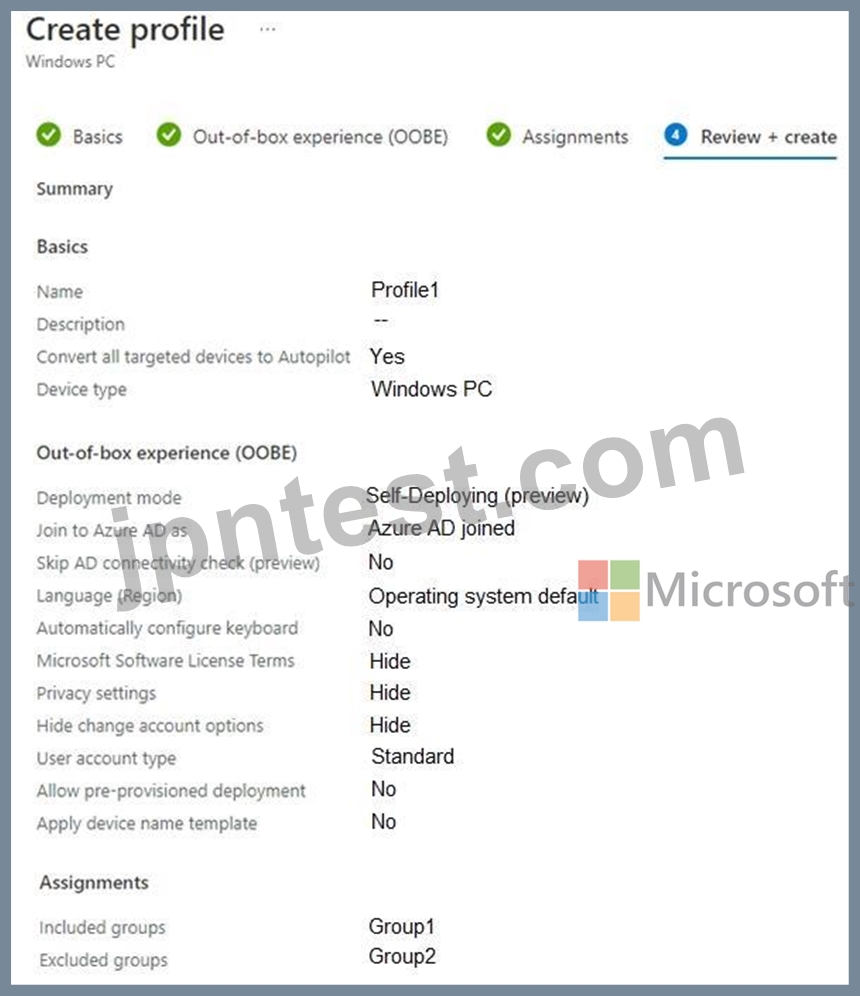
次の各文について、正しい場合は「はい」を選択してください。そうでない場合は「いいえ」を選択してください。
注意: 正しい選択ごとに 1 ポイントが付与されます。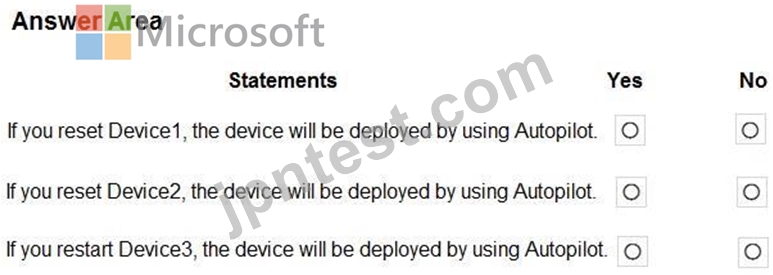
正解:
解説:
質問 # 85
注: この質問は、同じシナリオを提示する一連の質問の一部です。一連の質問にはそれぞれ、定められた目標を満たす独自の解決策が含まれています。質問セットによっては、正しい解決策が複数ある場合もあれば、正しい解決策がない場合もあります。
このセクションの質問に回答した後は、その質問に戻ることはできません。そのため、これらの質問はレビュー画面に表示されません。
あなたの会社では Windows Update for Business を使用しています。
研究部門には、特殊なハードウェアとソフトウェアがインストールされたコンピューターが数台あります。
Windows Update を使用してビデオ ドライバーが自動的に更新されないようにする必要があります。
解決策: グループ ポリシー オブジェクト (GPO) のデバイス インストール設定で、デバイス ドライバーのソースの場所の検索順序を指定するを有効にし、Windows Update を検索しないを選択します。
これは目標を満たしていますか?
- A. はい
- B. いいえ
正解:A
解説:
Device driver searches using Windows Update must be prevented.
Configure the policy value for Computer Configuration -> Administrative Templates -> System -> Device Installation -> "Specify search order for device driver source locations" to "Enabled: Do not search Windows Update".
Reference:
https://www.stigviewer.com/stig/microsoft_windows_server_2012_member_server/2013-07-
25/finding/WN12-CC-000024
質問 # 86
Microsoft 365 E5 サブスクリプションをお持ちです。
Microsoft Intune を使用してすべての Windows 11 デバイスを管理します。
攻撃対象領域削減ルール プロファイルに基づいて、Profile1 という名前の攻撃対象領域削減 (ASR) ポリシーを作成し、すべてのデバイスに Profile1 を割り当てます。
ユーザーから、Adobe Reader プラグインがブロックされているという報告がありました。
プラグインがブロックされていないことを確認する必要があります。
何をすべきでしょうか?
- A. デバイス コンプライアンス ポリシーを作成し、そのポリシーをすべてのデバイスに割り当てます。
- B. Profile1 でルール除外ごとに ASR のみを設定します。
- C. エンドポイント権限管理ポリシーを作成し、そのポリシーをすべてのデバイスに割り当てます。
- D. Profile1 にスコープ タグを追加します。
正解:B
質問 # 87
会社には本社と 6 つの支社があります。支社は WAN リンクを使用して本社に接続します。
すべてのオフィスにはローカル インターネット接続と Hyper-V ホスト クラスターがあります。会社には Microsoft System Center Configuration Manager が導入されています。メイン オフィスがプライマリ サイトです。
各ブランチには配布ポイントがあります。Windows 10 を実行するすべてのコンピューターは、Configuration Manager と Microsoft Intune の両方を使用して管理されます。
すべてのコンピューターに Microsoft Office 365 ProPlus の最新ビルドを展開する予定です。
計画された展開では、会社のインターネット リンク上のネットワーク トラフィックの量を最小限に抑える必要があります。
展開計画には何を含めるべきですか?
- A. Configuration Manager からアプリケーションの展開を作成します。
各オフィスで、Office 365 配布ファイルを Configuration Manager 配布ポイントにコピーします。 - B. Intune から、Office 365 ProPlus スイートのアプリの割り当てを構成します。
各オフィスで、Office 365 配布ファイルを Microsoft Deployment Toolkit (MDT) 展開共有にコピーします。 - C. Configuration Manager からアプリケーションの展開を作成します。
Office 365 配布ファイルを Configuration Manager クラウド配布ポイントにコピーします。 - D. Intune から、Office 365 ProPlus スイートのアプリの割り当てを構成します。
各オフィスで、Office 365 配布ファイルを Configuration Manager 配布ポイントにコピーします。
正解:A
解説:
Deploy the Microsoft 365 Apps application in Configuration Manager.
After the files for the Microsoft 365 Apps application are copied to the appropriate distribution points, the next step is to deploy the application. When you deploy the application, you specify which computers or users get the application and when.
To deploy the application:
1. In the Configuration Manager console, choose Software Library > Application Management > Applications.
2. Select the Microsoft 365 Apps application, and then on the Home tab, in the Deployment group, choose Deploy.
3. Etc.
Note: If you use Microsoft Endpoint Configuration Manager to deploy software, such as Office, to users and computers in your organization, you can also use that existing Configuration Manager environment to deploy Microsoft 365 Apps. By using Configuration Manager, you can control which users and computers get Microsoft 365 Apps, where they get the installation files from, and when the Microsoft 365 Apps installation occurs.
Reference:
https://docs.microsoft.com/en-us/deployoffice/deploy-office-365-proplus-with-system-center- configuration-manager-2012r2#distribute-the-office-365-proplus- application-to-distribution-points- in-configuration-manager
質問 # 88
Microsoft Intune Suite を使用する Microsoft 365 サブスクリプションをお持ちです。
デバイスを管理するには、Microsoft Intune を使用します。
Intune に登録されている Device1 という名前の Windows 11 デバイスがあります。Device1 は 30 日間オフラインになっています。
Device1 を Intune から直ちに削除する必要があります。ソリューションでは、デバイスが再度チェックインしたときに、Intune によってプロビジョニングされたアプリとデータがすべて削除されるようにする必要があります。ユーザーがインストールしたアプリ、個人データ、および OEM がインストールしたアプリは保持する必要があります。
何を使うべきでしょうか?
- A. 退却アクション
- B. 削除アクション
- C. フレッシュスタートアクション
- D. オートパイロットリセットアクション
正解:A
解説:
https://learn.microsoft.com/en-us/mem/intune/remote-actions/devices-wipe#delete-devices-from-the-intune-adm
質問 # 89
Microsoft Deployment Toolkit (MDT) がインストールされています。
参照コンピューターにWindows 11をインストールしてカスタマイズします
参照コンピューターのイメージをキャプチャし、そのイメージを複数のコンピューターに展開できることを確認する必要があります。
イメージをキャプチャする前に実行するコマンドはどれですか?
- A. システム準備
- B. 嫌悪感
- C. wpeinit
- D. bcdedit
正解:A
解説:
To capture an image of a reference computer and make it ready for deployment to multiple computers, you need to run the sysprep command with the /generalize option. This option removes all unique system information from the Windows installation, such as the computer name, security identifier (SID), and driver cache. The other commands are not used for this purpose. Reference: Sysprep (Generalize) a Windows installation
質問 # 90
User1 という名前のユーザーと App1 という名前の Web アプリを含む Microsoft 365 E5 サブスクリプションがあります。
App1 は最新の認証要求のみを受け入れる必要があります。
次の設定を持つ CAPolicy1 という名前の条件付きアクセス ポリシーを作成する予定です。
- 課題
- ユーザーまたはワークロード ID: User1
- クラウド アプリまたはアクション: App1
- アクセス制御
- 許可: アクセスをブロック
App1 へのレガシー認証要求のみをブロックする必要があります。
CAPolicy1 に追加する必要がある条件はどれですか?
- A. ユーザーリスク
- B. デバイスプラットフォーム
- C. サインインリスク
- D. デバイスのフィルター
- E. クライアントアプリ
正解:E
解説:
https://learn.microsoft.com/en-us/azure/active-directory/conditional-access/block-legacy- authentication
質問 # 91
ネットワークには Active Directory ドメインが含まれています。ドメインには、Windows 10 を実行する 2,000 台のコンピューターが含まれています。ハイブリッド Azure AD と Microsoft Intune を実装します。
既存のすべてのコンピューターを Azure AD に自動的に登録し、コンピューターを Intune に登録する必要があります。ソリューションでは、管理の労力を最小限に抑える必要があります。
何を使うべきでしょうか?
- A. 自動検出アドレスレコード
- B. グループ ポリシー オブジェクト (GPO)
- C. Windows Autopilot 展開プロファイル
- D. 自動検出サービス接続ポイント (SCP)
正解:B
質問 # 92
Microsoft 365 サブスクリプションをお持ちです。
次の図に示すように、Retention1 という名前の保持ラベルを作成します。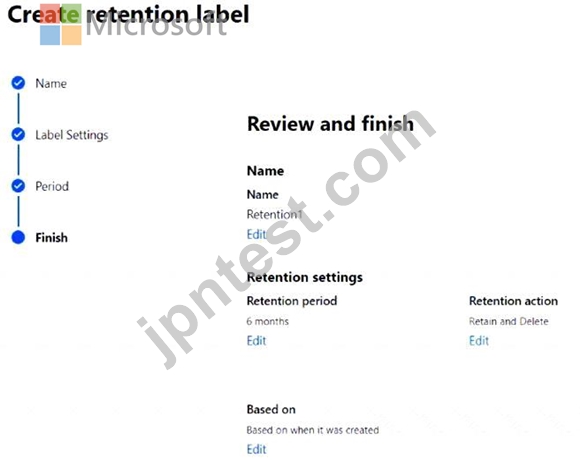
すべての Microsoft OneDrive コンテンツに Retention1 を適用します。
2020 年 1 月 1 日に、ユーザーは File1 という名前のファイルを OneDrive に保存します。
2020 年 1 月 10 日に、ユーザーは File1 を変更します。
2020 年 2 月 1 日に、ユーザーは File1 を削除します。
File1 が OneDrive から完全に削除され、回復不能になるのはいつですか?
- A. 2020年7月1日
- B. 2020年2月1日
- C. 2020年7月10日
- D. 2020年8月1日
正解:A
質問 # 93
会社には、Windows 10 を実行する Computer1 という名前のコンピューターがあります。
計算されたのは、会社を退職したユーザーによって使用されました。
Computer1 を再利用し、そのコンピューターを新しいユーザーに割り当てる予定です。
Windows Autopilot を使用して Computer1 を再展開する必要があります。
どの 3 つのアクションを順番に実行する必要がありますか? 回答するには、アクション リストから適切なアクションを回答領域に移動し、正しい順序で並べます。
正解:
解説:
Explanation: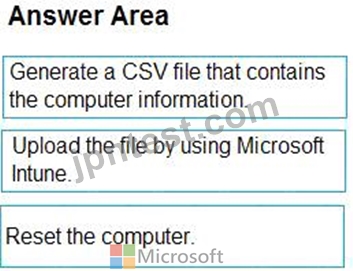
質問 # 94
次の表に示すように、動的デバイス メンバーシップ タイプを使用するグループがあります。
Microsoft 365 アプリを展開しています。
次の表に示すように、Microsoft Intune に登録されているデバイスがあります。
Microsoft Endpoint Manager 管理センターで、図に示すように Microsoft 365 アプリ アプリを作成します。([図] タブをクリックします。)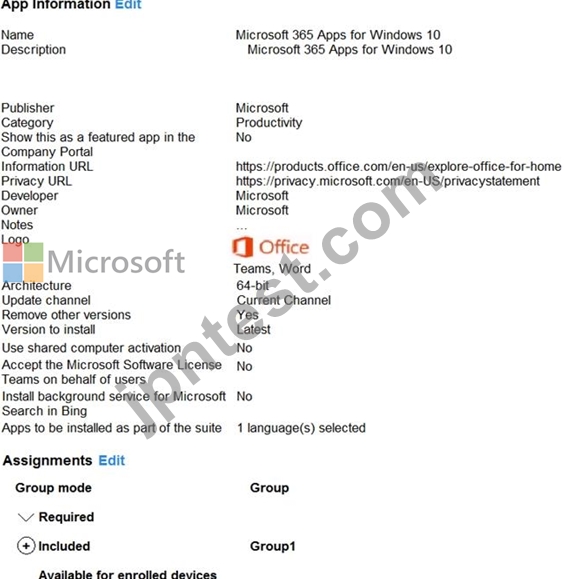
次の各文について、正しい場合は「はい」を選択してください。そうでない場合は「いいえ」を選択してください。
注意: 正しい選択ごとに 1 ポイントが付与されます。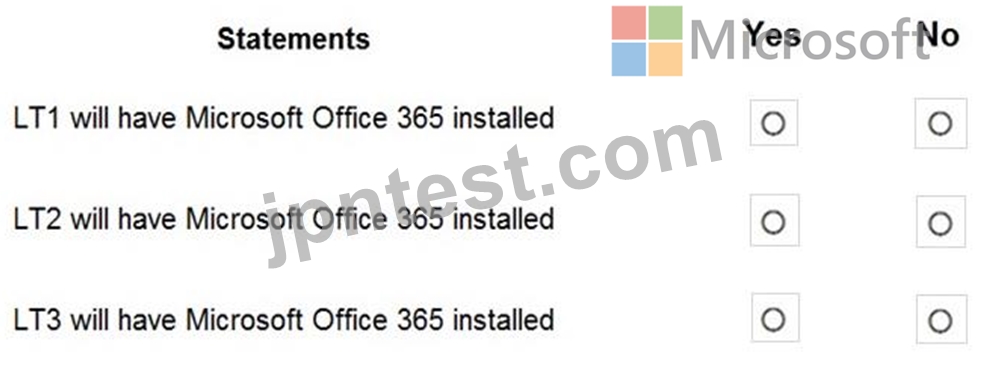
正解:
解説: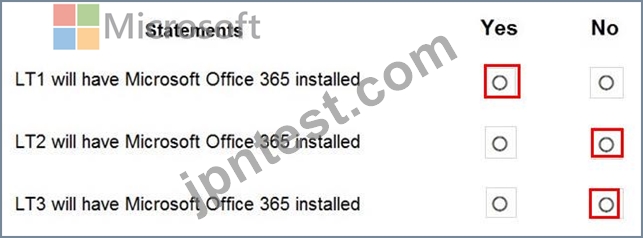
Reference:
https://docs.microsoft.com/en-us/mem/intune/apps/apps-add-office365
https://docs.microsoft.com/en-us/mem/intune/apps/apps-deploy
https://docs.microsoft.com/en-us/mem/intune/apps/apps-add
質問 # 95
ホットスポットに関する質問
Microsoft Intune を使用する Microsoft 365 E5 サブスクリプションがあります。
ユーザーが登録できるのは、次の要件を満たすデバイスのみであることを確認する必要があります。
- 仕事用プロファイルの使用をサポートする Android デバイス。
- iOS 11.0 以降を実行する iOS デバイス。
どの 2 つの制限を変更する必要がありますか? 回答するには、回答領域で制限を選択します。
注意: 正しい選択ごとに 1 ポイントが付与されます。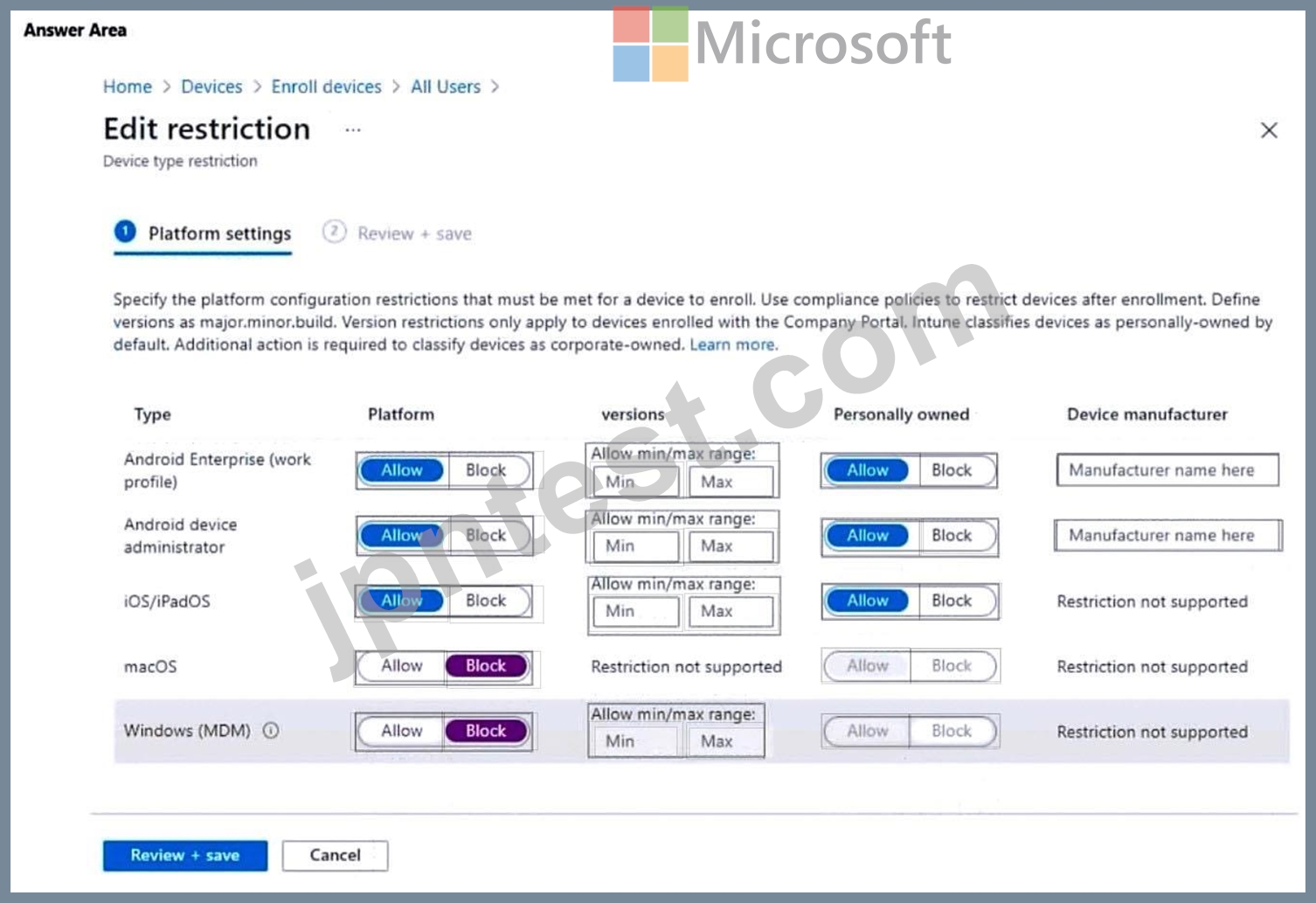
正解:
解説: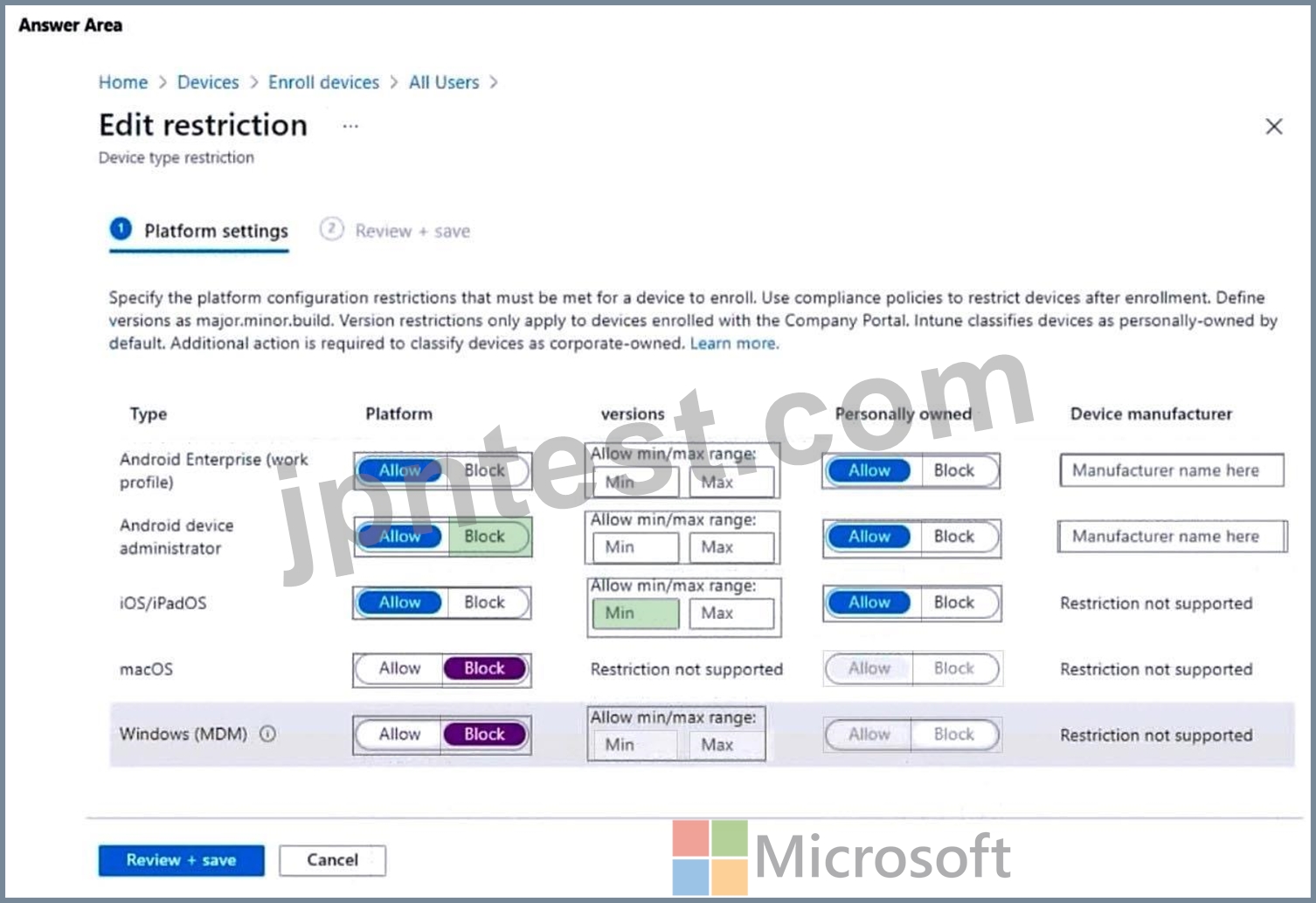
Explanation:
Box 1: Android device administrator, Platform: Block
Restrict devices running on the following platforms:
Android device administrator
Android Enterprise work profile
iOS/iPadOS
macOS
Windows
Note: If you allow both Android platforms for the same group, devices that support work profile will enroll with a work profile. Devices that don't support it will enroll on the Android device administrator platform. Neither work profile nor device administrator enrollment will work until you complete all prerequisites for Android enrollment.
Box 2: iOS/PadOS, Allow min/max Range: Min
Reference:
https://docs.microsoft.com/en-us/mem/intune/enrollment/enrollment-restrictions-set
質問 # 96
Microsoft Intune Suite を使用する Microsoft 365 サブスクリプションをお持ちです。
デバイスを管理するには、Microsoft Intune を使用します。
Intune での自動登録が構成されています。
ワークグループには 100 台の Windows 11 デバイスがあります。
デバイスを企業のワイヤレスネットワークに接続し、100個の新しいWindowsを登録する必要があります。
Intune に 11 台のデバイスがあります。
何を使うべきでしょうか?
- A. グループ ポリシー オブジェクト (GPO)
- B. モバイルデバイス管理 (MDM) 自動登録
- C. プロビジョニング パッケージ
- D. デバイス構成ポリシー
正解:C
解説:
https://learn.microsoft.com/en-us/mem/intune/enrollment/windows-bulk-enroll
質問 # 97
ホットスポットに関する質問
会社では Microsoft Defender for Endpoint を使用しています。Microsoft Defender for Endpoint には、次の表に示すデバイス グループが含まれています。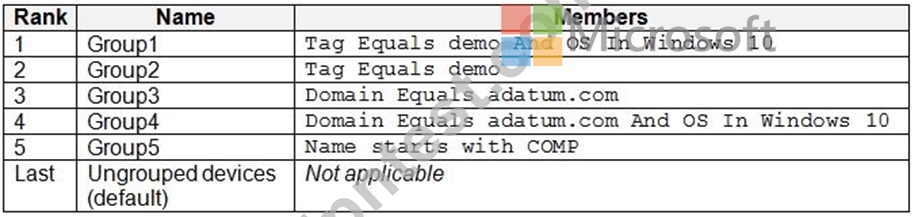
次の図に示すように、コンピューターを Microsoft Defender for Endpoint にオンボードします。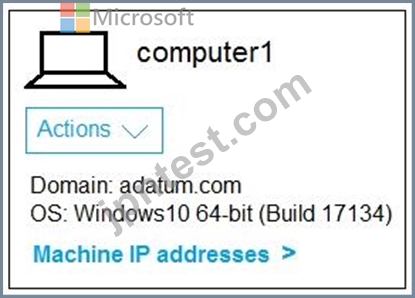
Microsoft Defender for Endpoint 構成の効果は何ですか? 回答するには、回答領域で適切なオプションを選択してください。
注意: 正しい選択ごとに 1 ポイントが付与されます。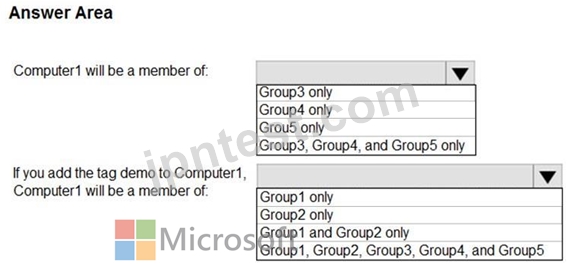
正解:
解説: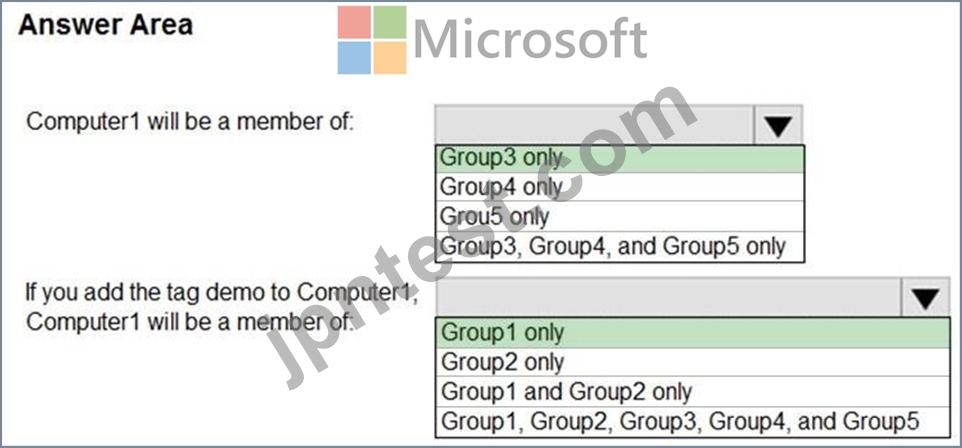
Explanation:
https://docs.microsoft.com/en-us/microsoft-365/security/defender-endpoint/machine- groups?view=o365-worldwide#manage-device-groups If a device is also matched to other groups, it's added only to the highest ranked device group.
質問 # 98
Microsoft Intune を含む Microsoft 365 サブスクリプションをお持ちです。
Android デバイスにカスタム アプリを展開する必要があります。アプリは APK ファイル形式を使用します。
展開にはどのタイプのアプリを選択する必要がありますか?
- A. 組み込み
- B. Android ストア
- C. 基幹業務 (LOB)
- D. マネージド Google Play
- E. ウェブリンク
正解:C
質問 # 99
ネットワークには、Azure AD と同期する contoso.com という名前のオンプレミスの Active Directory ドメインが含まれています。User! という名前のユーザーは、次の表に示すドメインに参加しているデバイスを使用します。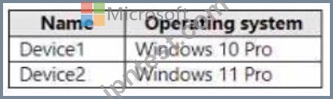
Microsoft Entra 管理センターで、User1 に Windows 11 Enterprise E5 ライセンスを割り当てます。
User1 が次にデバイスにサインインしたときに何が起こるかを特定する必要があります。
各デバイスについて何を識別する必要がありますか? 回答するには、回答領域で適切なオプションを選択してください。
注意: 正しい選択ごとに 1 ポイントが付与されます。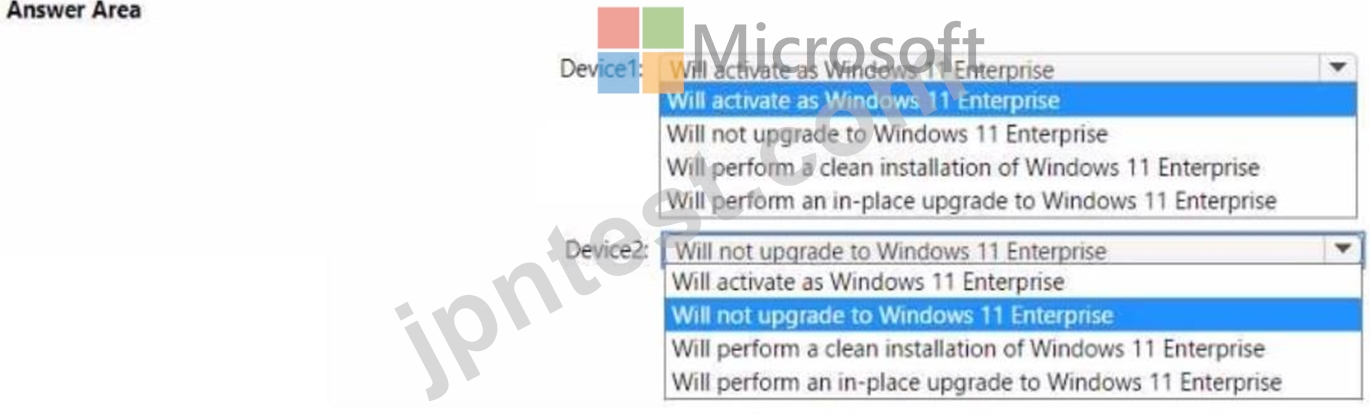
正解:
解説: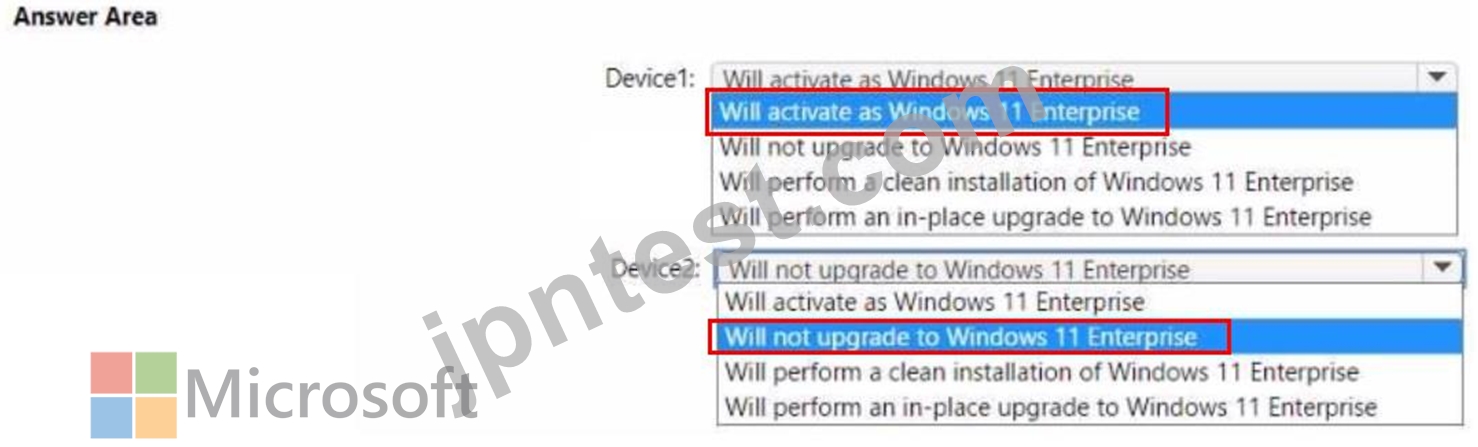
質問 # 100
Windows 10 を実行し、Azure Log Analytics ワークスペースに接続するコンピューターが 100 台あります。
Log Analytics を使用してコンピューターから収集できる 3 つのデータの種類はどれですか? 正解はそれぞれ完全なソリューションです。
注意: 正しい選択ごとに 1 ポイントが付与されます。
- A. セキュリティ ログからの失敗イベント
- B. プロセスとその実行時間のリスト
- C. サードパーティのアプリケーションログがテキストファイルとして保存されます
- D. 平均プロセッサ使用率
- E. システムログからのエラーイベント
正解:C、D、E
解説:
You can collect error events from the System log, third-party application logs stored as text files, and the average processor utilization from the computers by using Log Analytics. These are some of the types of data that you can collect by using data sources such as Windows event logs, custom logs, and performance counters. You cannot collect failure events from the Security log or the list of processes and their execution times by using Log Analytics. Reference: https://docs.microsoft.com/en-us/azure/azure-monitor/agents/data-sources-overview
質問 # 101
Microsoft Intune を使用して 1,000 台のデバイスを管理しています。デバイス コンプライアンス傾向レポートを確認します。レポートにはどのくらいの期間、傾向データが表示されますか?
- A. 90日間
- B. 365日
- C. 30日間
- D. 60日
正解:D
解説:
The Device compliance trends report shows the number of devices that are compliant, noncompliant, and not evaluated over time. The report displays trend data for the last 60 days by default, but you can change the time range to view data for the last 7, 14, or 30 days as well. The report does not show data for more than 60 days. References: [Device compliance trends report]
質問 # 102
......
Microsoft MD-102日本語問題集で一発合格を目指すならこれ!:https://www.jpntest.com/shiken/MD-102-JPN-mondaishu