

JPNTest HPE6-A85日本語問題集104問でACA Campus Access Associateを確実実践
リアル最新HPE6-A85日本語試験問題HPE6-A85日本語問題集
質問 # 38
IP カメラ AP を展開するときに、スイッチ ポートで PoE 優先順位を動的に設定するにはどうすればよいですか。他の PoE デバイスはどうですか?
- A. デバイス プロビジョニングのプロファイリングを有効にする
- B. PoE 電源管理を動的モードに設定します。
- C. PoE 電源管理をクラスベース モードに設定します。
- D. スイッチ モジュールで Quick PoE を有効にする
正解:A
解説:
Profiling is a feature that allows Aruba switches to automatically identify and classify devices connected to them based on various attributes such as MAC address, DHCP options, LLDP information, etc. Profiling can be used to dynamically set the PoE priority on a switch port based on the device type and power requirements. For example, an IP camera may have a higher PoE priority than a printer or a PC. Profiling can also be used to apply other configuration settings such as VLANs, ACLs, QoS, etc. based on the device profile. Reference: https://www.arubanetworks.com/techdocs/ArubaOS_86_Web_Help/Content/arubaos-solutions/1-overview/profiling.htm
質問 # 39
MAC アドレスが B8-31-B5-80-41-4F のデバイスについて正しいのはどれですか?
- A. デバイスの OUI は B8-31-B5 で、デバイスの NIC シリアル番号は 80-41-4F です。
- B. デバイスの OUI は 80-41-4F で、デバイスの NIC シリアル番号は B8-31-B5 です。
- C. デバイスの OUI は B8-31 で、デバイスの NIC シリアル番号は B5-80-41-4F です。
- D. デバイスの OUI は B8-31-B5 で、デバイスのシリアル番号は MD5 です。ハッシュは 80-41-4F です。
正解:A
解説:
A MAC address is divided into two parts: the Organizationally Unique Identifier (OUI) and the Network Interface Controller (NIC) serial number. The OUI is the first three octets of the MAC address and is unique to the manufacturer. The NIC serial number is the last three octets and is unique to the device itself. Therefore, for the MAC address B8-31-B5-80-41-4F, the OUI is B8-31-B5, and the NIC serial number is 80-41-4F.
質問 # 40
「show lacp Interfaces」で LACP を確認するときの「ALFOE」のステータスは何を意味しますか?
- A. ローカル スイッチ上のインターフェイスはstatic LAG として構成されています
- B. LACP は同期プロセス中です
- C. LACP は問題なく正常に動作しています。
- D. LACP がピア側で設定されていません
正解:D
解説:
When checking the status of LACP (Link Aggregation Control Protocol) with the command "show lacp interfaces," various flags indicate the state of the LACP negotiation. "ALFOE" indicates different states for each letter: A (Activity), L (Link), F (Aggregation), O (Synchronization), and E (Collecting). In this context, the O flag is particularly of interest. If the O flag is not set (meaning the synchronization is not achieved), it typically suggests that LACP is not configured or not functioning correctly on the peer side, hence the link is not operational as part of an LACP channel.
質問 # 41
ユーザーがグループの作成中に Aruba Central で定義できるデバイス設定グループのタイプはどれですか? (2つ選択してください。)
- A. テンプレートグループ
- B. ウルグループ
- C. ESPグループ
- D. デフォルトグループ
- E. セキュリティグループ
正解:A、D
解説:
Explanation
Aruba Central allows you to create device configuration groups that define common settings for devices within each group. You can create different types of groupsdepending on your network requirements and management preferences. Two types of groups that you can define in Aruba Central during group creation are:
Template group: A template group allows you to create configuration templates using variables and expressions that can be applied to multiple devices or device groups. Template groups provide flexibility and scalability for managing large-scale deployments with similar configurations.
Default group: A default group is automatically created when you add devices to Aruba Central for the first time. The default group contains basic configuration settings that are applied to all devices that are not assigned to any other group. You can modify or delete the default group as needed.
References: https://www.arubanetworks.com/techdocs/Central/latest/content/nms/device-groups.htm
https://www.arubanetworks.com/techdocs/Central/latest/content/nms/template-groups.htm
https://www.arubanetworks.com/techdocs/Central/latest/content/nms/default-group.htm
質問 # 42
既存の IAP-315 アクセス ポイントを持つネットワーク管理者は Aruba Central に興味があり、特定の機能にどのライセンスが必要かを知る必要があります。機能ごとに必要なライセンスを一致させてください (一致は複数回使用される可能性があります)。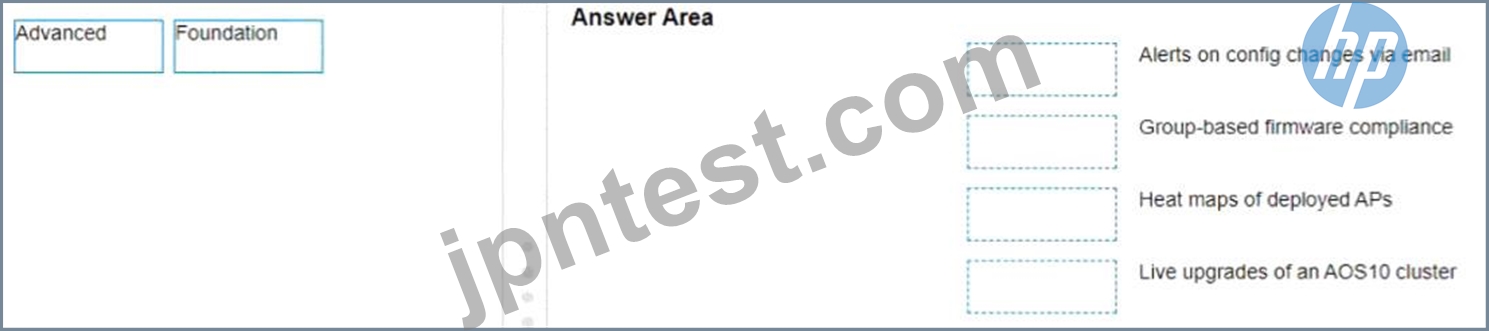
正解:
解説: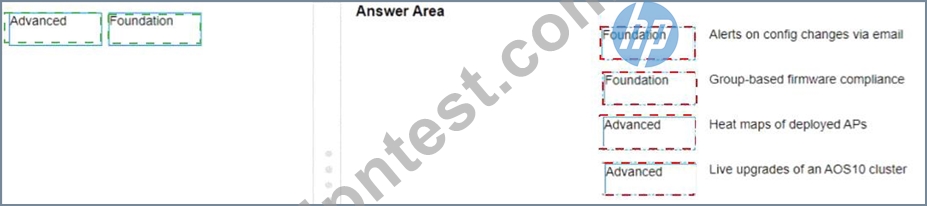
Explanation
a) Alerts on config changes via email - Foundation b) Group-based firmware compliance - Foundation c) Heat maps of deployed APs - Advanced d) Live upgrades of an AOS10 cluster - Advanced According to the Aruba Central Licensing Guide1, the Foundation License provides basic device management features such as configuration, monitoring, alerts, reports, firmware management, etc. The Advanced License provides additional features such as AI insights, WLAN services, NetConductor Fabric, heat maps, live upgrades, etc.
https://www.arubanetworks.com/techdocs/central/2.5.3/content/pdfs/licensing-guide.pdf
質問 # 43
ClientMatch の 2 つの特徴は何ですか? (2つ選択してください。)
- A. RF パターンを調整するアルゴリズム。
- B. これは Aruba の特許取得済みテクノロジーです。
- C. スティッキー クライアントを別の AP に移動するのに役立ちます。
- D. クライアントを見つけるために使用されます。
- E. AP のチャネルを最適化します。
正解:B、C
解説:
ClientMatch is an Aruba patented technology that helps to move sticky clients-clients that stay connected to an AP even when there are better APs available-to a more appropriate AP. This technology ensures that clients are always connected to the best available AP, optimizing both the client's performance and the overall performance of the wireless network.
質問 # 44
AruDaCX 8400 の「snow ip Route」出力に基づきます。ルートのタイプは「10.1 20 0/24、VRF デフォルト経由」です。
10.1.12.2。[1/0]」?
- A. 接続されています
- B. ローカル
- C. OSPF
- D. static
正解:D
解説:
A static route is a route that is manually configured on a router or switch and does not change unless it is modified by an administrator. Static routes are used to specify how traffic should reach specific destinations that are not directly connected to the device or that are not reachable by dynamic routing protocols. In Aruba CX switches, static routes can be configured using the ip route command in global configuration mode. Based on the "show ip route" output on an Aruba CX 8400 switch, the route "10.1 20 0/24, vrf default via 10.1.12.2, [1/0]" is a static route because it has an administrative distance of 1 and a metric of 0, which are typical values for static routes. Reference: https://en.wikipedia.org/wiki/Static_routing https://www.arubanetworks.com/techdocs/AOS-CX_10_04/NOSCG/Content/cx-noscg/ip-routing/static-routes.htm https://www.arubanetworks.com/techdocs/AOS-CX_10_04/NOSCG/Content/cx-noscg/ip-routing/show-ip-route.htm
質問 # 45
展示を参照してください。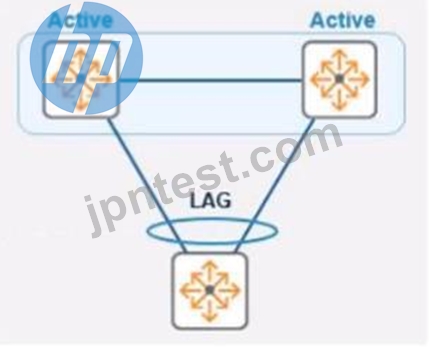
指定されたトポロジでは、Aruba CX 8325 スイッチのペアが、アクティブ ゲートウェイを使用する VSX スタック内にあります。クライアントが VSX をデフォルト ゲートウェイとして使用してアクセス スイッチに接続されている場合、VSX ペアの仮想 IP の性質と動作は何ですか?
- A. 仮想 IP はプライマリ VSX スイッチでアクティブです
仮想フローティング IP は障害が発生した場合にフェイルオーバーします。 - B. 仮想 IP は VSX と同期された SVI IP アドレスを使用します
- C. 仮想 IP は両方の CX スイッチでアクティブです
正解:A
解説:
Explanation
Virtual Switching Extension (VSX) is a feature that allows two Aruba CX switches to operate as a single logical device with a single control plane and data plane. VSX provides high availability, scalability, and simplified management for campus and data center networks3. In VSX, one switch is designated as the primary switch and the other as the secondary switch. The primary switch owns and responds to ARP Address Resolution Protocol. ARP is a communication protocol used for discovering the link layer address, such as a MAC address, associated with a given internet layer address, typically an IPv4 address. This mapping is a critical function in the Internet protocol suite. requests for the virtual IP address of the VSX pair4. The virtual IP address is used as the default gateway for clients connected to the access switch. If the primary switch fails, the secondary switch takes over the virtual IP address and continues to forward traffic for the clients5.
References: 3
https://www.arubanetworks.com/techdocs/AOS-CX_10_04/UG/Content/cx-ug/vsx/vsx-overview.htm 4
https://www.arubanetworks.com/techdocs/AOS-CX_10_04/UG/Content/cx-ug/vsx/vsx-ip-addressing.htm 5
https://www.arubanetworks.com/techdocs/AOS-CX_10_04/UG/Content/cx-ug/vsx/vsx-failover.htm
質問 # 46
ワイヤレス アクセス ポイントにおける LLDP の一般的な使用法は何ですか?
- A. アクセス ポイントとスイッチ間の物理リンクの品質をテストします。
- B. 近くのアクセス ポイントとの RF チャネル情報の交換
- C. 不正なアクセス ポイントの検出
- D. アクセス ポイントに提供される PoE 電力レベルのネゴシエーション
正解:D
解説:
LLDP (Link Layer Discovery Protocol) is commonly used by network devices, including wireless access points, to negotiate PoE (Power over Ethernet) power levels with the switch they are connected to. This allows the access point to communicate its power requirements to ensure it receives the necessary power for optimal operation.
質問 # 47
セキュリティで保護されたエンタープライズ モード WLAN に接続する場合、802.1x 認証プロセスはいつ開始されますか?
- A. ファイアウォール ポリシーがセッションに適用された後
- B. WPA 4-Way ハンドシェイク完了後
- C. クライアントが 802.11 アソシエーションを完了した後
- D. キャプティブ ポータル認証の完了後
正解:C
解説:
The 802.1x authentication process begins after the client device completes the 802.11 association with the access point but before the WPA 4-Way Handshake. This is part of the EAP (Extensible Authentication Protocol) process, which authenticates the device before allowing full network access.
質問 # 48
正しく起動できない Aruba CX 6300F スイッチのトラブルシューティングを行う必要があります。スイッチへのアクセスを許可するオプションを選択し、OS イメージと ServiceOS で使用できるブート オプションを確認します。
- A. SSH を使用する Omgmt ポート
- B. RJ-45 コンソール ポート
- C. USB-C コンソール ポート
- D. USB-A コンソール ポート
正解:C
解説:
To troubleshoot an Aruba CX 6300F switch that is failing to boot correctly, you would typically use the USB-C console port. This port allows you to connect to the switch directly with a console cable and access the boot loader menu, where you can see the available OS images and the ServiceOS for recovery and troubleshooting purposes.
質問 # 49
ワイヤレス クライアントは、カウントダウン タイマーがゼロになり、送信機会 (TXOP) を受信したときに最初に何をしますか?
- A. すぐにデータ フレームを送信し、AP から ACK を受信します。
- B. 再アソシエーション要求フレームを AP に送信し、そのデータ フレームを送信します。
- C. CTS-to-self アナウンスを ESP ゲートウェイに送信します。
- D. CTS-to-self アナウンスを AP および他のすべてのクライアントに送信します。
正解:A
解説:
When a wireless client's countdown timer (also known as a backoff timer) reaches zero during contention-based access periods, and it receives a Transmit Opportunity (TXOP), it has the right to transmit its data frames on the medium. After sending the data frames, it expects an acknowledgment (ACK) from the Access Point (AP) to ensure the frames were received successfully.
質問 # 50
配信およびレイヤー 3 サービスに使用される 6300M スイッチのスタック ペアを使用してネットワークを構成しています。ディストリビューション スタックの下流に接続された CX6200 スイッチの複数のアクセス スタックで使用されるユーザー用の新しい VLAN を作成します。これと同様の複数の VLAN/サブネットを作成します。これらは複数のアクセス スタックで利用されます。正しい設定方法は何ですか?この VLAN に関連付けられるサブネットのルーティング可能なインターフェイスは?
- A. 各ダウンストリーム スイッチのサブネットに SVl を作成します。
- B. 6300M スタック上のサブネットに SVl を作成し、各ダウンストリーム スイッチ スタックの管理アドレスを同じサブネット内の異なる IP アドレスに割り当てます。
- C. 6300M スタック上のサブネットに SVl を作成します。
- D. 各ダウンストリーム スイッチの 6300M スタック上のサブネットに物理的にルーティングされたインターフェイスを作成します。
正解:C
解説:
The correct way to configure the routable interface for the subnet to be associated with this VLAN is to create an SVI Switched Virtual Interface (SVI) Switched Virtual Interface (SVI) is a virtual interface on a switch that represents a VLAN and provides Layer 3 routing functions for that VLAN . SVIs are used to enable inter-VLAN routing , provide gateway addresses for hosts in VLANs , apply ACLs or QoS policies to VLANs , etc . SVIs have some advantages over physical routed interfaces such as saving interface ports , reducing cable costs , simplifying network design , etc . SVIs are usually numbered according to their VLAN IDs (e.g., vlan 10) and assigned IP addresses within the subnet of their VLANs . SVIs can be created and configured by using commands such as interface vlan , ip address , no shutdown , etc . SVIs can be verified by using commands such as show ip interface brief , show vlan , show ip route , etc . in the subnet on the 6300M stack. An SVI is a virtual interface on a switch that represents a VLAN and provides Layer 3 routing functions for that VLAN. Creating an SVI in the subnet on the 6300M stack allows the switch to act as a gateway for the users in that VLAN and enable inter-VLAN routing between different subnets. Creating an SVI in the subnet on the 6300M stack also simplifies network design and management by reducing the number of physical interfaces and cables required for routing.
The other options are not correct ways to configure the routable interface for the subnet to be associated with this VLAN because:
Create a physically routed interface in the subnet on the 6300M stack for each downstream switch: This option is incorrect because creating a physically routed interface in the subnet on the 6300M stack for each downstream switch would require using one physical port and cable per downstream switch, which would consume interface resources and increase cable costs. Creating a physically routed interface in the subnet on the 6300M stack for each downstream switch would also complicate network design and management by requiring separate routing configurations and policies for each interface.
Create an SVl in the subnet on each downstream switch: This option is incorrect because creating an SVI in the subnet on each downstream switch would not enable inter-VLAN routing between different subnets, as each downstream switch would act as a gateway for its own VLAN only. Creating an SVI in the subnet on each downstream switch would also create duplicate IP addresses in the same subnet, which would cause IP conflicts and routing errors.
Create an SVl in the subnet on the 6300M stack, and assign the management address of each downstream switch stack to a different IP address in the same subnet: This option is incorrect because creating an SVI in the subnet on the 6300M stack, and assigning the management address of each downstream switch stack to a different IP address in the same subnet would not enable inter-VLAN routing between different subnets, as each downstream switch would still act as a gateway for its own VLAN only. Creating an SVI in the subnet on the 6300M stack, and assigning the management address of each downstream switch stack to a different IP address in the same subnet would also create unnecessary IP addresses in the same subnet, which would waste IP space and complicate network management.
質問 # 51
スイッチ EDGE1 および CORE1 にいくつかの show コマンドを入力して、問題のトラブルシューティングのための情報を収集しようとします。 show コマンドの出力イメージを使用して、EDGE1 アップリンクがダウンしている理由を特定します。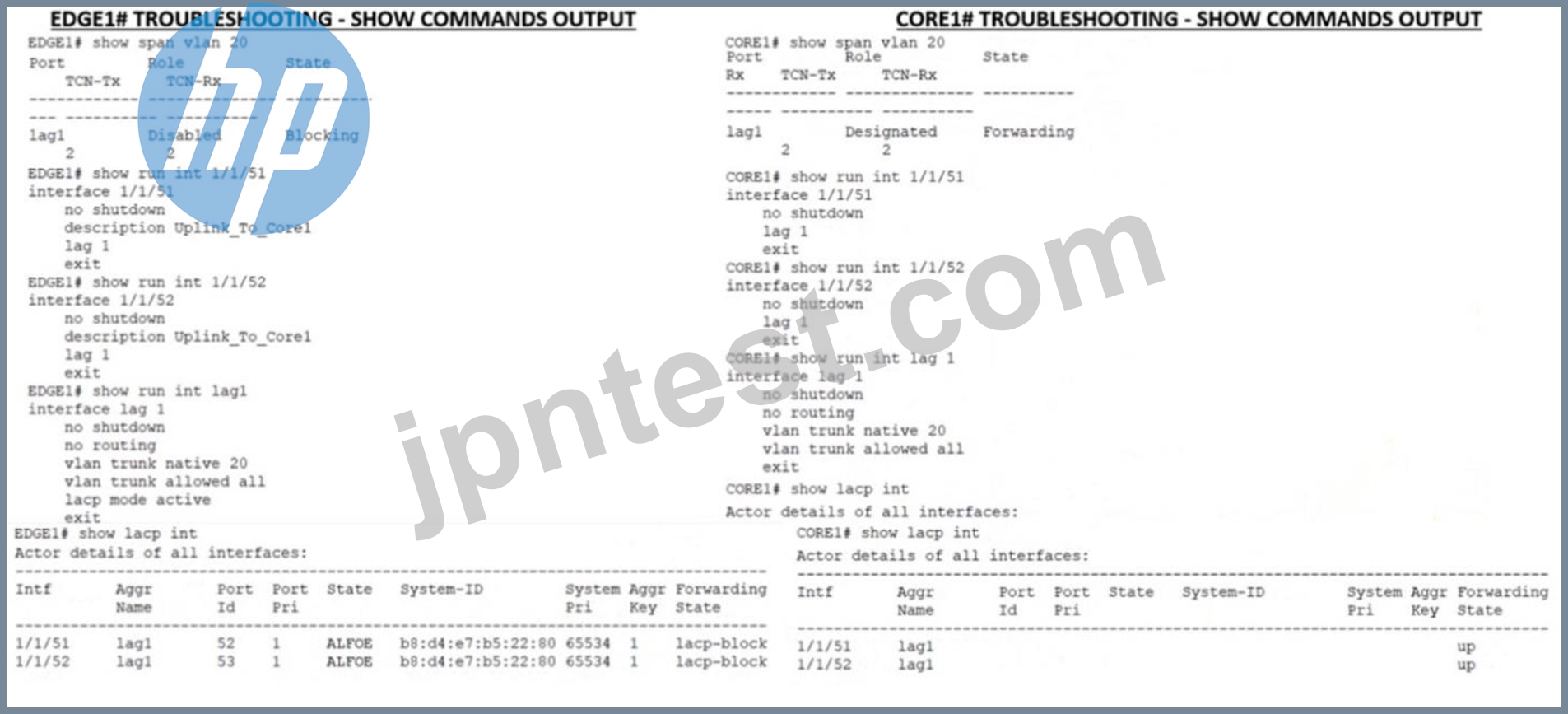
- A. 物理インターフェイスは正しい LAG のメンバーではありません。
- B. スパニングツリー ブロック状態により、コア アップリンクがエッジに接続できなくなります。
- C. LACP がコア アップリンクに設定されていません
- D. コアが間違った物理インターレースに接続されています
正解:C
解説:
LACP is a protocol that allows multiple physical links to be aggregated into a single logical link for increased bandwidth and redundancy. LACP must be configured on both ends of the link for it to work properly. In this case, EDGE1 has LACP configured on its uplink port-channel 1, but CORE1 does not have LACP configured on its corresponding port-channel 1. This causes a mismatch and prevents the link from coming up. Reference: https://www.arubanetworks.com/techdocs/ArubaOS_86_Web_Help/Content/arubaos-solutions/1-overview/lacp.htm
質問 # 52
要求どおりにエッジ スイッチのアップリンクを設定した後、同僚がコアへの ping に失敗したと言います。 あなたは同僚に、接続が差し込まれており、スイッチの電源が入っていることを確認するように依頼します。同僚は両方が正しいことを確認します。 あなたはコア スイッチに ping を試みます。 ping が失敗していることを確認します。
この展開の性質を理解した上で、この問題のトラブルシューティングにどのようなコマンドを使用できるか
- A. Ping 10.11 1 - コアに ping して、接続性を確認します。 トランクを表示 - LAG インターフェイスがスイッチに正しく追加されたかどうかを確認します。 スパニング ツリーを表示します。 - スパニング ツリーのブロック状態を確認します。 ポート アクセス クライアント インターフェイスをすべて表示します。 - すべてのインターフェイスでポート アクセスのブロック状態または失敗した認証試行を表示します。 show runinterface vlan20 - l_3 接続に対してレイヤ 3 SVI 設定が正しいことを再確認します。 Show lldp neighors - コアをL2 ネイバーは、正しいリンクが正しいポートに接続されているかどうかを確認します。
- B. Diag diag Cable-diag 1/1/51 diag Cable-diag 1/1/52 - 物理リンクの診断情報を表示して、レイヤー 1 接続の中断に関するステータスを取得するには、show ip Route - 確認します。デフォルト ゲートウェイがルーティング テーブルに存在すること show ip ospf - レイヤ 3 ルーティング プロトコルが有効になっているかどうかを確認する show ip dns - 有効な DNS ソースがあるかどうかを表示する
- C. 10.1.1.1 に ping - コアに ping を実行して、接続を確認します。 show lacp agg - どのリンク アグリゲーションが現在どの物理ポートを使用して設定されているかを確認します。 show lacp int - LACP ステータスと、リンクがブロックされているかどうかを確認します。トポロジ show lldp neighors - コアを L2 ネイバーとして認識できるかどうかを確認し、正しいリンクが正しいポートに接続されているかどうかを確認します。 show runinterface 1/1/51.1/1/52 - 物理インターフェイスを確認します。 no-shut であり、ラグのメンバーである show runinterface lag 1 - 正しい VLAN トランキング設定が論理インターフェイスに適用されていることを確認するため show run int vlan 20 - L3 SVI が no shut であり、正しいサブネットに設定されていることを確認するため
- D. Show run - スイッチの実行構成を表示します。 Show run | begin 20 "vlan 20" - VLAN 20 がデータベースに正しく追加されたことを確認するには、show run | begin 20 'interface vlan 20' - L3 SVI 設定を表示します Show runinterface 1/1/51.1/1/52 - 物理インターフェイスがシャットされておらず、LAG 1 のメンバーとして追加されていることを確認します Show run int lag 1 - LACP ブロック状態を解消するために LACP モードがアクティブに設定されていることを確認します
正解:C
解説:
These commands might help troubleshoot this issue as they check various aspects of the connectivity between the edge switch and the core switch, such as Layer 3 reachability, Layer 2 adjacency, LACP configuration and status, VLAN trunking configuration, and interface status. Reference: https://www.arubanetworks.com/techdocs/AOS-CX_10_04/CLI/GUID-8F0E7E8B-0F4B-4A3C-AE7F-0F1B5A7F9C5D.html
質問 # 53
あなたは顧客との会議に出席しており、ネットワーク冗長機能マルチプル スパニング ツリー (MSTP) について説明するよう求められています。この機能についての正しい説明は何ですか?
- A. スイッチのシリアル番号を使用したデフォルトの MSTP 構成 ID 名
- B. デフォルトではスイッチのシリアル番号としての MSTP 構成 ID リビジョン
- C. スイッチ IMC アドレスを使用したデフォルトの MSTP 構成 ID 名
- D. 現在の MSTP ルート優先順位としてデフォルトで設定されている MSTP 構成 ID リビジョン
正解:C
解説:
MSTP Multiple Spanning Tree Protocol. MSTP is an IEEE standard protocol for preventing loops in a network with multiple VLANs. MSTP allows multiple VLANs to be mapped to a reduced number of spanning-tree instances. configuration ID consists of two parameters: name and revision. The name is a 32-byte ASCII string that identifies the MSTP region, which is a group of switches that share the same configuration ID and VLAN-to-instance mapping. The revision is a 16-bit number that indicates the version of the configuration ID. By default, the MSTP configuration ID name is set to the switch IMC address, which is a unique identifier derived from the MAC address Media Access Control address. MAC address is a unique identifier assigned to a network interface controller (NIC) for use as a network address in communications within a network segment. of the switch. Reference: https://www.arubanetworks.com/techdocs/ArubaOS_86_Web_Help/Content/arubaos-solutions/mstp/mstp.htm
質問 # 54
ClearPass セルフサービス登録ページを使用してヘッドレス デバイス用の複数事前共有キー (MPSK) を生成する場合、どのような情報が必要ですか?
- A. デバイスの OS タイプ
- B. デバイスのモデル番号
- C. デバイスの MAC アドレス
- D. デバイスの IP アドレス
正解:C
解説:
When generating a Multiple Pre-Shared Key (MPSK) for headless devices using the ClearPass self-service registration page, the MAC address of the device is required. MPSK associates a unique PSK with the MAC address of a device, providing a way to authenticate devices that may not have a user interface.
質問 # 55
Aruba AP でライブ ファームウェア アップグレードを実行するとき。クライアントへの影響を最小限に抑えるために、RF 近隣データに基づいてすべての AP を分割するテクノロジーはどれですか?
- A. Aruba ClientMatch
- B. Aruba ESP
- C. アルバ エアマッチ
- D. Aruba Ai の洞察
正解:C
解説:
Aruba AirMatch is a feature that optimizes RF Radio Frequency. RF is any frequency within the electromagnetic spectrum associated with radio wave propagation. When an RF current is supplied to an antenna, an electromagnetic field is created that then is able to propagate through space. performance and user experience by using machine learning algorithms and historical data to dynamically adjust AP power levels, channel assignments, and channel width. AirMatch performs live firmware upgrades on Aruba APs by partitioning all the APs based on RF neighborhood data and minimizing the impact on clients. AirMatch uses a rolling upgrade process that upgrades one partition at a time while ensuring that adjacent partitions are not upgraded simultaneously. Reference: https://www.arubanetworks.com/assets/ds/DS_AirMatch.pdf https://www.arubanetworks.com/techdocs/ArubaOS_86_Web_Help/Content/arubaos-solutions/arm/AirMatch.htm
質問 # 56
顧客の導入環境に新しい Aruba 6300M をオンボードするよう求められました。 オンサイトではなくリモートで作業しています。 同僚がスイッチを設置しています。 同僚がエッジ スイッチを設定するためのリモート コンソール セッションを提供しました。 あなたは次のことを求められています。インターフェイス 1/1/51 および 1/1/52 を使用して、コアに戻るリンク アグリゲーションを設定します。プロジェクトのシニア エンジニアは、次のガイドラインに従ってスイッチと 1Q アップリンクを設定するように依頼しました。
1. VLAN 20 を Mgmt という名前でローカル VLAN データベースに追加します。
2. 10.1.1 0/24 サブネットのアドレス 10 を使用して、管理用に VLAN 20 に L3 SV1 を追加します。 3. アップリンクに対してアクティブな LACP モードを使用して LAG 1 を追加します。
4 LAG 上のネイティブ VLAN として VLAN 20 を使用します。 5. インターフェイスがすべて ON であることを確認します。
どの構成スクリプトがタスクを達成しますか?
- A. conf t vlan 20 名前管理 IP アドレス 10 1 1.10/24 no shut インターフェイスラグ 1 shut vlan トランクネイティブ 1 vlan トランク許可すべて lacp モード active int 1/1/51.1/1/52 shut no ルーティングインターフェイスラグ 1シャットインターフェースがありません
1/1/51.1/1/52 ノーシャット - B. Edgel# conf t vlan 20 name Mgmt Interface vlan 20 ip address 10 1 1 10/24 no shut インターフェイスラグ 1 shut vlan トランク ネイティブ 20 vlan トランク許可すべて lacp モード active Int 1/1/51.1/1/52シャット ルーティング ラグ 1 なし インターフェイス ラグ 1 なし シャット インターフェイス 1/1/51.1/1/52 シャットなし
- C. Edgel# conf t vlan 20 name Mgmt Interface VLAN 20 IP address 10 1.1 10/24 no shut インターフェイス
1/1/51.1/1/52 シャット VLAN トランク ネイティブ 20 VLAN トランク許可すべてラグ 1 lacp モード アクティブ インターフェイス 1/1/51.1/1/52 シャットなし - D. Edge1# conf t vlan 20 name Mgmt interface vlan 20 ip address 10.1.1.10/24 no shut インターフェイスラグ 1 shut vlan access 20 lacp mode active Int 1/1/51.1/1/52 shut no routing lag 1 インターフェイスラグ1ノーシャット
正解:B
解説:
This configuration script will achieve the task as it follows the guidelines given by the Senior Engineer. It creates VLAN 20 with name Mgmt, adds L3 SVI on VLAN 20 with IP address 10.1.1.10/24, creates LAG 1 with LACP mode active for the uplink, uses VLAN 20 as the native VLAN on the LAG, and ensures that the interfaces are all ON. Reference: https://www.arubanetworks.com/techdocs/AOS-CX/10.04/HTML/5200-6790/GUID-8F0E7E8B-0F4B-4A3C-AE7F-0F1B5A7F9C5D.html Edge1# conf t vlan 20 name Mgmt interface vlan 20 ip address 10.1.1.10/24 no shut interface lag 1 no shut vlan trunk native 20 vlan trunk allowed all lacp mode active interface 1/1/51 no shut lag 1 interface 1/1/52 no shut lag 1 exit This script correctly creates VLAN 20 with the name 'Mgmt', adds an L3 SVI for management using the specified IP address, and configures LACP for link aggregation (LAG 1) using the active mode. It also sets VLAN 20 as the native VLAN on the LAG and ensures all interfaces are enabled ('no shut' is the command to bring up the interface if it has been administratively shut down).
質問 # 57
ネットワーク機器はIP通信に関連するエラーや動作情報を送信するために何を使用しますか?
- A. インターネット制御メッセージ プロトコル (ICMP)
- B. ユーザー データグラム プロトコル (UDP)
- C. 巡回冗長検査 (CRC)
- D. フレーム チェック シーケンス (FCS)
正解:A
解説:
ICMP (Internet Control Message Protocol) is used by network devices to send error and operational information related to IP communications. It is used to send messages like "destination unreachable" or "time exceeded" when there are issues in IP communication
質問 # 58
複数の 20MHz 幅の 802.11 チャネルを結合するのはいつですか?
- A. 高利得全方向性アンテナを使用する場合
- B. 高可用性 AP グループをプロビジョニングするため
- C. 信号対雑音比 (SNR) を下げるには
- D. クライアントと AP 間のスループットを向上させるため
正解:D
解説:
Bonding multiple 20MHz wide 802.11 channels is a technique to create a wider bandwidth channel that supports higher data rate transmissions. It can increase the throughput between the client and AP by using more spectrum resources and reducing interference. Reference: https://ieeexplore.ieee.org/document/9288995 Bonding multiple 20MHz wide 802.11 channels is a technique used to increase the throughput between the client device and the Access Point (AP). By combining two or more 20MHz channels into a wider channel (e.g., 40MHz, 80MHz, or even 160MHz), the data carrying capacity and, consequently, the overall throughput of the wireless connection are increased. This method is particularly useful in high-bandwidth applications or environments where higher data rates are required.
質問 # 59
クライアントが WLAN 内のあるアクセス ポイントから別のアクセス ポイントにローミングするときに、クライアントはどのような変更を加えますか?
- A. 802.11 フレームの宛先 MAC アドレスを変更します。
- B. デフォルト ゲートウェイを新しいアクセス ポイントの IP に変更します。
- C. 新しいアクセス ポイントの SSID と一致するように SSID を変更します。
- D. 新しいワイヤレス コントローラーの SSID との関連付けを変更します。
正解:A
解説:
When a client roams from one access point to another, it must change the destination MAC address on its 802.11 frames to match the new access point to which it is associated. The SSID does not change since it is typically consistent across an entire WLAN, and the default gateway remains the same as long as the client stays within the same IP subnet. The association to a new access point involves updating the destination MAC address in the frames that the client sends.
質問 # 60
WPA3-Personal は、ステーションがワイヤレス ネットワークに接続するたびに異なるペアワイズ マスター キー (PMK) を生成するソースとして何を使用しますか?
- A. キー暗号化キー (KEK)
- B. 日和見無線暗号化 (OWE)
- C. セッション固有の情報 (MAC および nonce)
- D. 同等者同時認証 (SAE)
正解:D
解説:
WPA3-Personal enhances the security of wireless networks by using Simultaneous Authentication of Equals (SAE), which is a more secure replacement for the Pre-Shared Key (PSK) method used in WPA2. SAE strengthens the initial key exchange, providing better protection against offline dictionary attacks and ensuring that each session has a unique Pairwise Master Key (PMK), derived from the interaction between the client and the access point, including session-specific information like MAC addresses and nonces.
質問 # 61
IP カメラ AP を展開するときに、スイッチ ポートで PoE 優先順位を動的に設定するにはどうすればよいですか。他の PoE デバイスはどうですか?
- A. デバイス プロビジョニングのプロファイリングを有効にする
- B. PoE 電源管理を動的モードに設定します。
- C. PoE 電源管理をクラスベース モードに設定します。
- D. スイッチ モジュールで Quick PoE を有効にする
正解:A
解説:
Explanation
Profiling is a feature that allows Aruba switches to automatically identify and classify devices connected to them based on various attributes such as MAC address, DHCP options, LLDP information, etc. Profiling can be used to dynamically set the PoE priority on a switch port based on the device type and power requirements.
For example, an IP camera may have a higher PoE priority than a printer or a PC. Profiling can also be used to apply other configuration settings such as VLANs, ACLs, QoS, etc. based on the device profile.
References:https://www.arubanetworks.com/techdocs/ArubaOS_86_Web_Help/Content/arubaos-solutions/1-ove
質問 # 62
......
HPE6-A85日本語別格な問題集で最上級の成績にさせるHPE6-A85日本語問題:https://www.jpntest.com/shiken/HPE6-A85J-mondaishu