

Microsoft SC-200日本語最新問題集[2026]高得点を掴み取れ
SC-200日本語問題集JPNTest100%合格率保証
質問 # 80
Azure Defender を使用しています。
機密情報を含む Azure ストレージ アカウントをお持ちです。
誰かが不審な IP アドレスからストレージ アカウントにアクセスした場合は、PowerShell スクリプトを実行する必要があります。
どの 2 つのアクションを実行する必要がありますか?それぞれの正解は、解決策の一部を示しています。
注: 正しく選択するたびに 1 ポイントの価値があります。
- A. Azure Security Center から、ワークフローの自動化を有効にします。
- B. 手動トリガーを持つ Azure ロジック アプリを作成します
- C. Azure Active Directory (Azure AD) から、アプリの登録を追加します。
- D. Azure Security Center アラート トリガーを持つ Azure ロジック アプリを作成します。
- E. HTTP トリガーを持つ Azure ロジック アプリを作成します。
正解:A、D
解説:
Reference:
https://docs.microsoft.com/en-us/azure/storage/common/azure-defender-storage-configure?tabs=azure-security-center
https://docs.microsoft.com/en-us/azure/security-center/workflow-automation
質問 # 81
Microsoft 365 サブスクリプションをお持ちです。
サードパーティのウイルス対策製品がインストールされ、Microsoft Defender ウイルス対策がパッシブ モードになっている Windows デバイスが 1,000 台あります。サードパーティのウイルス対策製品では検出されなかった悪意のあるアーティファクトからデバイスを保護する必要があります。解決策: 制御されたフォルダー アクセスを構成します。これで目標は達成されますか?
- A. いいえ
- B. はい
正解:A
質問 # 82
Microsoft Defender for Endpoint を使用する Microsoft 365 サブスクリプションがあります。
171.23.3432 ~ 171.2334.63 の範囲内のすべての IP アドレスに脅威インジケーターを追加する必要があります。ソリューションでは、管理労力を最小限に抑える必要があります。
Microsoft 365 Defender ポータルでは何をすべきですか?
- A. [インジケーターの追加] を選択し、IP アドレスを 171.2334.32-171.23.34.63 に設定します。
- B. 範囲内の個々の IP アドレスを含むインポート ファイルを作成します。 「インポート」を選択し、ファイルをインポートします。
- C. [インジケーターの追加] を選択し、IP アドレスを 171.23.34.32/27 に設定します。
- D. IP アドレス 171.23.34.32/27 を含むインポート ファイルを作成します。 「インポート」を選択し、ファイルをインポートします。
正解:B
解説:
This will add all the IP addresses in the range of 171.23.34.32/27 as threat indicators. This is the simplest and most efficient way to add all the IP addresses in the range.
Reference:
[1] https://docs.microsoft.com/en-us/windows/security/threat-protection/microsoft-defender-atp/threat-intelligenc
質問 # 83
sws1 という名前の Microsoft Sentinel ワークスペースがあります。
sws1 でインシデントが生成されたときに、オンプレミスの IT サービス管理システムでインシデントを発生させる Azure ロジック アプリを作成する予定です。
ロジック アプリの Microsoft Sentinel コネクタの資格情報を構成する必要があります。ソリューションは次の要件を満たす必要があります。
* 管理労力を最小限に抑えます。
* 最小特権の原則を使用します。
資格情報をどのように構成すればよいでしょうか?回答するには、回答領域で適切なオプションを選択してください。
注: 正しく選択するたびに 1 ポイントの価値があります。
正解:
解説:
Explanation:
質問 # 84
Group1 メンバーが Microsoft Sentinel 要件を満たしていることを確認する必要があります。
どの役割を Group1 に割り当てるべきですか?
- A. Microsoft Sentinel プレイブック オペレーター
- B. ロジック アプリのコントリビューター
- C. Microsoft Sentinel Automation の貢献者
- D. オートメーション オペレーター
正解:A
質問 # 85
User1 という名前のゲスト ユーザーと、workspace1 という名前の Microsoft Sentinel ワークスペースを含む Azure サブスクリプションがあります。
ユーザー1がワークスペース1でMicrosoft Sentinelインシデントをトリアージできるようにする必要があります。このソリューションでは、最小権限の原則を適用する必要があります。
User1 にはどのロールを割り当てる必要がありますか? 回答するには、回答領域で適切なオプションを選択してください。
注意: 正しい選択ごとに 1 ポイントが付与されます。
正解:
解説:
Explanation:
質問 # 86
米国東部の Azure リージョンに Azure Sentinel デプロイがあります。
米国西部 Azure リージョンに LogsWest という名前の Log Analytics ワークスペースを作成します。
既存の Azure Sentinel デプロイでスケジュールされた分析ルールを使用して、LogsWest へのクエリに基づいてアラートを生成できることを確認する必要があります。
まず何をすべきでしょうか?
- A. Azure Sentinel でデータ コネクタを作成します。
- B. Azure Data Catalog を米国西部 Azure リージョンにデプロイします。
- C. Microsoft Sentinel をワークスペースに追加します。
- D. 既存の Azure Sentinel デプロイのワークスペース設定を変更します。
正解:C
解説:
Azure Sentinel (now Microsoft Sentinel) is enabled per Log Analytics workspace. Each workspace operates independently; analytics rules in one Sentinel workspace cannot directly query another workspace's data unless Sentinel is also enabled there.
To use scheduled analytics rules against data in the LogsWest workspace, you must first add Microsoft Sentinel to that workspace. After Sentinel is enabled on LogsWest, you can create or connect analytics rules that query its data. You cannot simply modify workspace settings or connect data across regions without enabling Sentinel for the target workspace.
質問 # 87
Azure サブスクリプションをお持ちです。
次の要件を満たすために権限を委任する必要があります。
Azure Defender を有効または無効にします。
セキュリティに関する推奨事項をリソースに適用します。
ソリューションでは、最小特権の原則を使用する必要があります。
各要件に対してどの Azure Security Center ロールを使用する必要がありますか?回答するには、適切なロールを正しい要件にドラッグします。各ロールは、1 回使用することも、複数回使用することも、まったく使用しないこともできます。コンテンツを表示するには、ペイン間で分割バーをドラッグするか、スクロールする必要がある場合があります。
注: 正しく選択するたびに 1 ポイントの価値があります。
正解:
解説:
Explanation:
Reference:
https://docs.microsoft.com/en-us/azure/security-center/security-center-permissions
質問 # 88
Azure Active Directory (Azure AD) ユーザーをブロックするために使用される既存の Azure ロジック アプリがあります。ロジック アプリは手動でトリガーされます。
Azure Sentinel をデプロイします。
既存のロジック アプリを Azure Sentinel のプレイブックとして使用する必要があります。まず何をすべきでしょうか?
- A. 新しいスケジュールされたクエリ ルール。
- B. ロジック アプリでトリガーを変更します。
- C. Azure Sentinel でカスタム Threat Intelligence コネクタを構成します。
- D. Azure Sentinel にデータ コネクタを追加します。
正解:B
解説:
https://docs.microsoft.com/en-us/azure/sentinel/playbook-triggers-actions https://docs.microsoft.com/en-us/azure/sentinel/tutorial-respond-threats-playbook
質問 # 89
Microsoft Defender for Endpoint を使用する Microsoft 365 E5 サブスクリプションがあります。次の要件を満たす検出ルールを作成する必要があります。
* 重大なソフトウェア脆弱性のあるデバイスが過去 1 時間アクティブであった場合にトリガーされます
* 重複する結果の数を制限します
KQL クエリをどのように完成させるべきでしょうか?回答するには、回答領域で適切なオプションを選択してください。
注: 正しく選択するたびに 1 ポイントの価値があります。
正解:
解説:
質問 # 90
DNS 関連のアクティビティを調査するには、クエリを作成する必要があります。ソリューションは Microsoft Sentinel の要件を満たしている必要があります。クエリをどのように完了すればよいでしょうか?回答するには、回答エリアで適切な選択肢を選択してください。 注: 正しい選択肢はそれぞれ 1 ポイントの価値があります。
正解:
解説:
Explanation:
質問 # 91
Microsoft Defender for Endpoint プラン 2 を使用し、Device 1 という名前の Windows デバイスを含む Microsoft 365 サブスクリプションがあります。Device1 でライブ応答セッションを開始し、バックグラウンドで File1.exe という名前の実行可能ファイルを起動します。次の操作を実行する必要があります。
* File1 exe のコマンド ID を識別します。
* lnteractwithFile1.exe を実行します。
各アクションに対してどのライブ レスポンス コマンドを実行する必要がありますか? 回答するには、回答領域で適切なオプションを選択します。
注意: 正しい選択ごとに 1 ポイントが付与されます。
正解:
解説:
Explanation:
質問 # 92
次の表に示すユーザーを含む Azure サブスクリプションがあります。
次のタスクを委任する必要があります。
* 仮想マシン上で Microsoft Defender for Servers を有効にします。
* セキュリティに関する推奨事項を確認し、サーバーの脆弱性スキャンを有効にします。
ソリューションでは、最小特権の原則を使用する必要があります。
どのユーザーが各タスクを実行する必要がありますか?回答するには、適切なユーザーを正しいタスクにドラッグします。各ユーザーは 1 回使用することも、複数回使用することも、まったく使用しないこともできます。コンテンツを表示するには、ペイン間で分割バーをドラッグするか、スクロールする必要がある場合があります。
注: 正しく選択するたびに 1 ポイントの価値があります。
正解:
解説:
Explanation:
質問 # 93
Microsoft Defender XDR を使用する Microsoft 365 サブスクリプションをお持ちです。すべてのエンドポイント デバイスが Microsoft Defender for Endpoint にオンボードされています。
Workspace 1 という名前の Microsoft Sentinel ワークスペースを含む Azure サブスクリプションがあります。すべての Microsoft Defender XDR イベントは Workspace1 に取り込まれます。
Microsoft Entra テナントがあります。
デバイス ログで既知の脆弱性を検索する、query1 という名前の KQL クエリを作成します。
クエリ1が1時間ごとに実行されるようにする必要があります。ソリューションは管理作業を最小限に抑える必要があります。
何を設定すればよいでしょうか?
- A. 自動化ルール
- B. ウォッチリスト
- C. カスタム検出ルール
- D. 自動調査と対応(AIR)
正解:C
解説:
To have your query1 run every hour in a Microsoft Sentinel environment, you should configure it as an analytics rule-specifically a scheduled query (custom detection) rule. Microsoft's official documentation for Sentinel describes "scheduled analytics rules" as queries that you configure to run on a recurring schedule, with a defined lookback period, and trigger alerts if the query results meet the rule criteria. Those scheduled rules are the mechanism by which KQL queries are periodically executed automatically.
When you create an analytics rule in Sentinel, you supply the query (i.e. query1) and you specify the recurrence (for example, every hour). Once configured as such, Sentinel takes care of executing it on schedule with minimal ongoing administrative intervention. This aligns exactly with "minimize administrative effort." Among the answer choices:
* An automation rule is used to act upon alerts (for example, route, suppress, or apply playbooks) but does not itself schedule periodic queries.
* Automated Investigation and Response (AIR) is part of Defender for Endpoint's automated remediation workflow and is used for responding to alerts on endpoints-not for scheduling general KQL hunting queries.
* A watchlist is a static data reference (list of values) you can use within queries or rules but does not itself execute queries on a schedule.
* A custom detection (analytics) rule is exactly what you would use to wrap query1 into a scheduled operation.
Thus, converting query1 into a custom detection rule (i.e. a scheduled analytics rule) is the correct choice.
From Microsoft SecOps and Sentinel rule documentation: scheduled rules are based on Kusto queries configured to run at regular intervals over a lookback period, and if results cross a threshold, an alert is triggered. The rule's scheduling frequency (such as hourly) is part of rule configuration. This model ensures your query1 gets executed every hour automatically with minimal manual work.
質問 # 94
SW1 という名前の Microsoft Sentinel ワークスペースがあります。
SW1 では、ユーザーおよびエンティティの動作分析 (UEBA) を有効にします。
次のタスクを実行するには、KQL を使用する必要があります。
* 各エンティティ タイプのフィールドを持つエンティティ データを表示します。
* ルールのパフォーマンスを分析して、ルールの品質を評価します。
各タスクに対して KQL でどのテーブルを使用する必要がありますか? 回答するには、適切なテーブルを正しいタスクにドラッグします。
各テーブルは、1 回、複数回、またはまったく使用されない場合があります。コンテンツを表示するには、ペイン間の分割バーをドラッグするか、スクロールする必要がある場合があります。
注意: 正しい選択ごとに 1 ポイントが付与されます。
正解:
解説:
Explanation: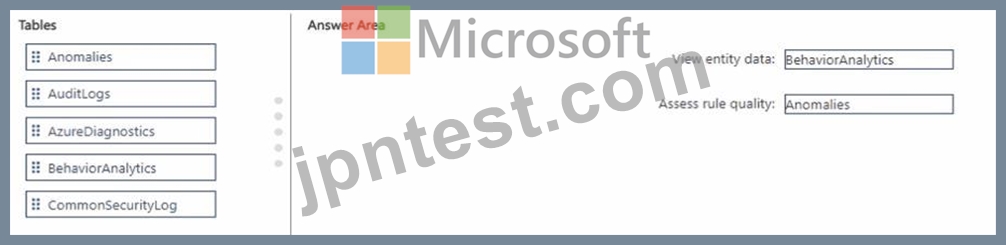
質問 # 95
カスタム ブックを含む Microsoft Sentinel ワークスペースがあります。
セキュリティ イベントの概要をクエリする必要があります。ソリューションは次の要件を満たしている必要があります。
* 過去 1 週間に取り込まれたセキュリティ イベントの数を特定します。
* 日別のイベント数をグラフで表示します。
クエリをどのように完了すればよいですか? 回答するには、回答領域で適切なオプションを選択します。
注意: 正しい選択ごとに 1 ポイントが付与されます。
正解:
解説:
Explanation:
To summarize security events over the last week and chart them by day, use KQL time binning on the event timestamp. In Sentinel/Log Analytics, bin() groups records into fixed time buckets on a datetime column- here, TimeGenerated. Pair that with a time filter for the past 7 days and render as a timechart. The key pattern is:
SecurityEvent
| where TimeGenerated >= ago(7d)
| summarize Count = count() by bin(TimeGenerated, 1d)
| render timechart
* bin is the correct aggregator for time-based bucketing.
* TimeGenerated is the standard timestamp column used across Sentinel tables for ingestion time.
* Using a 1-day bin shows the daily counts; the where TimeGenerated >= ago(7d) limits results to the past week.
* render timechart visualizes the grouped counts over time.
In the answer area shown, you select bin and TimeGenerated; (the full query would also include the where line and a 1d bin size to meet the "by day" requirement).
質問 # 96
Azure と Google Cloud にリソースがあります。
Google Cloud Platform (GCP) データを Azure Defender に取り込む必要があります。
どの順序でアクションを実行する必要がありますか?回答するには、すべてのアクションをアクションのリストから回答領域に移動し、正しい順序で並べます。
正解:
解説:
1 - Configure the GCP Security Command Center.
2 - Enable Security Health Analytics.
3 - Enable the GCP Security Command Center API.
4 - Create a dedicated service account and a private key.
5 - From Azure Security Center, add cloud connectors.
Reference:
https://docs.microsoft.com/en-us/azure/security-center/quickstart-onboard-gcp
質問 # 97
ご使用の環境に影響を与える新しい一般的な脆弱性と露出 (CVE) の脆弱性について通知されます。
有効なエクスプロイトが文書化されている場合は、Microsoft Defender セキュリティ センターを使用して、影響を受けるシステムを担当するチームに修復を要求する必要があります。
どの 3 つのアクションを順番に実行する必要がありますか?回答するには、アクションのリストから適切なアクションを回答領域に移動し、正しい順序で並べます。
正解:
解説: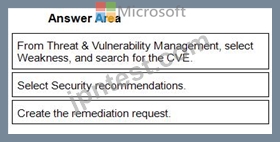
1 - From Threat & Vulnerability Management, select Weakness, and search for the CVE.
2 - Select Security recommendations.
3 - Create the remediation request.
Reference:
https://techcommunity.microsoft.com/t5/core-infrastructure-and-security/microsoft-defender-atp-remediate-apps-using-mem/ba-p/1599271
質問 # 98
Workspace1 という名前の Log Analytics ワークスペースを含む Azure サブスクリプションがあります。
Azure アクティビティ ログと Microsoft Entra ID ログを Workspace1 に転送するように構成します。
危険なユーザーによってクエリまたは変更された Azure リソースを特定する必要があります。
KQL クエリをどのように完了すればよいですか? 回答するには、回答領域で適切なオプションを選択します。
注意: 正しい選択ごとに 1 ポイントが付与されます。
正解:
解説:
Explanation:
質問 # 99
Microsoft Sentinel ワークスペースがあります。
ユーザーおよびエンティティの行動分析 (UFBA) は、監査ログとサインイン ログを使用して有効にします。 Azure AD テナントで次のエンティティが検出されます。
※アプリ名:App1
* IP アドレス: 192.168.1.2
* コンピュータ名: Device1
※使用クライアントアプリ:Microsoft Edge
* メールアドレス: [email protected]
※サインインURL:https://www.company.com
UEBA を使用して調査できるエンティティはどれですか?
- A. クライアント アプリとアプリ名のみを使用
- B. IP アドレスのみ
- C. アプリ名、コンピューター名、IP アドレス、電子メール アドレス、および使用したクライアント アプリのみ
- D. IP アドレスと電子メール アドレスのみ
正解:C
質問 # 100
Azure Sentinel の要件を満たすように Azure Sentinel 統合を構成する必要があります。
あなたは何をするべきか?回答するには、回答領域で適切なオプションを選択してください。
注: 正しく選択するたびに 1 ポイントの価値があります。
正解:
解説:
Explanation:
Reference:
https://docs.microsoft.com/en-us/cloud-app-security/siem-sentinel
Topic 3, Adatum Corporation
Adatum Corporation is a United States-based financial services company that has regional offices in New York, Chicago, and San Francisco.
The on-premises network contains an Active Directory Domain Services (AD DS) forest named corp.adatum.
com that syncs with an Azure AD tenant named adatum.com. All user and group management tasks are performed in corp.adatum.com. The corp.adatum.com domain contains a group named Group! that syncs with adatum.com.
All the users at Adatum are assigned a Microsoft 365 E5 license and an Azure Active Directory Perineum 92 license.
The cloud environment contains a Microsoft 365 subscription, an Azure subscription linked to the adatum.
com tenant, and the resources shown in the following table.
The on-premises network contains the resources shown in the following table.
Adatum plans to perform the following changes;
* Implement a query named rulequery1 that will include the following KQL query.
* Implement a Microsoft Sentinel scheduled rule that generates incidents based on rulequery1.
Adatum identifies the following Microsoft Defender for Cloud requirements:
* The members of Group1 must be able to enable Defender for Cloud plans and apply regulatory compliance initiatives.
* Microsoft Defender for Servers Plan 2 must be enabled on all the Azure virtual machines.
* Server2 must be excluded from agentless scanning.
Adatum identifies the following Microsoft Sentinel requirements:
* Implement an Advanced Security Information Model (ASIM) query that will return a count of DNS requests that results in an NXDOMAIN response from Infoblox1.
* Ensure that multiple alerts generated by rulequery1 in response to a single user launching Azure Cloud Shell multiple times are consolidated as a single incident.
* Implement the Windows Security Events via AMA connector for Microsoft Sentinel and configure it to monitor the Security event log of Server1.
* Ensure that incidents generated by rulequery1 are closed automatically if Azure Cloud Shell is launched by the company's SecOps team.
* Implement a custom Microsoft Sentinel workbook named Workbook1 that will include a query to dynamically retrieve data from Webapp1.
* Implement a Microsoft Sentinel near-real-time (NRT) analytics rule that detects sign-ins to a designated break glass account
* Ensure that HuntingQuery1 runs automatically when the Hunting page of Microsoft Sentinel in the Azure portal is accessed.
* Ensure that higher than normal volumes of password resets for corp.adatum.com user accounts are detected.
* Minimize the overhead associated with queries that use ASIM parsers.
* Ensure that the Group1 members can create and edit playbooks.
* Use built-in ASIM parsers whenever possible.
Adatum identifies the following business requirements:
* Follow the principle of least privilege whenever possible.
* Minimize administrative effort whenever possible.
Directory Perineum 92 license.
質問 # 101
機密ファイルの外部共有に応じてアラートを生成し、修復アクションをトリガーするには、Microsoft Cloud App Security を構成する必要があります。
Cloud App Security ポータルで実行する必要がある 2 つのアクションはどれですか?それぞれの正解は、解決策の一部を示しています。
注: 正しく選択するたびに 1 ポイントの価値があります。
- A. [ファイルの調査] を選択し、[アプリ] を [Office 365] にフィルターします。
- B. [設定] から、[情報保護]、[ファイル] の順に選択し、ファイル監視を有効にします。
- C. [設定] から、[Information Protection]、[Azure Information Protection] の順に選択し、[このテナントからの Azure Information Protection 分類ラベルとコンテンツ検査警告のファイルのみをスキャンする] を選択します。
- D. [設定] から、[Information Protection]、[Azure Information Protection] の順に選択し、[新しいファイルの Azure Information Protection 分類ラベルとコンテンツ検査警告を自動的にスキャンする] を選択します。
- E. [ファイルの調査] を選択し、[ファイル タイプ] を [ドキュメント] にフィルターします。
- F. [ファイルの調査] を選択し、検索から [新しいポリシー] を選択します。
正解:B、D
解説:
Reference:
https://docs.microsoft.com/en-us/cloud-app-security/tutorial-dlp
https://docs.microsoft.com/en-us/cloud-app-security/azip-integration
質問 # 102
......
100%合格率リアルSC-200日本語試験成功を掴み取れ:https://www.jpntest.com/shiken/SC-200J-mondaishu