
試験InsuranceSuite-Developer トピック1 問題33 スレッド
Guidewire InsuranceSuite-Developerのリアル試験問題集
問題 #: 33
トピック #: 1
問題 #: 33
トピック #: 1
Given the following screen showing a DetailView in Guidewire Studio highlighted in red:
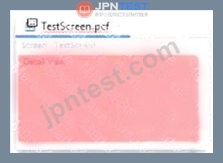
Which single item added directly to the detail view will correct the error shown, with no further errors?
Which single item added directly to the detail view will correct the error shown, with no further errors?
おすすめの解答:D 解答を投票する
In Guidewire InsuranceSuite PCF (Page Configuration File) Configuration, the hierarchy and structural requirements of container widgets are strictly enforced by the Studio compiler and visual editor. A DetailView (DV) is a specific type of container designed to display and edit individual fields (atomic widgets) in a column-based layout.
When a developer adds a DetailView to a PCF, Studio will initially display it in red, indicating a validation error. This occurs because, according to the PCF Architecture standards, a DetailView is not a direct container for input widgets like TextInput or RangeInput. Instead, it requires a layout-specific child element to define how those widgets are organized. The mandatory child for a standard DetailView is the InputColumn.
An InputColumn provides the necessary structure to align labels and their corresponding input widgets.
Without at least one InputColumn defined directly under the DetailView, the DV is considered incomplete and structurally invalid. Adding an InputColumn (Option D) satisfies the minimum container requirement, effectively clearing the validation error and allowing the developer to then place field-level widgets within that column.
Regarding the other options: A RowIterator (Option A) is a component specifically used within a ListView to iterate over a collection of data and is not a direct child of a DetailView. While a ListView (Option C) can be displayed within a DV, it must be wrapped in a ListViewInput or placed inside an InputSet, and simply adding a " list view " does not satisfy the core structural requirement for an input-based DV layout as directly as an InputColumn. A Toolbar (Option B) is typically associated with a Screen, PanelRef, or ListView, rather than being a structural correction for a DetailView. Therefore, the InputColumn is the fundamental architectural element required to make the DV valid.
When a developer adds a DetailView to a PCF, Studio will initially display it in red, indicating a validation error. This occurs because, according to the PCF Architecture standards, a DetailView is not a direct container for input widgets like TextInput or RangeInput. Instead, it requires a layout-specific child element to define how those widgets are organized. The mandatory child for a standard DetailView is the InputColumn.
An InputColumn provides the necessary structure to align labels and their corresponding input widgets.
Without at least one InputColumn defined directly under the DetailView, the DV is considered incomplete and structurally invalid. Adding an InputColumn (Option D) satisfies the minimum container requirement, effectively clearing the validation error and allowing the developer to then place field-level widgets within that column.
Regarding the other options: A RowIterator (Option A) is a component specifically used within a ListView to iterate over a collection of data and is not a direct child of a DetailView. While a ListView (Option C) can be displayed within a DV, it must be wrapped in a ListViewInput or placed inside an InputSet, and simply adding a " list view " does not satisfy the core structural requirement for an input-based DV layout as directly as an InputColumn. A Toolbar (Option B) is typically associated with a Screen, PanelRef, or ListView, rather than being a structural correction for a DetailView. Therefore, the InputColumn is the fundamental architectural element required to make the DV valid.
Kurasawa 2026-07-19 11:35:03
コメント
他人の解答コメントを賛成するのも、その解答に一票を入れることになります。したがって、すでに同じ意見の投票コメントが存在する場合、新規コメントをする代わりに賛成することもできます。
コメントを通報する
コメント中
今すぐ 新規登録 / ログイン (無料です)。