
 440 お客様のコメント
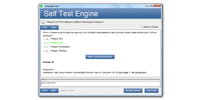

本番さながらの環境で練習したい方には、JPNTestのテストエンジンがおすすめです。070-511試験の画面構成や制限時間を再現した模擬試験で、Microsoft TS: Windows Applications Development with Microsoft .NET Framework 4の288の問題に取り組めます。本番の緊張感に慣れておけば、当日も落ち着いて解答できるようになります。
Microsoft 070-511 試験概要:
| 認定ベンダー: | Microsoft |
|---|---|
| 試験名: | TS: Microsoft .NET Framework 4 による Windows アプリケーション開発 |
| 試験番号: | 70-511 |
| 合格点: | 700点(満点1000点) |
| 関連資格: | MCTS: Windows アプリケーション開発(Microsoft .NET Framework 4 対応) |
| 試験形式: | シナリオ形式の問題, 事例問題, 多肢選択式問題 |
| 受験料: | 165米ドル(地域によって異なります) |
| 認定の有効期間: | 廃止済み(現在の認定試験としては実施されていません) |
| 対応言語: | 英語 |
| 試験時間: | 120 分 |
| 出題数: | 約40~60問 |
| 推奨トレーニング: | Microsoft Learn .NET デスクトップ開発関連リソース |
| 受験申し込み: | Pearson VUE Microsoft 認定試験 |
| サンプル問題: | Microsoft 070-511 サンプル問題 |
| 受験方法: | Pearson VUE が提供する会場での受験またはオンライン監督付き受験 |
| 前提条件: | 正式な受験資格要件は設けられていませんが、C# および .NET Framework に関する実務経験が強く推奨されます |
| 公式シラバスのURL: | https://learn.microsoft.com/ |
Microsoft 070-511 試験シラバストピック:
| セクション | 目標 |
|---|---|
| トピック 1: アプリケーションのロジックとパフォーマンス | - 例外処理とデバッグ - マルチスレッド処理と非同期プログラミング |
| トピック 2: Windows アプリケーションの設計 | - コントロールの使用方法とレイアウトの管理 - Windows アプリケーション向けユーザーインターフェース設計の原則 - Windows Forms および WPF の基礎知識 |
| トピック 3: 展開とセキュリティ | - アプリケーションの展開戦略 - .NET アプリケーションにおけるセキュリティの基礎知識 |
| トピック 4: .NET Framework 4 によるアプリケーション開発 | - LINQ によるデータ操作 - .NET におけるオブジェクト指向プログラミング - コレクションとジェネリック |
| トピック 5: データアクセスとデータバインディング | - Windows Forms および WPF におけるデータバインディング - ADO.NET によるデータアクセス |
070-511試験についてよくあるご質問
「070-511」は、Microsoftが実施する「TS: Microsoft .NET Framework 4 による Windows アプリケーション開発」の試験コードです。この試験に合格すると、「Microsoft Certified Technology Specialist (MCTS)」の認定を取得できます。認定レベルはアソシエイトに位置づけられています。関連する認定としては、MCTS: Windows アプリケーション開発(Microsoft .NET Framework 4 対応)などが挙げられます。JPNTestでは、070-511試験対策として288の練習問題をご用意しています。
070-511試験の出題数は約40~60問、制限時間は120 分です。限られた時間内で全問に取り組む必要があるため、1問にかけられる時間を常に意識し、難しい問題に長く留まりすぎないペース配分が求められます。本番で時間不足に慌てないよう、JPNTestのテストエンジンで制限時間つきの模擬試験に挑戦し、時間配分の感覚を体に覚えさせておくことをおすすめします。
070-511試験の合格ラインは700点(満点1000点)、受験料は165米ドル(地域によって異なります)です。万が一不合格だった場合、再受験には改めて全額の受験料が必要になるため、費用面の負担も無視できません。受験前にJPNTestの288の練習問題で模擬試験に取り組み、安定して合格ラインを超えられることを確認してから本番に臨むと安心です。
正式な受験資格要件は設けられていませんが、C# および .NET Framework に関する実務経験が強く推奨されます
受験条件は変更される場合があります。最新かつ正確な情報は、Microsoftの公式ページで必ずご確認ください。
070-511試験は、以下の公式窓口からお申し込みいただけます。
なお、本試験の受験方式はPearson VUE が提供する会場での受験またはオンライン監督付き受験です。
Microsoftでは070-511試験向けに、以下の公式トレーニングを用意しています。
公式トレーニングで知識の土台を固めたうえで、JPNTestの288の練習問題に取り組めば、理解度の確認と弱点の洗い出しを効率よく進められます。
はい、ご購入前にJPNTestの070-511問題集の無料サンプル(PDFデモ)をダウンロードして、問題の品質や形式をご確認いただけます。ご購入後は365日間の無料更新が付帯し、更新期間の終了後も50%割引で継続更新をご利用いただけるため、常に最新の出題傾向に沿った内容で学習を続けられます。
JPNTestでは「返金保証」制度をご用意しています。ご購入後60日以内に070-511試験を受験して不合格となった場合、全額返金をご申請いただけます。なお、ご購入後3日以内の受験や、ダウンロード後に実際の受験をしていない場合、無料資料や期限切れのご注文は対象外となり、受験者氏名とお支払い者氏名が一致している必要があります。ご申請の際は、受験票(enrollment slip)の写しと公式スコアレポート(Score Report)のPDFを試験後2日以内にご提出いただき、受理後7日以内に手続きが完了します。返金をご希望でない場合は、同等価値の試験資料2点を無料でお受け取りいただき、元の製品の更新サービスを継続する選択肢もございます。
また、ご購入いただいた製品はお支払い完了後すぐにダウンロードでき、メールでも1分以内にお届けします。2時間以内に届かない場合はカスタマーサポートまでご連絡ください。インストール可能なパソコンの台数に制限はありません。
070-511試験の出題範囲は、全部で5分野で構成されています。主な分野としては、「アプリケーションのロジックとパフォーマンス」、「データアクセスとデータバインディング」、「展開とセキュリティ」などが挙げられます。各分野の詳細なトピックと配点は、上記の試験大綱をご確認ください。JPNTestの070-511練習問題は、これらの出題分野を幅広くカバーしています。
Microsoft TS: Windows Applications Development with Microsoft .NET Framework 4 認定 070-511 試験問題:
問題 #1
You use Microsoft Visual Studio 2010 and Microsoft .NET Framework 4 to create a
Windows Presentation Foundation (WPF) application.
You suspect that the data returned from the database is incorrect.
You need to capture interactions to the database by using IntelliTrace.
Which event type should you capture?
A. DataBinding
B. ServiceModel
C. Tracing
D. ADO.NET
問題 #2
You use Microsoft .NET Framework to create a Windows Presentation Foundation (WPF) application.
You create a window that contains a Button control and a MenuItem control. Both controls are labeled "Add sugar." The Command properties of the Button and MenuItem controls are set to the same RoutedCommand named AddSugarCommand.
You write the following code segment.
Private Sub CanAddSugar(sender As Object, e As CanExecuteRoutedEventArgs)
...
End Sub
You need to ensure that when the CanAddSugar method sets e.CanExecute to false, the MenuItem and Button controls are disabled.
What should you do?
A. Inherit the AddSugarCommand from the RoutedUICommand class instead of the RoutedCommand class. Call the CanAddSugar method from within the constructor of the AddSugarCommand command.
B. Add a CommandBinding object to the CommandBindings property of the window. Set the Command property of CommandBinding to the AddSugarCommand command. Set the CanExecute property of the CommandBinding object to the CanAddSugar method.
C. Add a CommandBinding object to the CommandBinding property of the MenuItem control. Set the CanExecute property of the CommandBinding object to the CanAddSugar method.
D. Create an event handler for the CanExecuteChanged event of the AddSugarCommand command. Call the CanAddSugar method from within the event handler.
問題 #3
You are deploying a ClickOnce application manually in a test environment.
You need to ensure that the deployment is signed with a self-signed test X.509 certificate.
Which tool should you use to create the certificate?
A. cert2spc.exe
B. Ic.exe
C. mage.exe
D. makecert.exe
問題 #4
You are developing a Windows Presentation Foundation (WPF) application.
A user control responds to a click event. The click event handler sets the Handled property to True.
You need to ensure that a parent control responds to the event after the user control's handler executes.
What should you do?
A. Add a tunneling routed event handler to the parent control.
B. Programmatically add an event handler to the parent control and set the HandledEventsToo property to False.
C. Add a bubbling routed event handler to the parent control.
D. Programmatically add an event handler to the parent control and set the HandledEventsToo property to True.
問題 #5
You use Microsoft .NET Framework 4 to create a Windows Presentation Foundation (WPF) application.
You create a Button control for the application.
You need to ensure that the application meets the following requirements:
- When the mouse pointer is over the Button control, the background color of the button is set to red and the Button control appears bigger. - When the mouse pointer is not over the Button control, the button returns to its original state.
What should you do?
A. Create a ScaleTransform class. Bind the ScaleX and ScaleY properties of the Button control to the Background property by using a custom value converter.
B. Add a method named ChangeAppearance in the code-behind file. Subscribe the ChangeAppearance method to the MouseEnter event of the Button control,
C. Create a template. Declare a VisualState element in the template.
D. Create a StoryBoard animation. Add an EventTrigger class to the Button control that begins the StoryBoard animation.
解説:
| 問題 #1 正解: C | 問題 #2 正解: B | 問題 #3 正解: D | 問題 #4 正解: D | 問題 #5 正解: C |


 0
0
 0
0
 0
0
 0
0
