
 497 お客様のコメント
 クリック」
クリック」
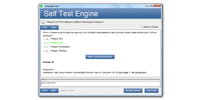

試験内容はベンダーの方針変更とともに更新されるため、教材の鮮度が学習効果を左右します。JPNTestの070-688問題集は購入後365日間無料で更新され、2026年時点のMicrosoft Managing and Maintaining Windows 8の出題内容にも対応しています。
Microsoft 070-688 試験概要:
| 認定ベンダー: | Microsoft |
|---|---|
| 試験名: | Windows 8 クライアントの管理および維持 |
| 試験番号: | 70-688 |
| 出題数: | 40-60 |
| 認定の有効期間: | 廃止済み(現在は実施されていません。有効期間中、この認定に有効期限はありませんでした) |
| 試験形式: | ドラッグ&ドロップ, 単一選択式, 複数選択式, パフォーマンスベースのタスク, ケーススタディ |
| 合格点: | 700/1000 |
| 関連資格: | MCSA Windows 8 |
| 試験時間: | 120-150 |
| 対応言語: | 簡体字中国語, フランス語, ドイツ語, スペイン語, 英語, 日本語 |
| 受験料: | $165 USD(国・地域により異なる場合があります) |
| 推奨トレーニング: | Microsoft Learn (Windows クライアント ドキュメント) Microsoft 公式トレーニング リソース(廃止された試験のアーカイブ コンテキスト) |
| 受験申し込み: | Microsoft 認定資格 / 試験 Pearson VUE Microsoft 試験 |
| サンプル問題: | Microsoft 070-688 サンプル問題 |
| 受験方法: | Pearson VUE を通じて提供されるコンピュータベースの試験(テストセンターまたは利用可能な場合はオンライン監督試験) |
| 前提条件: | 推奨される前提条件:完全な MCSA Windows 8 認定パスのための Microsoft 試験 70-687 (Configuring Windows 8.1) |
| 公式シラバスのURL: | https://learn.microsoft.com |
Microsoft 070-688 試験シラバストピック:
| セクション | 目標 |
|---|---|
| ネットワーク接続の構成 | - ワイヤレス ネットワークの管理 - TCP/IP 設定の構成 - VPN とリモート アクセスの構成 |
| Windows 8 クライアントの保守 | - システムおよびアプリケーションの問題のトラブルシューティング - システム パフォーマンスの監視 - 更新プログラムとパッチの構成 |
| Windows 8 エンタープライズ デスクトップの展開 | - デスクトップ展開ツールの管理 - アプリケーション展開方法の構成 |
| Windows 8 デバイスとデータの管理 | - デバイス ドライバーの構成 - データのバックアップと回復の構成 - ファイル システムとストレージの管理 |
| Windows 8 クライアントのインストールとアップグレード | - インストール後の設定の構成 - システムのアップグレードと移行 - Windows 8 のインストール |
070-688試験についてよくあるご質問
「070-688」は、Microsoftが実施する「Windows 8 クライアントの管理および維持」の試験コードです。この試験に合格すると、「MCSA Windows 8」の認定を取得できます。認定レベルはアソシエイトに位置づけられています。関連する認定としては、MCSA Windows 8などが挙げられます。JPNTestでは、070-688試験対策として189の練習問題をご用意しています。
070-688試験の出題数は40-60、制限時間は120-150です。限られた時間内で全問に取り組む必要があるため、1問にかけられる時間を常に意識し、難しい問題に長く留まりすぎないペース配分が求められます。本番で時間不足に慌てないよう、JPNTestのテストエンジンで制限時間つきの模擬試験に挑戦し、時間配分の感覚を体に覚えさせておくことをおすすめします。
070-688試験の合格ラインは700/1000、受験料は$165 USD(国・地域により異なる場合があります)です。万が一不合格だった場合、再受験には改めて全額の受験料が必要になるため、費用面の負担も無視できません。受験前にJPNTestの189の練習問題で模擬試験に取り組み、安定して合格ラインを超えられることを確認してから本番に臨むと安心です。
推奨される前提条件:完全な MCSA Windows 8 認定パスのための Microsoft 試験 70-687 (Configuring Windows 8.1)
受験条件は変更される場合があります。最新かつ正確な情報は、Microsoftの公式ページで必ずご確認ください。
070-688試験は、以下の公式窓口からお申し込みいただけます。
なお、本試験の受験方式はPearson VUE を通じて提供されるコンピュータベースの試験(テストセンターまたは利用可能な場合はオンライン監督試験)です。
Microsoftでは070-688試験向けに、以下の公式トレーニングを用意しています。
公式トレーニングで知識の土台を固めたうえで、JPNTestの189の練習問題に取り組めば、理解度の確認と弱点の洗い出しを効率よく進められます。
はい、ご購入前にJPNTestの070-688問題集の無料サンプル(PDFデモ)をダウンロードして、問題の品質や形式をご確認いただけます。ご購入後は365日間の無料更新が付帯し、更新期間の終了後も50%割引で継続更新をご利用いただけるため、常に最新の出題傾向に沿った内容で学習を続けられます。
JPNTestでは「返金保証」制度をご用意しています。ご購入後60日以内に070-688試験を受験して不合格となった場合、全額返金をご申請いただけます。なお、ご購入後3日以内の受験や、ダウンロード後に実際の受験をしていない場合、無料資料や期限切れのご注文は対象外となり、受験者氏名とお支払い者氏名が一致している必要があります。ご申請の際は、受験票(enrollment slip)の写しと公式スコアレポート(Score Report)のPDFを試験後2日以内にご提出いただき、受理後7日以内に手続きが完了します。返金をご希望でない場合は、同等価値の試験資料2点を無料でお受け取りいただき、元の製品の更新サービスを継続する選択肢もございます。
また、ご購入いただいた製品はお支払い完了後すぐにダウンロードでき、メールでも1分以内にお届けします。2時間以内に届かない場合はカスタマーサポートまでご連絡ください。インストール可能なパソコンの台数に制限はありません。
070-688試験の出題範囲は、全部で5分野で構成されています。主な分野としては、「Windows 8 デバイスとデータの管理」、「Windows 8 クライアントのインストールとアップグレード」、「ネットワーク接続の構成」などが挙げられます。各分野の詳細なトピックと配点は、上記の試験大綱をご確認ください。JPNTestの070-688練習問題は、これらの出題分野を幅広くカバーしています。
Microsoft Managing and Maintaining Windows 8 認定 070-688 試験問題:
問題 #1
HOTSPOT
You have 10 client computers that run Windows 8 Pro. The Storage Spaces settings of the computers are configured as shown in the following exhibit. (Click the Exhibit button.)
To answer, complete each statement according to the information presented in the exhibit. Each correct selection is worth one point.
問題 #2
You have client computers that run Windows 8 Enterprise.
The network contains a network printer. Users connect to the printer by using a local TCP/IP port.
A network administrator changes the IP address of the printer.
You need to create a script to update the IP address used by the local TCP/IP port on the computers.
Which two Windows PowerShell cmdlets should you run? (Each correct answer presents part of the solution. Choose two.)
A. Add-Printer
B. Add- PrinterD river
C. Set-PrinterConfiguration
D. Set-Printer
E. Add-PrinterPort
問題 #3
At home, you use a Windows 8.1 desktop computer. At work, you use a Windows 8.1
laptop that is connected to a corporate network. You use the same Microsoft account to log on to both computers.
You have a folder with some personal documents on your desktop computer. The folder must be available and synced between both computers.
You need to ensure that the latest version of these files is available.
What should you do?
A. Create a folder by using SkyDrive for Windows. Move all of the personal documents to the new folder.
B. Right-click the folder and click Properties. Under Security, provide Full Control for the Microsoft account.
C. Move the folder to the Libraries folder.
Go to PC Settings. Under Sync your settings, enable App settings.
D. Right-click the folder and select Share With, and then select Homegroup (view and edit).
問題 #4
You have a Windows 8.1 Enterprise client computer named Computer1 The Storage Spaces settings of Computer1 are configured as shown in the following exhibit. (Click the Exhibit button.)
You plan to create a three-way mirror storage space in the storage pool and to set the size of the storage space to 50 GB.
You need to identify the minimum number of disks that must be added to the storage pool for the planned mirror.
How many disks should you identify?
A. 3
B. 5
C. 1
D. 4
問題 #5
DRAG DROP
You have a computer that runs Windows 8. You have a 1-terabyte external hard drive. You purchase a second 1-terabyte external hard drive.
You need to create a fault-tolerant volume that includes both external hard drives. You also need to ensure that additional external hard drives can be added to the volume.
Which three actions should you perform in sequence? (To answer, move the appropriate actions from the list of actions to the answer area and arrange them in the correct order.)
解説:
| 問題 #1 正解: 会員のみ閲覧可能 | 問題 #2 正解: D、E | 問題 #3 正解: A | 問題 #4 正解: A | 問題 #5 正解: 会員のみ閲覧可能 |


 0
0
 0
0
 0
0
 0
0
