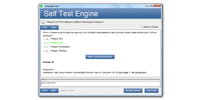
本番さながらの環境で練習したい方には、JPNTestのテストエンジンがおすすめです。070-692試験の画面構成や制限時間を再現した模擬試験で、Microsoft Upgrading Your Windows XP Skills to MCSA Windows 8.1の76の問題に取り組めます。本番の緊張感に慣れておけば、当日も落ち着いて解答できるようになります。
Microsoft 070-692 試験概要:
| 認定ベンダー: | Microsoft |
|---|---|
| 試験名: | Windows XPのスキルをMCSA Windows 8.1向けにアップグレードする |
| 試験番号: | 70-692 |
| 出題数: | 70~76問 |
| 受験料: | 165米ドル(地域によって異なります) |
| 対応言語: | スペイン語, ドイツ語, ポルトガル語(ブラジル), フランス語, 英語, 中国語(簡体字), 日本語 |
| 認定の有効期間: | 2019年3月31日に試験の提供を終了;取得済みの認定資格は生涯有効 |
| 試験形式: | 多肢選択式, シミュレーション式, シナリオ設問式, ドラッグアンドドロップ式 |
| 関連資格: | MCSA: Windows 8.1 |
| 合格点: | 700点(満点1000点のスケーリングスコア) |
| 試験時間: | 120 分 |
| 推奨トレーニング: | Microsoft公式コース 20688: Windows 8.1の管理と保守 Microsoft公式コース 20687: Windows 8.1の設定 |
| 受験申し込み: | Microsoft ラーニング(提供終了済み試験のページ) Pearson VUE |
| サンプル問題: | Microsoft 070-692 サンプル問題 |
| 受験方法: | Pearson VUE認定試験会場での受験;試験提供終了につき、現在は申し込みできません |
| 前提条件: | Windows XPオペレーティングシステムの基礎知識を有すること;Windowsクライアントの管理業務経験が推奨されます |
| 公式シラバスのURL: | https://learn.microsoft.com/credentials/exams/70-692 |
Microsoft 070-692 試験シラバストピック:
| セクション | 比重 | 目標 |
|---|---|---|
| トピック 1: システムとデータの回復機能の設定 | 15% | - ファイル履歴機能とバックアップの設定 - システムの復元と回復オプションの設定 - 起動時の問題と動作パフォーマンスのトラブルシューティング |
| トピック 2: リモートアクセスとモビリティ機能の設定 | 20% | - 設定項目とデータの同期 - Workplace Joinとデータアクセスの設定 - リモートデスクトップとリモートアシスタンスの設定 |
| トピック 3: Windows 8.1のインストールとアップグレード | 20% | - Windows XPからのアップグレード可否の評価 - 移行作業と展開作業の実施 - エディションとライセンスの選択 |
| トピック 4: ネットワーク接続の設定 | 20% | - 無線LANとVPNの設定 - ファイアウォールとネットワークのセキュリティ設定 - IPアドレス指定とネットワーク設定 |
| トピック 5: ハードウェアとアプリケーションの設定 | 25% | - アプリケーションの互換性設定 - デスクトップアプリとWindowsストアアプリの管理 - デバイスとドライバーの設定 |
Microsoft Upgrading Your Windows XP Skills to MCSA Windows 8.1のQ&A
「070-692」は、Microsoftが実施する「Windows XPのスキルをMCSA Windows 8.1向けにアップグレードする」の試験コードです。この試験に合格すると、「MCSA: Windows 8.1」の認定を取得できます。認定レベルはアソシエイトに位置づけられています。関連する認定としては、MCSA: Windows 8.1などが挙げられます。JPNTestでは、070-692試験対策として76の練習問題をご用意しています。
070-692試験の出題数は70~76問、制限時間は120 分です。限られた時間内で全問に取り組む必要があるため、1問にかけられる時間を常に意識し、難しい問題に長く留まりすぎないペース配分が求められます。本番で時間不足に慌てないよう、JPNTestのテストエンジンで制限時間つきの模擬試験に挑戦し、時間配分の感覚を体に覚えさせておくことをおすすめします。
070-692試験の合格ラインは700点(満点1000点のスケーリングスコア)、受験料は165米ドル(地域によって異なります)です。万が一不合格だった場合、再受験には改めて全額の受験料が必要になるため、費用面の負担も無視できません。受験前にJPNTestの76の練習問題で模擬試験に取り組み、安定して合格ラインを超えられることを確認してから本番に臨むと安心です。
Windows XPオペレーティングシステムの基礎知識を有すること;Windowsクライアントの管理業務経験が推奨されます
受験条件は変更される場合があります。最新かつ正確な情報は、Microsoftの公式ページで必ずご確認ください。
070-692試験は、以下の公式窓口からお申し込みいただけます。
なお、本試験の受験方式はPearson VUE認定試験会場での受験;試験提供終了につき、現在は申し込みできませんです。
Microsoftでは070-692試験向けに、以下の公式トレーニングを用意しています。
公式トレーニングで知識の土台を固めたうえで、JPNTestの76の練習問題に取り組めば、理解度の確認と弱点の洗い出しを効率よく進められます。
はい、ご購入前にJPNTestの070-692問題集の無料サンプル(PDFデモ)をダウンロードして、問題の品質や形式をご確認いただけます。ご購入後は365日間の無料更新が付帯し、更新期間の終了後も50%割引で継続更新をご利用いただけるため、常に最新の出題傾向に沿った内容で学習を続けられます。
JPNTestでは「返金保証」制度をご用意しています。ご購入後60日以内に070-692試験を受験して不合格となった場合、全額返金をご申請いただけます。なお、ご購入後3日以内の受験や、ダウンロード後に実際の受験をしていない場合、無料資料や期限切れのご注文は対象外となり、受験者氏名とお支払い者氏名が一致している必要があります。ご申請の際は、受験票(enrollment slip)の写しと公式スコアレポート(Score Report)のPDFを試験後2日以内にご提出いただき、受理後7日以内に手続きが完了します。返金をご希望でない場合は、同等価値の試験資料2点を無料でお受け取りいただき、元の製品の更新サービスを継続する選択肢もございます。
また、ご購入いただいた製品はお支払い完了後すぐにダウンロードでき、メールでも1分以内にお届けします。2時間以内に届かない場合はカスタマーサポートまでご連絡ください。インストール可能なパソコンの台数に制限はありません。
070-692試験の出題範囲は、全部で5分野で構成されています。主な分野としては、「ハードウェアとアプリケーションの設定」(25%)、「システムとデータの回復機能の設定」(15%)、「リモートアクセスとモビリティ機能の設定」(20%)などが挙げられます。各分野の詳細なトピックと配点は、上記の試験大綱をご確認ください。JPNTestの070-692練習問題は、これらの出題分野を幅広くカバーしています。
Microsoft Upgrading Your Windows XP Skills to MCSA Windows 8.1 認定 070-692 試験問題:
問題 #1
A company has client Windows 8.1 client computers. The company uses Windows BitLocker Drive Encryption with the data-only option on all client computers.
You need to remove data fragments that exist in the free space on the local computer disk drives, without affecting current user data.
Which command should you run on the computers?
A. chkdsk
B. BdeHdCfg
C. diskpart
D. manage-bde
問題 #2
You use Windows 7 (32-bit) on your client computer. You create a complete backup of the client computer.
You need to install Windows 8.1 Pro (64-bit) on the computer.
What should you do?
A. Install Windows 8.1 into a virtual hard disk (VHD) file.
B. Install Windows 8.1 Pro 64-bit on the existing volume by performing a custom installation.
C. Install Windows 8.1 Pro Pack.
D. Install Windows 8.1 Pro 64-bit on the existing volume by performing an upgrade installation.
問題 #3
You are the system administrator for Contoso, Ltd.
The human resource director's Windows 8.1 computer crashes at login this morning. After powering off and restarting the computer, you successfully boot it, and the human resource director is able to log in. Later in the day, the director reports that the computer is still not functioning properly. Apps are opening extremely slowly, and the computer locks up for minutes at a time. You have not taken any disaster recovery steps prior to this problem. You decide to recover the computer's operating system.
You need to ensure that the recovery does not affect the human resource director's current data, personalization settings, and windows store apps.
Which utility should you use?
A. Reset PC
B. File Recovery
C. System Restore
D. Recovery Drive
問題 #4
You plan to purchase new Windows 8.1 tablets for your company network.
You need to ensure that tablet users are able to use the Windows 8.1 Snap feature.
Which hardware specifications should you meet in choosing tablets?
A. Monitor and video adapter that support a minimum screen resolution of 1024 x 768
B. Monitor and video adapter that support a minimum screen resolution of 1366 x 768
C. Monitor that supports at least five simultaneous touches
D. Monitor that supports at least three simultaneous touches
問題 #5
You are a system administrator for your company.
The company has satellite offices located within different regions around the world and does not want employees to rely on carrying computers around when they visit the satellite offices. The company is deploying Windows To Go as a solution.
You need to ensure that the company has the proper configuration for Windows To Go before deploying the solution.
Which configuration should you use?
A. A second partition to run Windows To Go with a minimum of a DVD-RW to write Windows To Go data
B. An ISO image of the computer on a DVD-RW
C. At least one USB 2.0 port on the host PC
D. A USB 1.0 device certified for use for Windows To Go
解説:
| 問題 #1 正解: D | 問題 #2 正解: B | 問題 #3 正解: A | 問題 #4 正解: D | 問題 #5 正解: C |
704 お客様のコメント