

更新された2024年01月テストエンジンに練習PL-200日本語テスト問題
PL-200日本語リアル試験問題テストエンジン問題集トレーニングには237問あります
質問 # 72
Guest1からの問い合わせに答えるには、チャットソリューションを設計する必要があります。
どの3つのコンポーネントを使用できますか?それぞれの正解は完全な解決策を提示します。
注:正しい選択はそれぞれ1ポイントの価値があります。
- A. トピック
- B. スマートマッチ
- C. エスカレーション
- D. 同義語
- E. 変数
正解:B、D、E
解説:
Explanation
Scenario: Guest1 inquires about snow conditions several times during each day of their stay.
Variables let you save responses from your customers in a conversation with your bot so that you can reuse them later in the conversation.
Synonyms allows you to manually expand the matching logic by adding synonyms. Smart match and synonyms seamlessly work together to make your bot even smarter.
Reference:
https://docs.microsoft.com/en-us/power-virtual-agents/authoring-variables
https://docs.microsoft.com/en-us/power-virtual-agents/advanced-entities-slot-filling
質問 # 73
ストア用のPowerVirtualAgentsチャットボットを設計しています。
チャットボットに、ストアの製品カテゴリと特定のカテゴリ内のバリエーションを確認するように教える必要があります。
チャットボットに製品カテゴリの知識を提供するには、カスタムエンティティを作成する必要があります。
どの機能を使用する必要がありますか?回答するには、回答領域で適切なオプションを選択します。
注:正しい選択はそれぞれ1ポイントの価値があります。
正解:
解説:
Explanation
Smart match
Synonyms
Topic
https://docs.microsoft.com/en-us/power-virtual-agents/advanced-entities-slot-filling
質問 # 74
Common DataServiceに接続するキャンバスアプリを設計しています。
要件を満たすようにアプリを構成し、キャンバスアプリがオフラインで利用できるようにする必要があります。
何を実装する必要がありますか?回答するには、回答領域で適切なオプションを選択します。
注:正しい選択はそれぞれ1ポイントの価値があります。
正解:
解説:
Explanation
Reference:
https://docs.microsoft.com/en-us/powerapps/maker/canvas-apps/offline-apps
質問 # 75
会社がPowerVirtualAgentsチャットボットを作成します。
ライブエージェントがサポートを提供するためにいつ従事するかを決定する必要があります。
どのメトリックを使用する必要がありますか?答えるには、適切なメトリックを正しいプロセスにドラッグします。各メトリックは、1回使用することも、複数回使用することも、まったく使用しないこともできます。コンテンツを表示するには、分割バーをペイン間でドラッグするか、スクロールする必要がある場合があります。
注:正しい選択はそれぞれ1ポイントの価値があります。
正解:
解説:
Explanation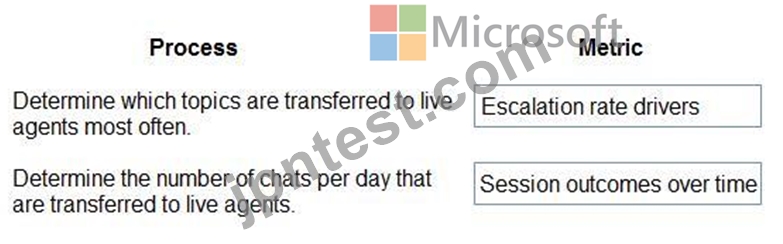
Reference:
https://docs.microsoft.com/en-us/power-virtual-agents/teams/analytics-summary-teams
質問 # 76
次のテキスト入力フィールドを含むキャンバスアプリがあります:Id、FirstName、LastName。このアプリには、Button1という名前のボタンもあります。
Button1のOnSelectプロパティには、次の式が含まれています。
Collect(People, {Id:Id.Text, FirstName:FirstName.Text, LastName:LastName.Text}) 次の各ステートメントで、ステートメントがtrueの場合は[はい]を選択します。それ以外の場合は、[いいえ]を選択します。
注:正しい選択はそれぞれ1ポイントの価値があります。
正解:
解説:
Explanation
Graphical user interface, text, application, email Description automatically generated
Box 1: Yes
If the data source doesn't already exist, a collection is created.
Box 2: No
Note: The Collect function adds records to a data source. The items to be added can be:
* A single value: The value is placed in the Value field of a new record. All other properties are left blank.
* A record: Each named property is placed in the corresponding property of a new record. All other properties are left blank.
* A table: Each record of the table is added as a separate record of the data source as described above. The table isn't added as a nested table to a record. To do this, wrap the table in a record first.
Box 3: No
Reference:
https://docs.microsoft.com/en-us/powerapps/maker/canvas-apps/functions/function-clear-collect-clearcollect
質問 # 77
ビジネスプロセスを自動化するワークフローを作成します。
メールマージテンプレートに基づいてメールを自動的に送信するワークフローを作成する必要があります。ワークフローには、次の構成が含まれている必要があります。
すぐに実行します。
条件が満たされたときに検証します。
条件が満たされたときにアクションを実行します。
回答するには、回答領域で適切な構成を選択します。
注:正しい選択はそれぞれ1ポイントの価値があります。
正解:
解説:
Explanation
Graphical user interface, text, application, email Description automatically generated
質問 # 78
データ インポート ウィザードを使用して、CSV ファイルからアカウント テーブルにレコードをインポートしています。
CSV からテーブルへのマッピングは次のとおりです。
* Name 列はアカウントを表し、Account 列にマップされます。
* TIE Parent Name 列は、テーブルにインポートされたレコードがファイル内の他のレコードにのみ関連する子会社の下にあるアカウントの持ち株会社を表します。
レコード間の関係を作成するには、インポートを構成する必要があります。
あなたは何をするべきか?
- A. ParentAccount 列のレコードのレコード ID を検索します。ファイルにレコード ID の新しい列を追加します。新しい列を ParentAccount 列にマップします。
- B. アカウント名列を使用して、アカウント テーブルの代替キーを作成します。親の名前をファイルにマップしないでください。
- C. CSV ファイル内の親の名前を [親アカウント] 列にマップします。ルックアップ基準としてアカウントを選択
- D. ファイル内の親の名前を親アカウント列にマップします。ルックアップ基準として親アカウントを選択
正解:A
解説:
Explanation
Add a new column for the self-referential mapping.
Reference: https://docs.microsoft.com/en-us/power-apps/developer/data-platform/import-data
質問 # 79
あなたはDynamics365の管理者です。
新しいアプリを作成します。
アプリのサイトマップを作成する必要があります。
どの3つのアクションを順番に実行する必要がありますか?回答するには、適切なアクションをアクションのリストから回答領域に移動し、正しい順序で配置します。
正解:
解説:
Explanation
質問 # 80
リゾートポータルの電子メール登録プロセスを設計する必要があります。
どのソリューションを使用する必要がありますか?回答するには、回答領域で適切なオプションを選択します。
注:正しい選択はそれぞれ1ポイントの価値があります。
正解:
解説:
Explanation
質問 # 81
あなたはスポーツアウトレット用のチャットボットを設計しています。
チャットボットを完了する必要があります。
どの機能を使用する必要がありますか?答えるには、適切な機能を正しい要件にドラッグします。各機能は、1回使用することも、複数回使用することも、まったく使用しないこともできます。コンテンツを表示するには、分割バーをペイン間でドラッグするか、スクロールする必要がある場合があります。
注正しい選択はそれぞれ1ポイントの価値があります。
正解:
解説:
Explanation
Graphical user interface, text, application, email Description automatically generated
Box 1: Entities
Out of the box, Power Virtual Agents comes with a set of prebuilt entities, which represent the most commonly used stereotype information in real-world dialogs, such as age, colors, numbers, and names.
With the knowledge granted by entities, a bot can smartly recognize the relevant information from a user input and save it for later use.
Box 2: Topics
In Power Virtual Agents, a topic defines a how a bot conversation plays out.
You can author topics by customizing provided templates, create new topics from scratch, or get suggestions from existing help sites.
A topic has trigger phrases - these are phrases, keywords, or questions that a user is likely to type that is related to a specific issue - and conversation nodes - these are what you use to define how a bot should respond and what it should do.
Box 3: Variables
Variables let you save responses from your customers in a conversation with your bot so that you can reuse them later in the conversation.
For example, you can save a customer's name in a variable called UserName. The bot can then address the customer by name as the conversation continues.
You can use variables to create logical expressions that dynamically route the customer down different conversation paths.
Reference:
https://docs.microsoft.com/en-us/power-virtual-agents/advanced-entities-slot-filling
https://docs.microsoft.com/en-us/power-virtual-agents/authoring-create-edit-topics
https://docs.microsoft.com/en-us/power-virtual-agents/advanced-flow
https://docs.microsoft.com/en-us/power-virtual-agents/authoring-variables
質問 # 82
ある企業は Dataverse を使用してデータ モデルを実装しています。
会社では、新しいカスタム テーブルに次の列が必要です。
各列のデータベース ストレージの使用量が最も少ない列タイプを選択する必要があります。
どの列タイプを選択する必要がありますか? 回答するには、回答領域で適切なオプションを選択してください。
注: 正しく選択するたびに 1 ポイントの価値があります。
正解:
解説:
Explanation
質問 # 83
リゾートポータルの電子メール登録プロセスを設計する必要があります。
どのソリューションを使用する必要がありますか?回答するには、回答領域で適切なオプションを選択します。
注:正しい選択はそれぞれ1ポイントの価値があります。
正解:
解説:
質問 # 84
ある動物病院は、Microsoft Power Platform を使用してカスタマー エクスペリエンスを合理化することを計画しています。顧客は、予定を管理するためのキャンバス アプリを作成します。
クライアント予約フォームには、クライアントがペットの種類を選択するためのドロップダウン フィールドがあります。クライアントがオプション「その他」を選択した場合、スタッフがペットに関する詳細を追加できるように、テキスト フィールドが表示される必要があります。
動的に表示されるフィールドを作成する必要があります。
何を設定する必要がありますか?
- A. 業務の流れ
- B. ビジネス ルール
- C. ワークフロー
正解:B
解説:
Explanation
A business rule can be used to configure the visibility of a field based on the value selected in another field. In this case, a business rule could be created to make the text field for additional pet details visible when the
"Other" option is selected in the dropdown field for the type of pet. This can be done by going to the Power Apps portal, navigating to the Common Data Service, and creating a new business rule for the entity that contains the appointment form. Within the rule, you can set the visibility of the text field to be dependent on the value selected in the dropdown field. Reference:
https://docs.microsoft.com/en-us/power-platform/model-driven-apps/model-driven-business-rules It's important to note that the above feature is only available in the PowerApps Model Driven App and not in Canvas App.
質問 # 85
顧客は Power Apps を使用して、Microsoft Dataverse に保存されている連絡先を表示および維持します。
販売員のセキュリティ設定が表示専用になるように、いくつかの列を構成する必要があります。
アクセス制限を設定する必要があります。
フィールドレベルのセキュリティにはどのコンポーネントを使用する必要がありますか? 回答するには、回答で適切なオプションを選択します。
注: それぞれの正しい選択は 1 ポイントの価値があります
正解:
解説:
Explanation
Graphical user interface, text, application Description automatically generated
質問 # 86
カスタマーサービス用にDynamics365の新しいインスタンスをセットアップします。
ユーザーは、モバイルデバイスのケースでの作業に関するさまざまな問題を報告しています。
ケースを表示できるようにモバイルアプリを構成する必要があります。
注:正しい選択はそれぞれ1ポイントの価値があります。
正解:
解説:
Explanation
1. User is able to login but can't see Case Records --> "Configure Mobile Settings on Case Entity Level"
2. Users can open cases but cannot see the subject of the case - "configure mobile settings at the field level within the case form
3. User reports that they cannot access the system from Dynamics 365 mobile app --> Configure a security role in the mobile permission set of the appropriate user
https://docs.microsoft.com/en-us/dynamics365/customer-engagement/mobile-app/set-up-dynamics-365-for-phon
質問 # 87
あなたはDynamics365カスタマーエンゲージメントの管理者です。 Dynamics365で新しいソリューションを作成します。
エンドユーザーが次に実行するアクションを理解し、ユーザーとの対話が管理可能な手順で行われるようにする必要があります。
どのアクションを実行する必要がありますか?回答するには、回答領域で適切なオプションを選択します。
注:正しい選択はそれぞれ1ポイントの価値があります。
正解:
解説:
質問 # 88
企業はキャンバス アプリを使用して、特定の地域の生産リソースを管理します。アプリを使用するには、従業員が会社の場所にいる必要があります。
従業員がリモートで作業することが突然要求されたため、従業員は仕事を行うために特定の場所に通勤しなくなり、キャンバス アプリにアクセスできなくなりました。
従業員が限られた数の場所からのみアプリにアクセスできるように、アプリを再構成する必要があります。
アプリへのアクセスを制限する必要があります。
どのコンポーネントを構成する必要がありますか? 回答するには、回答エリアで適切なオプションを選択します。
注: それぞれの正しい選択は 1 ポイントの価値があります。
正解:
解説:
Explanation
Graphical user interface, text, application, email Description automatically generated
Reference:
https://docs.microsoft.com/en-us/power-platform/admin/restrict-access-online-trusted-ip-rules
質問 # 89
Microsoft SQL Server データベースのデータを使用するキャンバス アプリを作成します。
データフローを使用して、一部のデータをデータベースから Microsoft Dataverse に移動します。ユーザーはアプリを使用してデータをフィルタリングします。
データフローとキャンバス アプリでデータをフィルター処理する必要があります。
どのツールを使用する必要がありますか? 答えるには、適切なツールを正しい要件にドラッグします。各ツールは、1 回以上使用することも、まったく使用しないこともできます。ペイン間の分割バーをドラッグするか、コンテンツを表示するためにスクロールする必要がある場合があります。
正解:
解説:
Explanation
First Box: Power Query
To filter data in a dataflow, you should use Power Query. Power Query is a data connection tool that is part of the Microsoft Power Platform, which allows you to connect to various data sources, transform, and load data into other applications such as Power BI, Excel, and Dataverse. It is a functional, case-sensitive, and data-transformation language that enables you to discover, connect, combine, and refine data sources to meet your business intelligence needs.
Power Query allows you to filter data by using its built-in functions and operators. You can filter data by using the filter, sort, and group by functions, as well as by using custom formulas and conditions. You can also use the advanced editor to write complex queries using M code, which is the underlying language used by Power Query.
Reference: https://docs.microsoft.com/en-us/power-query/
https://docs.microsoft.com/en-us/power-query/transform/filter-rows-by-condition
2nd Box: Power Fx
To filter data in a canvas app, you should use Power Fx. Power Fx is a no-code, low-code, and code-based platform that enables you to build custom business logic and automate workflows in your Power Platform apps. It allows you to create custom formulas and expressions in the app using a functional language, which allows you to filter data in the app.
Power Fx can be used to create custom formulas and expressions in the app which can filter data in the app by using its built-in functions and operators. You can filter data by using the filter, sort, and group by functions, as well as by using custom formulas and conditions. You can also use the advanced editor to write complex queries using Power Fx code.
Reference: https://docs.microsoft.com/en-us/power-apps/maker/canvas-apps/power-fx-formulas
質問 # 90
埋め込まれたキャンバスアプリを含むPowerBlレポートを作成して公開します。レポートは複数の人が使用します。
キャンバスアプリには修正が必要な問題があります。
キャンバスアプリを更新します。
更新されたキャンバスアプリが公開されたPowerBlレポートで利用可能であることを確認する必要があります。
あなたは何をするべきか?
- A. Power BlDesktopからPowerBlレポートを公開し、すべてのユーザーに再共有します。
- B. キャンバスアプリを公開します。
- C. Power BlDesktopからPowerBlレポートを公開します。
- D. 公開されたPowerBlレポートのデータソースを手動で更新します。
正解:B
質問 # 91
新しいビジネスラインをサポートするために、モデル駆動型アプリを実装しています。
自動化されたビジネスロジックを適用しなければならない場所がいくつかあります。
ビジネスロジックを適用する方法を決定する必要があります。
どの方法を使用する必要がありますか?答えるには、適切なメソッドを適切なビジネスロジックステートメントにドラッグします。各方法は、1回使用することも、複数回使用することも、まったく使用しないこともできます。コンテンツを表示するには、分割バーをペイン間でドラッグするか、スクロールする必要がある場合があります。
注:正しい選択はそれぞれ1ポイントの価値があります。
正解:
解説:
Explanation
Graphical user interface, text, application Description automatically generated
Box 1: Business rule
By combining conditions and actions, you can do any of the following with business rules:
* NSE5_FSM-5.2 Set column values
* Clear column values
* Set column requirement levels
* Show or hide columns
* Enable or disable columns
* Validate data and show error messages
* Create business recommendations based on business intelligence.
Box 2: Real-time workflow
Real-time workflows:
Graphical user interface, text, application, email Description automatically generated
Box 3: Power Automate instant flow
Instant Flows don't have a trigger in the same way as the Automated flow. Instead, they are triggered manually or on-demand, such as a user clicking a Flow button in the mobile app.
Reference:
https://docs.microsoft.com/en-us/powerapps/maker/model-driven-apps/create-business-rules-recommendations-a
https://docs.microsoft.com/en-us/powerapps/maker/data-platform/configure-workflow-steps
https://carldesouza.com/difference-between-instant-automated-and-scheduled-flows-in-power-automate-and-how
質問 # 92
ある会社は、Power Automate を使用して次の手動プロセスを自動化することを計画しています。
2 つのビジネス プロセスの UI フロー タイプを識別する必要があります。
どのデスクトップ フロー タイプを使用する必要がありますか? 答えるには、適切なデスクトップ フロー タイプを正しいビジネス プロセスにドラッグします。各デスクトップ フロー タイプは、1 回または複数回使用することも、まったく使用しないこともできます。ペイン間の分割バーをドラッグするか、コンテンツを表示するためにスクロールする必要がある場合があります。
注: それぞれの正しい選択は 1 ポイントの価値があります。
正解:
解説:
質問 # 93
システムを中断することなく、完了した作業を含むマネージド ソリューションの更新と展開を調整する必要があります。
あなたは何をするべきか?回答するには、回答エリアで適切なオプションを選択します。
注: それぞれの正しい選択は 1 ポイントの価値があります。
正解:
解説:
Explanation
Box 1: Deploy a patch with the changes made from the current solution.
Scenario:
The Onsite Visit managed solution has a table that is not in the Verification Process Automation managed solution. This table must be upgraded prior to the go-live date without the other shared components.
Box 2: Deploy a full copy of the original solution using the upgrade option. Then, deploy the new solution by using the update option.
Scenario: All components required for the verification process must be included in a new solution.
Corporate security requires that deployments to non-development environments must be automated using service accounts.
Managed solutions are used to move customizations from the development environment to other higher-level environments. These solutions are created and maintained by the power users and provided to internal IT for deployment when they are ready.
Note:
Upgrade This is the default option and upgrades your solution to the latest version and rolls up all previous patches in one step. Any components associated to the previous solution version that are not in the newer solution version will be deleted. This is the recommended option as it will ensure that your resulting configuration state is consistent with the importing solution including removal of components that are no longer part of the solution.
Update This option replaces your solution with this version. Components that are not in the newer solution won't be deleted and will remain in the system. This option is not recommended as your destination environment will differ in configuration from your source environment and could cause issues that are difficult to reproduce and diagnose.
ce: https://docs.microsoft.com/en-us/power-apps/maker/data-platform/update-solutions
質問 # 94
ビジネスプロセスフローがあります。
管理および保守の労力を最小限に抑えながら、ビジネスプロセスフローを更新する必要があります。
何を実装する必要がありますか?答えるには、適切な機能を正しい要件にドラッグします。各機能は、1回使用することも、複数回使用することも、まったく使用しないこともできます。コンテンツを表示するには、分割バーをペイン間でドラッグするか、スクロールする必要がある場合があります。
注:正しい選択はそれぞれ1ポイントの価値があります。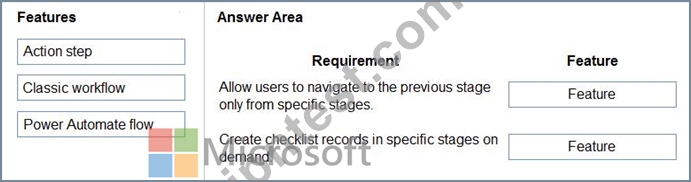
正解:
解説:
質問 # 95
Power Automateを使用して、いくつかの異なるプロセスを自動化することを計画しています。
各プロセスには固有の特性があります。
プロセスごとにコンポーネントを推奨する必要があります。
どのコンポーネントをお勧めしますか?答えるには、適切なコンポーネントを正しいプロセスにドラッグします。各コンポーネントは、1回使用することも、複数回使用することも、まったく使用しないこともできます。コンテンツを表示するには、分割バーをペイン間でドラッグするか、スクロールする必要がある場合があります。
注:正しい選択はそれぞれ1ポイントの価値があります。
正解:
解説:
Explanation
質問 # 96
不必要なデータ アクセスに関する幹部の懸念に対処する必要があります。
どのセキュリティ変更を行う必要がありますか? 回答するには、回答エリアで適切なオプションを選択します。
注: それぞれの正しい選択は 1 ポイントの価値があります。
正解:
解説:
Explanation
Box 1: Assign records to a service account and add the team member doing the verification by using an access team.
When to use access teams
* The teams are dynamically formed and dissolved. This typically happens if the clear criteria for defining the teams, such as established territory, product, or volume aren't provided.
* The team members require different access rights on the records. You can share a record with several access teams, each team providing different access rights on the record. For example, one team is granted the Read access right on the account and another team, the Read, Write and Share access rights on the same account.
* A unique set of users requires access to a single record without having an ownership of the record.
Box 2: Assign records to the QV team when the service request is completed.
Issues: More employees than are required can access individual client information and continue to have access after a service request is completed.
Management has decided to create a new qualification verification (QV) role to help ensure that clients get the most accurate results. This role examines completed work to ensure that nothing is missed.
* When users go on vacation, all their outstanding Service Request records are assigned to a substitute employee. The substitute employees are unable to see all the qualifications related to their service requests.
Reference:
https://docs.microsoft.com/en-us/power-apps/developer/data-platform/use-access-teams-owner-teams-collaborate
質問 # 97
......
PL-200日本語実際の問題解答PDFには100%カバー率リアル試験問題:https://www.jpntest.com/shiken/PL-200J-mondaishu