

最新の無料Network-Security-Essentials効率的問題集をダウンロード2025年03月03日更新された60問がある
WatchGuard Network-Security-Essentials試験練習テスト解答
質問 # 27
You want to create a branch office VPN virtual interface between a remote Firebox and your headquarters Firebox so the remote Firebox can send log data to a server at headquarters. For the log data to be sent from the remote Firebox over the VPN successfully, what BOVPN virtual interface setting must you configure?
(Select one.)
- A. Perfect Forward Secrecy (PFS)
- B. Dead Peer Detection (DPD)
- C. IKEv2 in the Phase 1 settings
- D. Virtual IP addresses
- E. An IPSec certificate, instead of a Pre-shared key
正解:D
解説:
To enable the remote Firebox to send log data to a server at headquarters through a Branch Office VPN (BOVPN) virtual interface, you must configureVirtual IP addresses. Virtual IPs enable devices on either end of the VPN tunnel to communicate as if they are on the same network, facilitating routing of log data from the remote Firebox to the log server located at headquarters.
Other options likeIPSec certificatesandIKEv2are not specifically required for this configuration, though they can enhance security.Dead Peer Detection (DPD)andPerfect Forward Secrecy (PFS)are useful for maintaining VPN stability and security but are not directly necessary for enabling log transmission.
質問 # 28
What steps must you take to send log messages from a Firebox to WatchGuard Cloud? (Select two.)
- A. Use the WatchGuard Cloud Add Device wizard to add the Firebox to WatchGuard Cloud
- B. Add the FQDN of your WatchGuard Cloud account as a Log Server on the Firebox
- C. Define an Authentication Key that all your Fireboxes use to communicate with WatchGuard Cloud
- D. Enable WatchGuard Cloud in the Firebox configuration
- E. Configure Dimension to synchronize log messages with WatchGuard Cloud
正解:A、D
解説:
* Enable WatchGuard Cloud in Firebox Configuration: To send log messages to WatchGuard Cloud, you need to activate WatchGuard Cloud integration within the Firebox's configuration settings. This action prepares the device to communicate with WatchGuard Cloud and transfer log data.
* Use the WatchGuard Cloud Add Device Wizard: The Add Device wizard in WatchGuard Cloud is used to register and connect the Firebox to WatchGuard Cloud. This wizard guides administrators through the setup and ensures that the device is correctly configured to send logs and other data to the cloud.
These steps are required to establish connectivity and ensure that log messages are sent to WatchGuard Cloud.
Other options, such as adding an FQDN or configuring Dimension synchronization, are not necessary for this task.
質問 # 29
Users cannot download a PDF file from your intranet. You know the file is safe to download. When you review the log messages, you see that IntelligentAV identified the file as malicious. The only way to resolve this is to change the file extension.
- A. True
- B. False
正解:B
解説:
When IntelligentAV identifies a file as malicious, users have options other than changing the file extension to resolve the issue. IntelligentAV relies on AI-driven detection, and if the PDF file isknown to be safe, an administrator can manually adjust the IntelligentAV settings or add an exception for the specific file.
Changing the file extension alone does not address the root of the detection and is not a reliable solution to bypass IntelligentAV checks.
質問 # 30
You recently installed network monitoring software on your server and then performed a port scan for each IP address in the network. When the scan finishes, you notice that the server lost access to the Internet. What is the most likely cause of this issue? (Select one.)
- A. The policy that handles outbound traffic was automatically disabled because the Firebox was port scanned
- B. The server IP address was added to the Blocked Sites list because the network was flooded with ESP traffic during the port scan
- C. The server IP address was added to the Blocked Sites list because of the default packet handling port scan rule
- D. The server IP address was added to the Blocked Sites list because an IPS signature was matchedduring the port scan
- E. The port scan traffic matched a default HTTP proxy content type rule configured with a Block action
正解:C
解説:
When a port scan is detected, Firebox devices with default settings often include a rule to add the source IP address of the scan to the Blocked Sites list to prevent potential threats. This is a standard security measure in Firebox configurations, aimed at mitigating the risk of network scanning attempts. Consequently, if the server you used to perform the port scan was added to the Blocked Sites list, it would lose Internet access as the device blocks any outgoing connections from that IP. This behavior aligns with Firebox's handling of port scan detection through default security rules.
質問 # 31
In a Mobile VPN configuration, why would you choose default-route (full tunnel) VPN instead of split tunnel VPN? (Select one.)
- A. Default-route VPN enables your Firebox to examine all remote user traffic.
- B. Default-route VPN is the only option you can use to apply security services to connections routed to your internal servers.
- C. Default-route VPN uses less processing power.
- D. Default-route VPN automatically allows dynamic NAT.
- E. Default-route VPN uses less bandwidth.
正解:A
解説:
In a Mobile VPN setup, adefault-route (full tunnel)VPN routes all of a remote user's internet traffic through the VPN tunnel to the Firebox. This configuration allows the Firebox to inspect and apply security policies to all traffic, including traffic that is not destined for internal network resources. In contrast, asplit tunnel VPN would route only traffic meant for the internal network through the VPN, while internet-bound traffic would bypass the Firebox, potentially exposing it to threats and limiting the Firebox's ability to inspect all traffic.
質問 # 32
When you migrate a configuration file from one Firebox to a new Firebox, which settings transfer to the new device? (Select two.)
- A. Policies
- B. Feature key
- C. Management users
- D. DNS servers
- E. Certificates
正解:A、C
解説:
When migrating configurations:
* Option A: Management user settings transfer, preserving administrator access control configurations on the new device.
* Option C: Policies, including firewall rules, transfer, ensuring that network traffic handling settings are retained.
* Option B(Certificates) andOption D(DNS servers) are specific configurations often set manually and do not automatically transfer.
* Option E(Feature key) is unique to each device and must be installed separately on the new Firebox.
質問 # 33
If you have only one public IP address, can you use Static NAT to enable inbound connections to both an email server and a web server on the private network? (Select one.)
- A. Yes, if both servers use different ports
- B. No, you must use Dynamic NAT to route inbound connections to more than one server
- C. Yes, if both servers are on different private subnets
- D. No, you must assign a public IP address to each server
正解:A
解説:
With only one public IP address, you can still configure Static NAT to route connections to both an email server and a web server, as long as each service is accessed on a different port. For instance, HTTP/HTTPS traffic for the web server can use port 80/443, while the email server can use ports associated with email protocols (e.g., 25 for SMTP). Static NAT can direct incoming requests to different internal servers based on port, making this approach feasible.
質問 # 34
After you enable content inspection, your users see a certificate warning when they browse the Internet. What is one way to resolve this? (Select one.)
- A. Configure the HTTPS proxy policy to allow inbound traffic from your CA
- B. Configure a WebBlocker exception for your certificate server
- C. Import a trusted web server certificate to the Firebox
- D. Install the current Firebox Proxy Authority certificate on your user workstations
正解:D
解説:
When content inspection is enabled on a Firebox, it decrypts HTTPS traffic for inspection, which requires presenting its own certificate to the client devices. This often causes certificate warnings in web browsers because the certificate issued by the Firebox is not inherently trusted by the client browsers. To resolve this, you need to install the Firebox'sProxy Authority certificateon each user's workstation as a trusted certificate. This action will prevent browsers from displaying certificate warnings, as they will recognize the Firebox certificate as a trusted source for secure connections.
質問 # 35
You routinely ship Fireboxes directly to remote offices without configuring them first. What is the zero-touch deployment method you can use to apply a configuration file after a Firebox arrives at a remote office? (Select one.)
- A. RapidDeploy
- B. WatchGuard System Manager
- C. Fireware Web UI
- D. Dimension Command
- E. Firebox Deployment Manager
正解:A
解説:
When shipping Fireboxes to remote offices without pre-configuration, theRapidDeployfeature is designed to facilitate zero-touch deployment. RapidDeploy enables network administrators to apply a pre-configured setup file after the device arrives at its destination.
* Process of RapidDeploy: Administrators can upload a configuration file to the WatchGuard Cloud or another accessible location, from which the Firebox downloads its initial configuration upon connection. This method ensures that even with remote deployment, the Firebox will automatically configure itself based on predefined settings, eliminating the need for manual on-site setup.
* Advantages: RapidDeploy streamlines setup for large-scale, geographically distributed environments where physical access may be limited. This feature is specifically useful for organizations seeking a scalable, efficient deployment process for devices in remote locations.
質問 # 36
If the Firebox does not have a feature key installed, which of these statements are true? (Select three.)
- A. You cannot run the Web Setup Wizard
- B. Only one user can connect to the Internet through the Firebox
- C. You cannot upgrade the Firebox
- D. You cannot save configuration changes to the Firebox
- E. You cannot configure subscription services
正解:C、D、E
解説:
Without a feature key:
* Option A: Upgrades are restricted, as the device relies on the feature key to validate software entitlement.
* Option B: Subscription services like antivirus, IPS, or web filtering cannot be configured without the feature key, which activates these services.
* Option D: Configuration changes cannot be permanently saved to the Firebox without the feature key, limiting the device's functionality.
* Option C(Web Setup Wizard) andOption E(one user internet access) do not depend on the feature key and are not restricted in this scenario.
質問 # 37
There is an Internet outage at your primary ISP, but the Internet connection from the Firebox has not failed over to your backup ISP. Both ISP connectors are correctly cabled and have active physical links. What could cause this problem? (Select two.)
- A. In the Multi-WAN settings, the Gradual Fallback option is enabled
- B. Link Monitor target for the backup ISP interface is not responding
- C. The Link Monitor target for the primary ISP interface is set to ping the default gateway, but the outage is further upstream
- D. In the Multi-WAN settings, the Immediate Fallback option is enabled
- E. The secondary IP addresses are not defined for the backup ISP interface
正解:B、C
解説:
* Link Monitor Target for Backup ISP: If the backup ISP's Link Monitor target is not responsive, the Firebox will not initiate a failover, as it interprets the backup connection as inactive or faulty.
* Primary ISP Link Monitor Configuration: When the Link Monitor for the primary ISP only checks the default gateway, it may not detect issues occurring further upstream. If the outage is beyond the gateway, failover will not activate because the monitor assumes the link is still valid.
These settings are critical to ensuring proper Multi-WAN failover behavior in case of ISP issues.
質問 # 38
To accurately detect applications over an HTTPS connection with Application Control, you must enable content inspection in the HTTPS proxy.
- A. True
- B. False
正解:A
解説:
For Application Control to accurately detect and manage applications over HTTPS connections, content inspection must be enabled in the HTTPS proxy. This is because HTTPS encrypts application traffic, making it unreadable without decryption. By enabling content inspection, the HTTPS proxy can inspect and classify the application traffic within HTTPS sessions, allowing Application Control to function effectively on secure connections.
質問 # 39
Your users have no network connectivity on their computers in the 10.0.40.0/24 network. You investigate and discover the DHCP address pool for this network is exhausted, but there are no available IP addresses in the network to assign. Which of these options can you use to expand the IP address space of this network? (Select two.)
- A. Add 10.0.50.1/24 to the 10.0.40.1/24 network as a secondary network
- B. Bridge the 10.0.40.1/24 network across additional interfaces
- C. Enable a wireless SSID for the 10.0.40.1/24 network
- D. Change the IP address of the 10.0.40.1/24 network to 10.0.40.123/24
- E. Create a Dynamic NAT rule for traffic from the 10.0.40.1/24 network going to the 10.0.50.1/24 network
正解:A、B
解説:
* Adding a Secondary Network (10.0.50.1/24): By adding a secondary subnet (such as10.0.50.1/24) to the existing 10.0.40.1/24 network, you expand the IP address space, effectively increasing the number of available IP addresses for DHCP allocation.
* Bridging Across Additional Interfaces: Bridging the 10.0.40.1/24 network across multiple interfaces can also increase the available address pool by creating a larger logical network. This approach helps manage IP space across a broader range of devices without subnet fragmentation.
These methods provide scalable solutions to expand IP address availability within constrained network spaces.
質問 # 40
Before packets are examined by Default Threat Protection, they are processed by firewall policies in top- down order.
- A. True
- B. False
正解:A
解説:
In Firebox configuration, packets are processed by firewall policies in atop-down orderbefore they reach Default Threat Protection. This ordering ensures that the firewall policies defined higher in the policy list take precedence. Packets are evaluated against each rule sequentially from top to bottom until a matching policy is found, which then determines the action taken (allow, deny, or inspect further). Only after this process will any unfiltered traffic be subject to Default Threat Protection for additional security checks.
質問 # 41
You have an existing network infrastructure built out that uses tagged and untagged VLAN networks. Based on the diagram below, which VLANs must you add to the Firebox interface? (Select one.)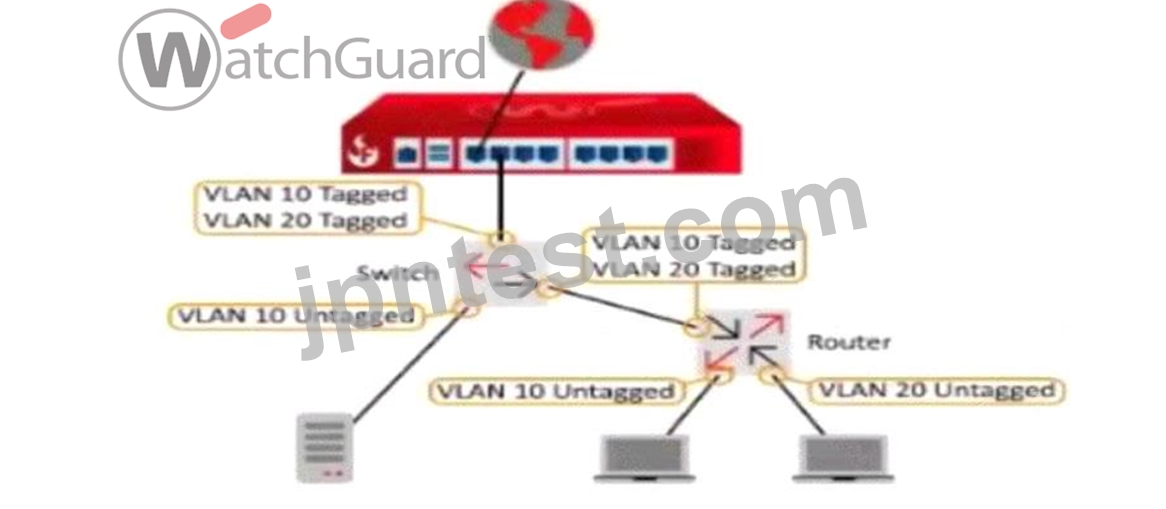
- A. VLAN 10 Untagged, VLAN 10 Tagged, and VLAN 20 Tagged
- B. VLAN 10 Tagged and VLAN 20 Untagged
- C. VLAN 10 Tagged and VLAN 20 Tagged
- D. VLAN 10 Untagged and VLAN 20 Tagged
- E. VLAN 10 Untagged and VLAN 20 Untagged
正解:C
解説:
Based on the diagram provided, the Firebox connects to a switch with VLAN 10 and VLAN 20 as tagged traffic. The connection between the Firebox and the switch shows that both VLAN 10 and VLAN 20 are tagged, indicating that traffic for these VLANs will be carried over a single trunk link to the Firebox.
To properly configure the Firebox to handle this setup, you need to addVLAN 10 TaggedandVLAN 20 Taggedto the Firebox interface, as this configuration will allow the Firebox to interpret tagged packets for both VLANs from the switch. Untagged configurations are not applicable here since the Firebox interface expects tagged traffic for both VLANs on the trunk connection.
質問 # 42
You can run TCP Dump directly from the Firebox.
- A. True
- B. False
正解:B
解説:
You cannot runTCP Dumpdirectly from a Firebox device. While Firebox has various monitoring tools such as Traffic Monitor and Firebox System Manager, it does not natively support TCP Dump, which is a command-line tool primarily available on Linux-based systems. Instead, packet captures and traffic monitoring need to be handled through Firebox-specific tools or by exporting logs to external devices for further analysis.
質問 # 43
Match each WatchGuard Subscription Service with its function.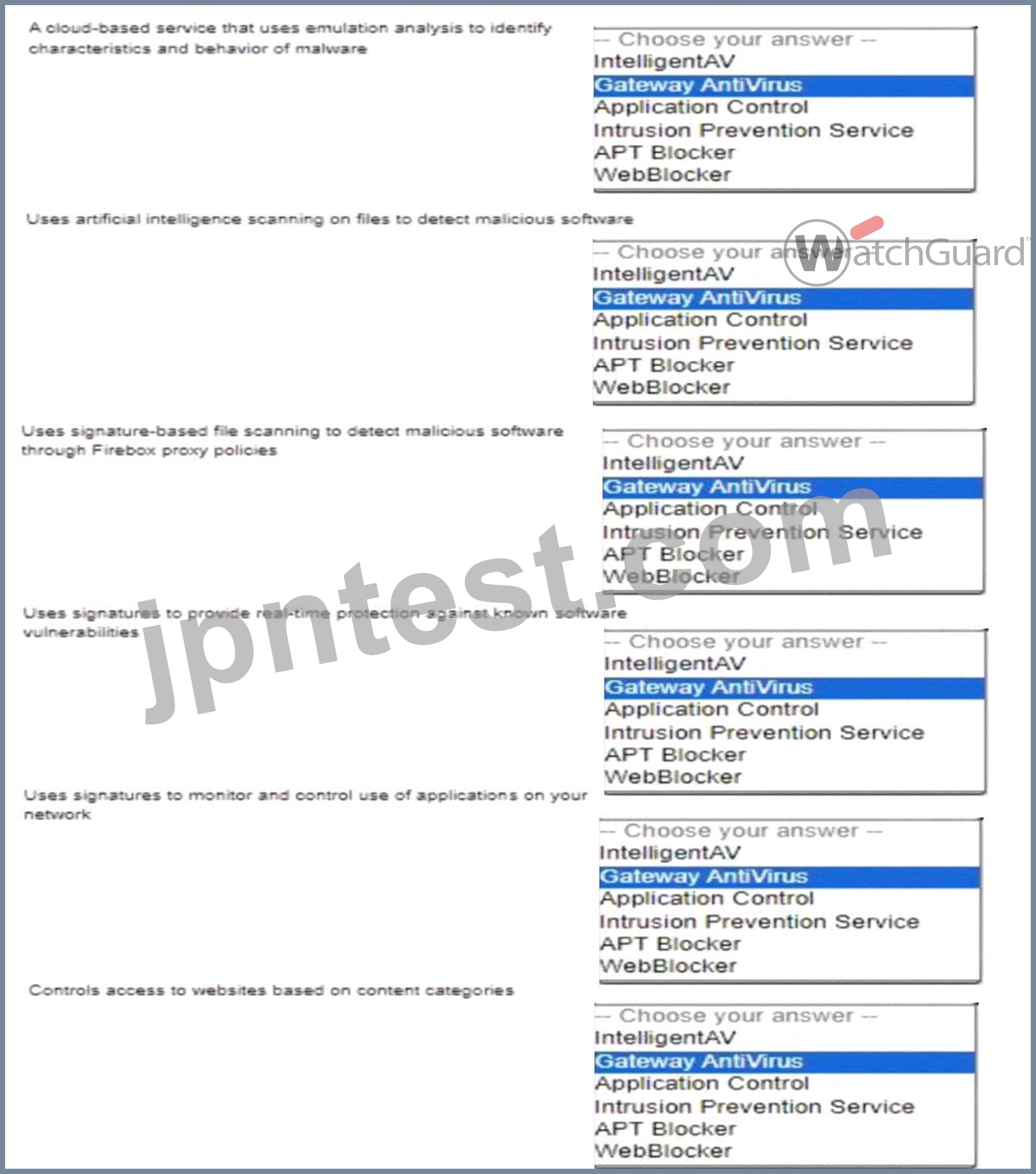
正解:
解説: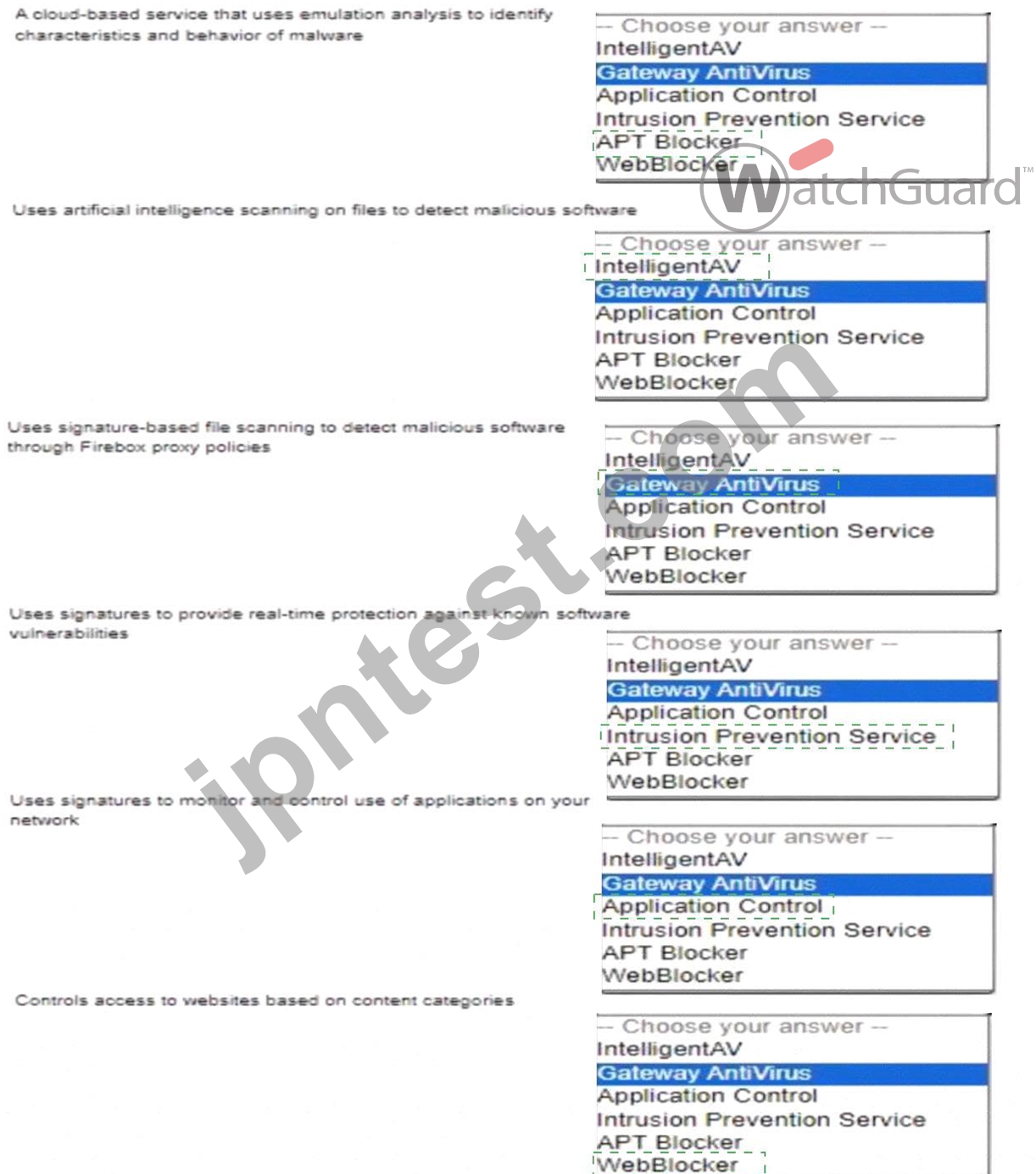
Explanation:
Here is the correct match for each WatchGuard Subscription Service and its function:
* A cloud-based service that uses emulation analysis to identify characteristics and behavior of malware : APT Blocker
* Uses artificial intelligence scanning on files to detect malicious software : IntelligentAV
* Uses signature-based file scanning to detect malicious software through Firebox proxy policies : Gateway AntiVirus
* Uses signatures to provide real-time protection against known software vulnerabilities : Intrusion Prevention Service
* Uses signatures to monitor and control use of applications on your network : Application Control
* Controls access to websites based on content categories : WebBlocker APT Blockeris a cloud-based, advanced threat detection service that performs behavioral analysis in a sandbox environment to identify sophisticated malware.
It focuses on identifying advanced persistent threats (APT) by observing their behavior in a controlled setting.
IntelligentAVleverages artificial intelligence to perform deep scanning and analysis of files to detect malware using predictive modeling techniques. This provides proactive protection by identifying previously unknown threats.
Gateway AntiVirusrelies on a signature-based detection mechanism to identify malware in real-time. It is used within Firebox's proxy policies to scan file transfers, ensuring files containing known malware are blocked.
Intrusion Prevention Service (IPS)scans network traffic against a database of known vulnerabilities to detect and prevent exploitation attempts in real time. It protects against network-based attacks targeting known vulnerabilities.
Application Controlhelps in monitoring, managing, and enforcing the use of applications across the network using a signature-based approach. It provides visibility and control over applications to enhance productivity and security.
WebBlockeris a content filtering service that restricts access to websites based on their content categories. It helps enforce web usage policies and block access to inappropriate or harmful content.
質問 # 44
......
最新の検証済みNetwork-Security-Essentials問題集と解答合格保証もしくは全額返金です:https://www.jpntest.com/shiken/Network-Security-Essentials-mondaishu
最新の認証試験Network-Security-Essentials問題集練習テスト解答はこちら:https://drive.google.com/open?id=1gRq8YSoxQPckOmYprs7knt6YYvo3nhNp