

[2025年04月] 問題集練習試験問題学習ガイドはAZ-140試験合格させます
AZ-140問題集には練習試験問題解答
Microsoft AZ-140試験に合格するには、候補者はAzure Virtual Desktopインフラストラクチャの深い理解を示し、仮想デスクトップ環境を操作および構成できる必要があります。この認定は、ITの専門家がAzure Virtual Desktop Managementの専門知識を紹介する優れた方法であり、キャリアを進め、より高い支払いの雇用機会を追求することができます。 Microsoft AZ-140認定により、専門家は自分のスキルを紹介し、Azureクラウドで仮想デスクトップ環境を管理および操作する能力を実証できます。
質問 # 65
Your network contains an on-premises Active Directory domain named contoso.com that syncs to an Azure Active Directory (Azure AD) tenant You have an Azure Virtual Desktop host pool named Pool1 that has the following settings:
* Host pool name- Pool 1
* Host pool type: Personal
* Number of VMs: 3
The session hosts have the following configurations:
* Image used to create the virtual machines: Windows 10 Enterprise
* Virtual machines domain-Joined to: On-premises conroso.com domain
You need to ensure that you can use Microsoft EndPoint Manager to manage security updates on the session hosts. What should you do?
- A. Change Host pool type to Pooled and specify Load balancing algorithm as Breadth-first
- B. Change Host pool type to Pooled and specify Load balancing algorithm as Depth-first
- C. Configure the session hosts as hybrid Azure AD-joined.
- D. Create Windows 10 Enterprise multi-session images.
正解:C
質問 # 66
You have an Azure Virtual Desktop deployment and the users shown in the following table.
All the users plan to use a web browser to access Azure Virtual Desktop resources.
Which users can connect to Azure Virtual Desktop by using their preferred browser?
- A. User1 only
- B. User2 only
- C. User2 and User3 only
- D. User1, User2, and User3
- E. User1 and User2 only
正解:D
解説:
Explanation
https://learn.microsoft.com/en-us/azure/virtual-desktop/users/connect-web
質問 # 67
-
Your on-premises network contains an Active Directory domain named fabrikam.com that syncs with Azure Active Directory (Azure AD). The domain contains a global group named AVDusers.
You have an Azure subscription that contains the resources shown in the following table.
All Azure Virtual Desktop users are members of the AVDusers group.
You plan to create FSLogix profile containers in Profiles1.
You need to configure Profiles1 and fabrikam.com to ensure that the HostPool1 sessions hosts can access the FSLogix profile containers.
What should you do? To answer, drag the appropriate configurations to the correct targets. Each configuration may be used once, more than once, or not at all. You may need to drag the split bar between panes or scroll to view content.
正解:
解説: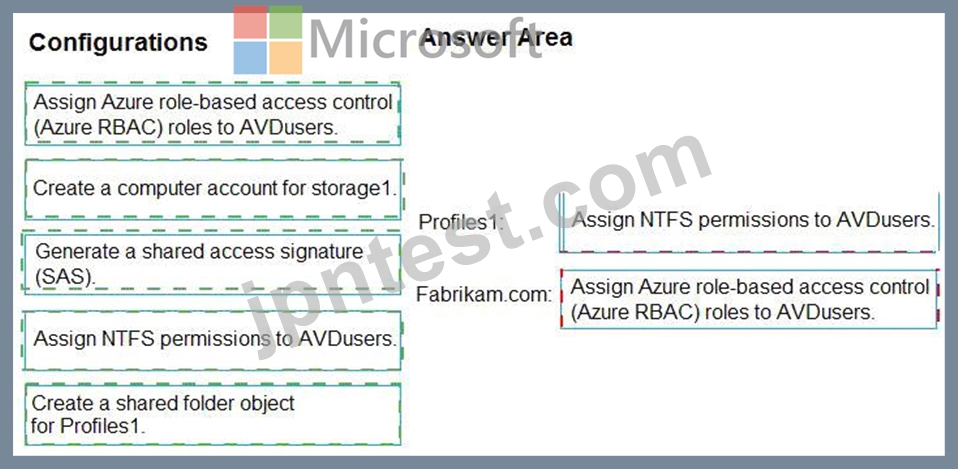
Explanation
Graphical user interface, text, application, chat or text message Description automatically generated
https://learn.microsoft.com/en-us/azure/virtual-desktop/fslogix-profile-container-configure-azure-files-active-dir
質問 # 68
You have an Azure Active Directory (Azure AD) tenant named contoso.com.
You use a user account named Admin1 to deploy an Azure Active Directory Domain Services (Azure AD DS) managed domain named aaddscontoso.com to a virtual network named VNET1.
You plan to deploy an Azure Virtual Desktop host pool named Pool1 to VNET1.
You need to ensure that you can use the Admin1 user account to deploy Windows 10 Enterprise session hosts to Pool1.
What should you do first?
- A. Add Admin1 to the AA Change Host pool type to Pooled and specify Load D DC Administrators group ofcontoso.com.
- B. Change the password of Admin1.
- C. Assign the Cloud device administrator role to Admin1.
- D. Assign a Microsoft 365 Enterprise E3 license to Admin1.
正解:A
解説:
Reference:
https://docs.microsoft.com/en-us/azure/virtual-desktop/create-host-pools-azure-marketplace?tabs=azure-portal
Topic 2, Contoso. Ltd
Existing Infrastructure
Active Directory
The network contains an on-premises Active Directory domain named contoso.com and an Azure Active Directory (Azure AD) tenant. One of the domain controllers runs as an Azure virtual machine and connects to a virtual network named VNET1. All internal name resolution is provided by DNS server that run on the domain controllers.
The on-premises Active Directory domain contains the organizational units (OUs) shown in the following table.
The on-premises Active Directory domain contains the users shown in the following table.
The Azure AD tenant contains the cloud-only users shown in the following table.
Existing Infrastructure. Network Infrastructure
All the Azure virtual networks are peered. The on-premises network connects to the virtual networks.
All servers run Windows Server 2019. All laptops and desktop computers run Windows 10 Enterprise.
Since users often work on confidential documents, all the users use their computer as a client for connecting to Remote Desktop Services (RDS).
In the West US Azure region, you have the storage accounts shown in the following table.
Existing Infrastructure. Remote Desktop Infrastructure
Contoso has a Remote Desktop infrastructure shown in the following table.
Requirements
Planned Changes
Contoso plans to implement the following changes:
Implement FSLogix profile containers for the Paris offices.
Deploy a Windows Virtual Desktop host pool named Pool4.
Migrate the RDS deployment in the Seattle office to Windows Virtual Desktop in the West US Azure region.
Requirements. Pool4 Configuration
Pool4 will have the following settings:
Host pool type: Pooled
Max session limit: 7
Load balancing algorithm: Depth-first
Images: Windows 10 Enterprise multi-session
Virtual machine size: Standard D2s v3
Name prefix: Pool4
Number of VMs: 5
Virtual network: VNET4
Requirements. Technical Requirements
Contoso identifies the following technical requirements:
Before migrating the RDS deployment in the Seattle office, obtain the recommended deployment configuration based on the current RDS utilization.
For the Windows Virtual Desktop deployment in the Montreal office, disable audio output in the device redirection settings.
For the Windows Virtual Desktop deployment in the Seattle office, store the FSLogix profile containers in Azure Storage.
Enable Operator2 to modify the RDP Properties of the Windows Virtual Desktop deployment in the Montreal office.
From a server named Server1, convert the user profile clicks to the FSLogix profile containers.
Ensure that the Pool1 virtual machines only run during business hours.
Use the principle of least privilege.
質問 # 69
You have a Azure Virtual Desktop host pool named Pool1.
You are troubleshooting an issue for a Remote Desktop client that stopped responding.
You need to restore the default Remote Desktop client settings and unsubscribe from all workspaces.
Which command should you run?
- A. resetpluginhost
- B. mstsc
- C. resetengine
- D. msrdcw
正解:D
解説:
https://docs.microsoft.com/en-us/azure/virtual-desktop/troubleshoot-client Remote Desktop client for Windows 7 or Windows 10 stops responding or cannot be opened Starting with version 1.2.790, you can reset the user data from the About page or using a command.
Use the following command to remove your user data, restore default settings and unsubscribe from all Workspaces.
cmd
Copy
msrdcw.exe /reset [/f]
質問 # 70
You have an Azure Virtual Desktop host pool. The pool contains session hosts that run Windows 10 Enterprise multi-session.
You connect to a Remote Desktop session on Pool1 and discover an issue with the frequency of screen updates.
You need to identify whether the issue related to insufficient server, network, or client resources. The solution must minimize how long it takes to identify the resource type.
What should you do?
- A. From Azure Cloud Shell, run the
Get-AzOperationalInsightsWorkspaceUsage cmdlet and specify the DefaultProfile parameter. - B. From within the current session, use Performance Monitor to display the values of all the RemoteFX Graphics(*)\Frames Skipped/Second counters.
- C. From Azure Cloud Shell, run the Get-AzWvdUserSession cmdlet and specify the UserSessionId parameter.
- D. From within the current session, use the Azure Virtual Desktop Experience Estimator.
正解:B
質問 # 71
-
You have an Azure Virtual Desktop deployment that contains the session hosts shown in the following table.
You have the users shows in the following table.
Users connect to Azure from the locations shown in the following table.
For each of the following statements, select Yes if the statement is true. Otherwise, select No.
NOTE: Each correct selection is worth one point.
正解:
解説:
Explanation
Text, letter Description automatically generated
質問 # 72
You have an Azure storage account that contains the generalized Windows 10 disk images shown in the following table.
You need to create an image that will be used to deploy an Azure Virtual Desktop session host.
Which disk should you use?
- A. Disk2
- B. Disk1
- C. Disk3
- D. Disk4
正解:B
解説:
Reference:
https://docs.microsoft.com/en-us/azure/virtual-desktop/set-up-customize-master-image
質問 # 73
You have a Windows Virtual Desktop deployment.
You publish a RemoteApp named AppVersion1.
You need AppVersion1 to appear in the Remote Desktop client as Sales Contact Application.
Which PowerShell cmdlet should you use?
- A. Register-AzWvdApplicationGroup
- B. Update-AzWvdApplicationGroup
- C. Update-AzWvdApplication
- D. New-AzADApplication
正解:C
解説:
Reference:
https://docs.microsoft.com/en-us/azure/virtual-desktop/customize-feed-for-virtual-desktop-users
https://docs.microsoft.com/en-us/powershell/module/az.desktopvirtualization/update-azwvdapplication?view=azps-5.7.0
質問 # 74
You have an Azure Virtual Desktop deployment that contains an Azure compute gallery.
The Azure compute gallery contains an image definition named
Definitions Definitionl contains the following image versions:
* 1.0.0
* 1.1.0
* 1.2.0
You need to ensure that when a virtual machine is created from the Azure compute gallery, the
1.1.0 image version is used by default.
What should you do?
- A. Apply a tag named default to image version 1.1.0.
- B. Apply a lock to image version 1.1.0.
- C. Select Exclude from latest for image version 1.2.0.
- D. Select Exclude from latest for image version 1.0.0.
正解:C
解説:
Updating resources.
Once created, you can make some changes to the gallery resources. These are limited to:
* Azure Compute Gallery:
* Image definition:
* Image version:
Regional replica count -
Target regions -
Exclude from latest -
End of life date -
Note: When you specify to use latest when creating a VM, the latest image is chosen based on the highest MajorVersion, then MinorVersion, then Patch.
Reference:
https://docs.microsoft.com/en-us/azure/virtual-machines/shared-image-galleries
質問 # 75
You have an Azure subscription that contains a hybrid Azure Active Directory (Azure AD) tenant and two domain-joined Azure virtual machines. The virtual machines run Windows Server 2019 and contain managed disks.
You plan to deploy an Azure Virtual Desktop host pool that will use a Storage Spaces Direct Scale-Out File Server to host user profiles.
You need to ensure that the virtual machines can host the Storage Spaces Direct deployment. The solution must meet the following requirements:
* Ensure that the user profiles are available if a single server falls.
* Minimize administrative effort.
What should you do? To answer, select the appropriate options In the answer area. NOTE: Each correct selection is worth one point.
正解:
解説:
Explanation
Graphical user interface, text, application Description automatically generated
References:
https://docs.microsoft.com/en-us/windows-server/storage/storage-spaces/deploy-storage-spaces-direct
質問 # 76
Note: This question is part of a series of questions that present the same scenario. Each question in the series contains a unique solution that might meet the stated goals. Some question sets might have more than one correct solution, while others might not have a correct solution.
After you answer a question in this section, you will NOT be able to return to it. As a result, these questions will not appear in the review screen.
You have an Azure Virtual Desktop host pool that runs Windows 10 Enterprise multi-session.
User sessions are load-balanced between the session hosts. Idle session timeout is 30 minutes.
You plan to shut down a session host named Host1 to perform routine maintenance.
You need to prevent new user sessions to Host1 without disconnecting active user sessions.
Solution: From the host pool, you remove Host1 from the session host list.
Does this meet the goal?
- A. Yes
- B. No
正解:B
解説:
Reference:
https://docs.microsoft.com/en-us/azure/virtual-desktop/drain-mode
質問 # 77
-
Your on-premises network contains an Active Directory domain named fabrikam.com that syncs with Azure Active Directory (Azure AD). The domain contains a global group named AVDusers.
You have an Azure subscription that contains the resources shown in the following table.
All Azure Virtual Desktop users are members of the AVDusers group.
You plan to create FSLogix profile containers in Profiles1.
You need to configure Profiles1 and fabrikam.com to ensure that the HostPool1 sessions hosts can access the FSLogix profile containers.
What should you do? To answer, drag the appropriate configurations to the correct targets. Each configuration may be used once, more than once, or not at all. You may need to drag the split bar between panes or scroll to view content.
正解:
解説:
Explanation:
Graphical user interface, text, application, chat or text message Description automatically generated
https://learn.microsoft.com/en-us/azure/virtual-desktop/fslogix-profile-container-configure-azure-files-active-dir
質問 # 78
DRAG DROP
You plan to deploy Windows Virtual Desktop.
You need to create Azure NetApp Files storage to store FSLogix profile containers.
Which four actions should you perform in sequence after you register the NetApp Resource Provider? To answer, move the appropriate actions from the list of actions to the answer area and arrange them in the correct order.
NOTE: More than one order of answer choices is correct. You will receive credit for any of the correct orders you select.
Select and Place:
正解:
解説:
Explanation/Reference:
https://docs.microsoft.com/en-us/azure/virtual-desktop/create-fslogix-profile-container#make-sure-userscan- access-the-azure-netapp-file-share
https://docs.microsoft.com/en-us/azure/azure-netapp-files/azure-netapp-files-quickstart-set-up-account-create- volumes?tabs=azure-portal
質問 # 79
You have an Azure subscription that contains the virtual machines shown in the following table.
You create a shared image gallery as shown in the SharedGallery1 exhibit. (Click the SharedGallery1 tab.)
You create an image definition as shown in the Image1 exhibit. (Click the Image1 tab.)
For each of the following statements, select Yes if the statement is true. Otherwise, select No.
NOTE: Each correct selection is worth one point.
正解:
解説:
Reference:
https://www.robinhobo.com/windows-virtual-desktop-wvd-image-management-how-to-manage-and-deploy-custom-images-including-versioning-with-the-azure-shared-image-gallery-sig/
質問 # 80
You have an Azure Virtual Desktop deployment that contains a host pool named Pool1. Pool1 contains 10 session hosts that were deployed by using an Azure Resource Manager (ARM) template.
You discover that Windows licenses were NOT applied to the session hosts.
You need to use a PowerShell script to update the licenses.
Which cmdlet should you include in the solution?
- A. Update-AzVm
- B. Update-AzWvdSessionHost
- C. Update-AzWvdDesktop
- D. Update-AzWvdHostPool
- E. Update-AzWvdWorkspace
正解:A
解説:
$vm = Get-AzVM -ResourceGroup <resourceGroupName> -Name <vmName>
$vm.LicenseType = "Windows_Client"
Update-AzVM -ResourceGroupName <resourceGroupName> -VM $vm
https://learn.microsoft.com/en-us/azure/virtual-desktop/apply-windows-license
質問 # 81
......
Microsoft AZ-140試験は、Azure Virtual Desktop環境の設定と運用における専門知識を証明することを目的としたITプロフェッショナルにとって貴重な認定資格です。この試験は、技術とその機能に対する堅牢な理解力を必要とする厳しい試験ですが、適切な準備と学習資料があれば、候補者は自信を持って試験に合格し、仮想デスクトップインフラストラクチャ分野でのキャリアを進めることができます。
無料Microsoft Certified AZ-140試験問題:https://www.jpntest.com/shiken/AZ-140-mondaishu
AZ-140はMicrosoft Certified実際の無料試験練習テスト:https://drive.google.com/open?id=1dDtuOKl6wtqj-dor0zgaf5aVWkyXSWi0