

最新のUiPath-ADPv1学習ガイド2026年最新の- 提供するのはテストエンジンとPDF
最新版を今すぐ試そうUiPath-ADPv1練習テスト問題解答が待ってます
UiPath UiPath-ADPv1 認定試験の出題範囲:
| トピック | 出題範囲 |
|---|---|
| トピック 1 |
|
| トピック 2 |
|
| トピック 3 |
|
| トピック 4 |
|
質問 # 91
What is the main function of the UiPath Remote Runtime component?
- A. It allows automations to run on the user machine, in a different Windows session.
- B. It facilitates the communication between a remote application or desktop and the dedicated UiPath extension, allowing selectors to be natively generated in UiExplorer.
- C. It introduces support for headless browser automation, so browser automation doesn't necessarily have to rely on visual elements on screen, such as window frames.
- D. It enables the use of OCR and image recognition activities on remote applications or desktops, without any extensions, allowing selectors to be natively generated in UiExplorer.
正解:B
解説:
The UiPath Remote Runtime component is a component that facilitates the communication between a remote application or desktop, such as Citrix Virtual Apps, and the dedicated UiPath extension - the UiPath Extension for Citrix, the UiPath Extension for Windows Remote Desktop and Apps, or the UiPath Extension for VMware Horizon1. It gathers information about the targeted UI elements of the remote applications and sends them to the corresponding extension, so that selectors are natively generated in UiExplorer1. The UiPath Remote Runtime component is required to establish the connection between an application or desktop server and a corresponding UiPath extension installed on a client machine, where Studio is installed1. This way, selectors are natively generated on the client machine, without having to rely on OCR and image recognition activities1. .
質問 # 92
A developer wants to add items to a list of strings using the Invoke Method activity. The list is declared as follows: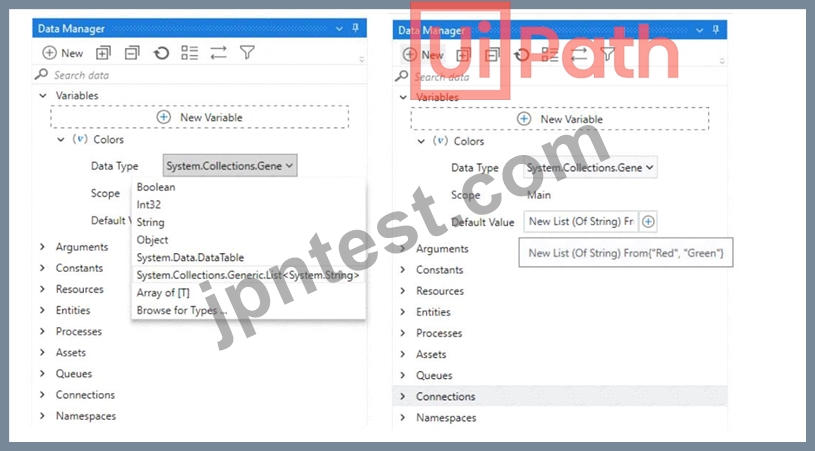
The Invoke Method includes the following properties: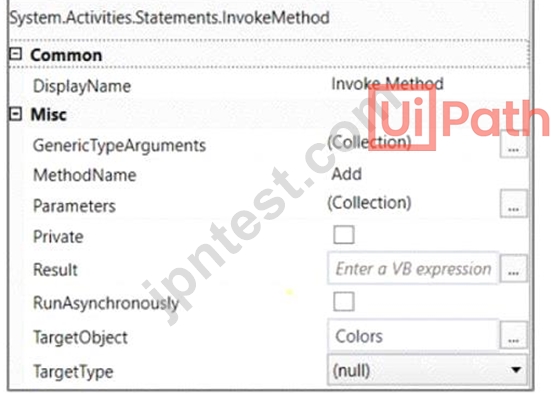
The Invoke Method includes the following properties: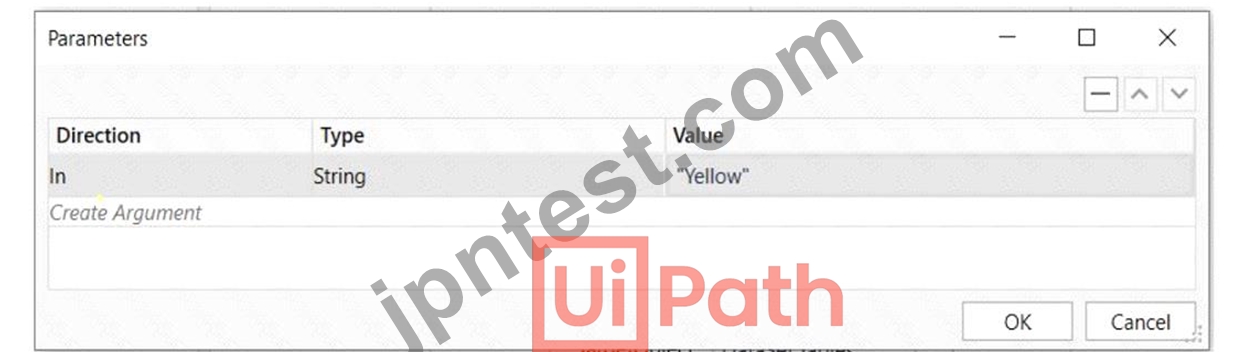
Based on the exhibits, what is the outcome of this Invoke Method activity?
- A. Colors will contain items in the following order: "Red", "Green", "Yellow".
- B. Colors will contain items in the following order: "Yellow", "Red", "Green".
- C. Invoke Method activity will throw an error.
- D. Colors will contain items in the following order: "Red", "Green".
正解:A
解説:
Based on the exhibits provided, the developer has set up an Invoke Method activity to add an item to the
"Colors" list variable. The list is initially declared with two items "Red" and "Green". The Invoke Method activity is configured to add the string "Yellow" to this list.
The properties of the Invoke Method activity indicate that the method 'Add' will be called on the target object
'Colors' with the parameter "Yellow". This means the string "Yellow" will be added to the end of the list.
The outcome of executing this Invoke Method activity will be:
D: Colors will contain items in the following order: "Red", "Green", "Yellow".
This is because items in a List<T> in .NET are added in sequence, and the "Add" method appends the new item to the end of the list.
質問 # 93
A developer examines a workflow in which filenames are stored within a collection. The collection is initialized with a single filename. When adding a new filename to the collection, which collection variable type will cause an error?
- A. System.Collections.Generic.Dictionary
- B. System.Data.DataTable
- C. System.Array
- D. System.Collections.Generic.List
正解:C
解説:
The collection variable type that will cause an error when adding a new filename to the collection is System.
Array. This is because System.Array is a fixed-size collection that cannot be resized or modified once it is initialized. Therefore, if the collection is initialized with a single filename, it cannot accommodate any more filenames. To add a new filename to the collection, the developer should use a dynamic collection type, such as System.Collections.Generic.List or System.Data.DataTable, that can grow or shrink as needed.
Alternatively, the developer can use System.Collections.Generic.Dictionary if the filenames need to be associated with some keys or values. References: [Array Class], [Collection Classes]
質問 # 94
A developer is building an automation which types text into a text file. The Activity Project Settings tor UI Automation Modern activities are set as follows: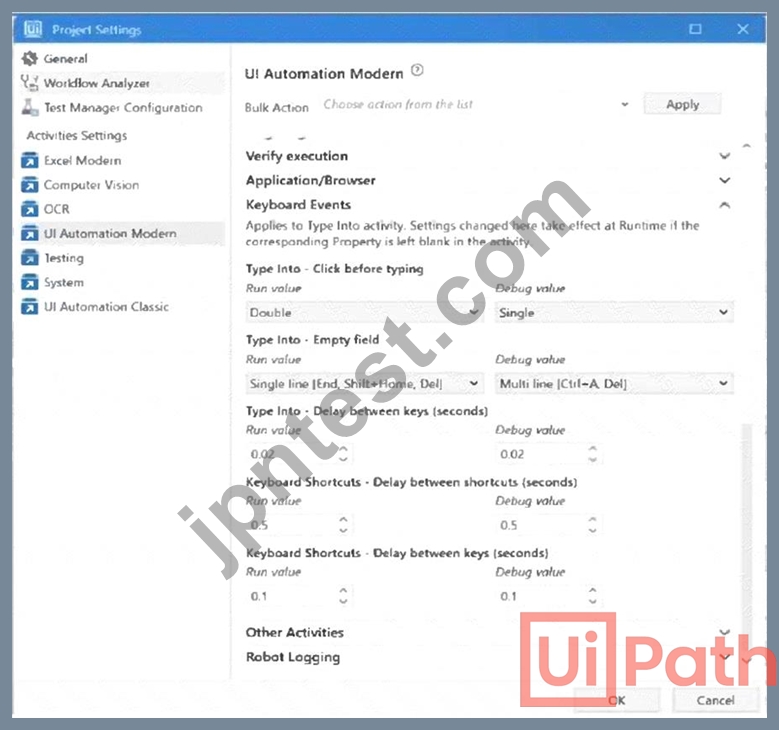
The developer has configured the properties of a Type Into activity as follows: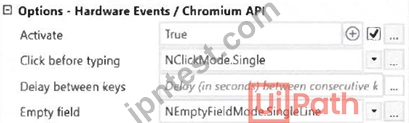
What is the behavior of the Type Into activity when executing the workflow?
- A. The activity will remove Multi Line in Run mode and a Single Line in Debug mode.
- B. The activity will remove a Single Line in Run mode and Multi Line in Debug mode.
- C. The activity will remove a Single Line in Run mode and in Debug mode.
- D. The activity will use only properties set in Activity Project Settings.
正解:B
解説:
The behavior of the Type Into activity when executing the workflow is that the activity will remove a Single Line in Run mode and Multi Line in Debug mode. This is because the activity has the Empty field property set to NEmptyFieldMode.SingleLine, which means that the activity will delete the existing content in the field by sending Ctrl+A and Delete keystrokes before typing the text. However, the activity also has the Debug mode property set to NEmptyFieldMode.MultiLine, which means that the activity will delete the existing content in the field by sending Ctrl+A, Shift+Home, and Delete keystrokes before typing the text. The Debug mode property overrides the Empty field property when the workflow is executed in Debug mode. Therefore, the activity will use different keystrokes to empty the field depending on the mode of execution. References:
[Type Into], [Empty Field], [Debug Mode]
質問 # 95
A developer intends to enter text into an input field using a combination of a string and a hotkey. The input action should take place within a hidden or minimized window.
Which input method(s) can be used individually for the Type Into activity?
- A. Simulate and Window Messages.
- B. Same as App/Browser and Simulate.
- C. Simulate only.
- D. Window Messages only.
正解:A
解説:
The Type Into activity has three input methods: Default, Simulate, and Window Messages. The Default method uses hardware drivers to send keystrokes to the target application, which means it requires the window to be active and visible. The Simulate and Window Messages methods use software drivers to send keystrokes to the target application, which means they can work in the background, even if the window is hidden or minimized. However, the Simulate method cannot send hotkeys, while the Window Messages method can.
Therefore, the only input methods that can be used individually for the Type Into activity to enter text and hotkeys in a hidden or minimized window are Simulate and Window Messages. References:
*Type Into
*Input Methods
質問 # 96
In the context of a linear process, implemented with REFramework, how many times will the process enter the Get Transaction Data state?
- A. The process will not enter the Get Transaction Data state because a linear process is not transactional.
- B. Until there are no more queue items left unprocessed in Orchestrator
- C. 2 times.
- D. 1 lime
正解:D
質問 # 97
Given the following list of arguments: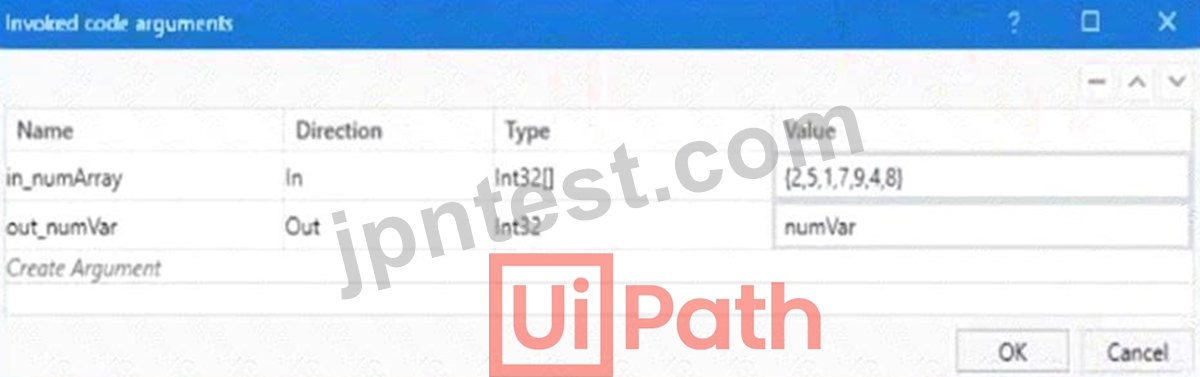
and the following code: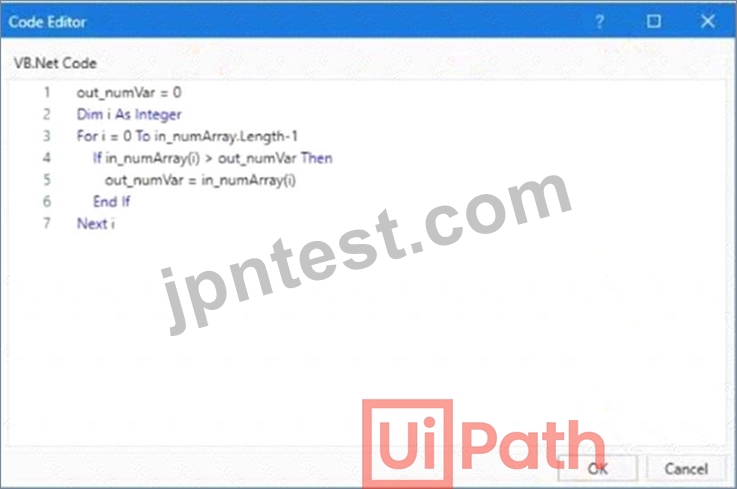
What is the value that will be displayed in the Output Panel at the end of the sequence below: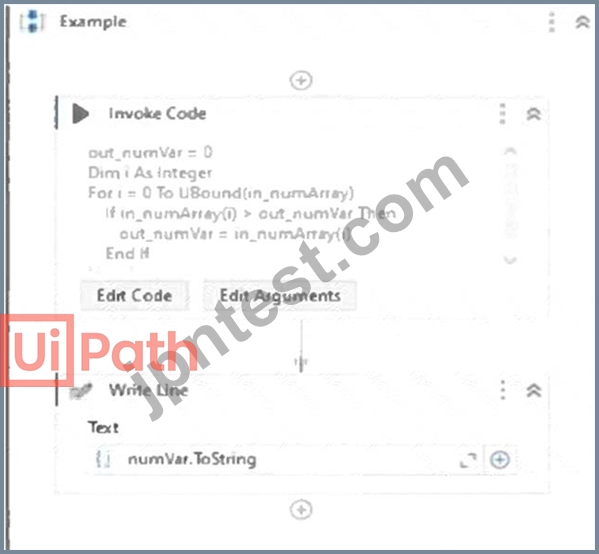
- A. 0
- B. 1
- C. 2
- D. 3
正解:C
解説:
The value that will be displayed in the Output Panel at the end of the sequence is 9. This is because the code in the Invoke Code activity is looping through the array in_numArray and setting the variable out_numVar to the highest value in the array. The array in_numArray has the values {1, 2, 7, 9, 4} as shown in the list of arguments. The variable out_numVar is initialized to 0. The For loop iterates from 0 to the upper bound of the array, which is 4. In each iteration, the If condition checks if the current element of the array is greater than the current value of out_numVar. If it is, then out_numVar is assigned to the current element of the array.
Otherwise, out_numVar remains unchanged. Therefore, after the first iteration, out_numVar becomes 1. After the second iteration, out_numVar becomes 2. After the third iteration, out_numVar becomes 7. After the fourth iteration, out_numVar becomes 9. After the fifth iteration, out_numVar remains 9, since 4 is not greater than 9. The Write Line activity outputs the value of out_numVar to the console, which is
9. References: Invoke Code
質問 # 98
When installing UiPath Studio, which of the following actions require administrator privileges?
- A. Administrator privileges are required for installing the robot in user mode.
- B. Administrator privileges are not required for installing UiPath Studio.
- C. Administrator privileges are required for installing the robot in both service mode and user mode.
- D. Administrator privileges are required for installing the robot in service mode.
正解:D
質問 # 99
Consider testing a workflow that computes the sum of two numbers having the data driven test data from the Excel file below: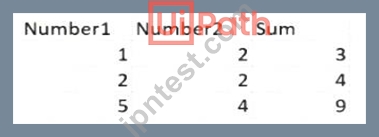
Expanding the functionality of the workflow to compute the sum of three numbers, the data needs to be updated as well to accommodate the new scenario: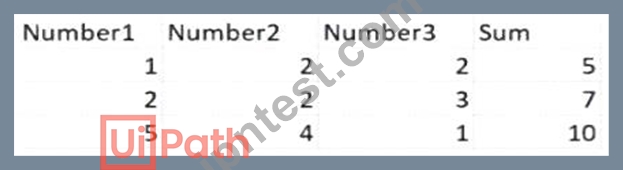
What are steps to do that?
- A. Click Right on the Test Case and select Update Test Data
- B. Click Right on the Test Case and select Add Test Data.
- C. Click Right on the Test Case and select Remove Test Data.
- D. Click Right on the Test Case and select Refresh Test Data
正解:D
解説:
When expanding the functionality of a workflow to compute the sum of three numbers instead of two, and having to update the test data in an Excel file accordingly, you would generally need to:
Open the Excel file that contains the test data.
Add a new column for the third number (e.g., Number3).
Fill in the data for the new column with the appropriate values for the test cases.
Save the Excel file with the updated data.
Refresh or update the data source in the test case to reflect these changes.
This is because "Refresh Test Data" suggests that the test case will re-import or re-read the test data from its source, which in this case is the updated Excel file with the additional Number3 column. "Update Test Data" might also seem appropriate, but it typically refers to a scenario where you need to update the test case's reference to the data, not the structure of the data itself. "Add Test Data" and "Remove Test Data" are not appropriate as they imply adding a new data set or removing an existing one, rather than refreshing or updating the existing data set with the new column.
質問 # 100
What is the functionality of the Include Subfolders filter in the Monitoring pages when a modern folder is selected?
- A. It enables you to sort the displayed data based on job priorities.
- B. It allows you to choose between background and foreground processes for the displayed data.
- C. It allows you to allocate licenses per machine for the displayed data.
- D. It allows you to select whether the contents of the selected folder's subfolders are displayed.
正解:D
解説:
The Monitoring pages in UiPath Orchestrator are pages that provide information and statistics about the performance and health of your robots, processes, queues, and jobs. You can access the Monitoring pages from the left menu in Orchestrator, under the Monitoring section.
The Include Subfolders filter in the Monitoring pages is a filter that allows you to select whether the contents of the selected folder's subfolders are displayed in the Monitoring pages. This filter is available when a modern folder is selected from the Folder drop-down list. A modern folder is a type of folder in Orchestrator that supports dynamic and fine-grained permission management, as well as folder-level isolation of data, processes, and execution.
When the Include Subfolders filter is checked, the Monitoring pages display the data for the selected folder and all its subfolders. For example, if you select a modern folder called Sales and check the Include Subfolders filter, the Monitoring pages will show the data for the Sales folder and all its subfolders, such as Sales-East, Sales-West, Sales-North, and Sales-South. This way, you can get a comprehensive view of the performance and health of your robots, processes, queues, and jobs across multiple subfolders.
When the Include Subfolders filter is unchecked, the Monitoring pages display the data only for the selected folder. For example, if you select a modern folder called Sales and uncheck the Include Subfolders filter, the Monitoring pages will show the data only for the Sales folder, excluding its subfolders. This way, you can get a focused view of the performance and health of your robots, processes, queues, and jobs within a specific folder.
The correct answer is B. It allows you to select whether the contents of the selected folder's subfolders are displayed. This statement accurately describes the functionality of the Include Subfolders filter in the Monitoring pages when a modern folder is selected.
The other options are not correct statements. Option A is incorrect, because the Include Subfolders filter does not allow you to choose between background and foreground processes for the displayed data. Background and foreground processes are types of processes that run in the background or foreground of the robot machine, respectively. You can filter the displayed data by process type using the Process Type filter in the Monitoring pages. Option C is incorrect, because the Include Subfolders filter does not enable you to sort the displayed data based on job priorities. Job priorities are levels of importance that are assigned to jobs when they are created or triggered, such as High, Normal, or Low. You can sort the displayed data by job priority using the Sort By drop-down list in the Monitoring pages. Option D is incorrect, because the Include Subfolders filter does not allow you to allocate licenses per machine for the displayed data. Licenses are resources that are consumed by robots, processes, or users when they perform certain actions in Orchestrator.
You can allocate licenses per machine using the License Allocation page in Orchestrator.
References: Orchestrator - Monitoring - UiPath Documentation Portal, Orchestrator - Modern Folders - UiPath Documentation Portal, Orchestrator - License Allocation - UiPath Documentation Portal
質問 # 101
Considering a process developed using REFramework, if the status of a transaction was set to "Failed" with the ErrorType specified as "Business", the process will transition to which state?
- A. Get Transaction Data
- B. Process Transaction
- C. Initialization
- D. End Process
正解:A
解説:
The REFramework is a project template based on State Machines, which follows the best practices regarding logging, exception handling, application initialization, and others1. The REFramework uses a queue in Orchestrator to store the transaction items, which are the units of data that need to be processed by the automation process1. The status of a transaction item can be set to Failed or Successful using the Set Transaction Status activity, which also allows specifying the ErrorType as Business or Application2. A Business ErrorType indicates that the transaction failed due to a business rule exception, such as invalid or incomplete data2. An Application ErrorType indicates that the transaction failed due to an application exception, such as a system error or a timeout2.
The REFramework has four main states: Init, Get Transaction Data, Process Transaction, and End Process1.
The process transitions between these states based on the conditions and triggers defined in the state machine1.
The process starts with the Init state, where the application is initialized and the Config file is read1. Then, the process moves to the Get Transaction Data state, where the next transaction item is retrieved from the queue1.
If there is a transaction item available, the process moves to the Process Transaction state, where the main logic of the automation is executed1. If the transaction is processed successfully, the status is set to Successful and the process returns to the Get Transaction Data state1. If the transaction fails due to a Business ErrorType, the status is set to Failed and the process also returns to the Get Transaction Data state, without retrying the transaction1. If the transaction fails due to an Application ErrorType, the status is set to Failed and the process retries the transaction until the maximum number of retries is reached1. If there is no transaction item available, or if the maximum number of retries is reached, or if a System Error occurs, the process moves to the End Process state, where the application is closed and the final report is generated1.
Therefore, considering a process developed using REFramework, if the status of a transaction was set to
"Failed" with the ErrorType specified as "Business", the process will transition to the Get Transaction Data state, where it will fetch the next transaction item from the queue.
質問 # 102
Given the following variables assignments: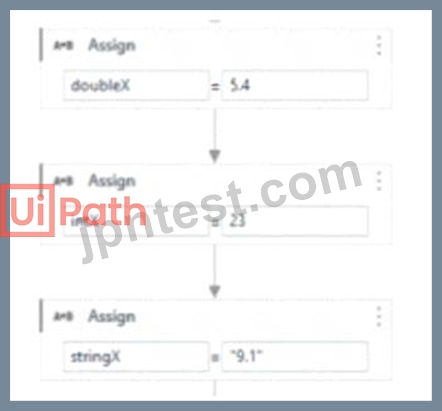
What will the output of the following conditional be: outputX = If(CInt(doubleX+Cdbl(intX)
+CDbl(stringX))> 38.30, 1, 0)
- A. 0
- B. Compilation error
- C. Error during runtime
- D. 1
正解:C
解説:
The conditional statement attempts to convert all variables to Double and then adds them up to compare against 38.30. However, the string "9.1" cannot be directly converted to a Double with CDbl because it is not in a correct format that can be recognized as a number (it might be due to the fact that it's a string with a comma instead of a period for a decimal point, depending on the culture settings of the system). This will cause a runtime error during the execution of the conditional statement.References:
Microsoft Visual Basic Guide: Type Conversion Functions
質問 # 103
A developer is building an automation which types text into a text file. The Activity Project Settings tor UI Automation Modern activities are set as follows: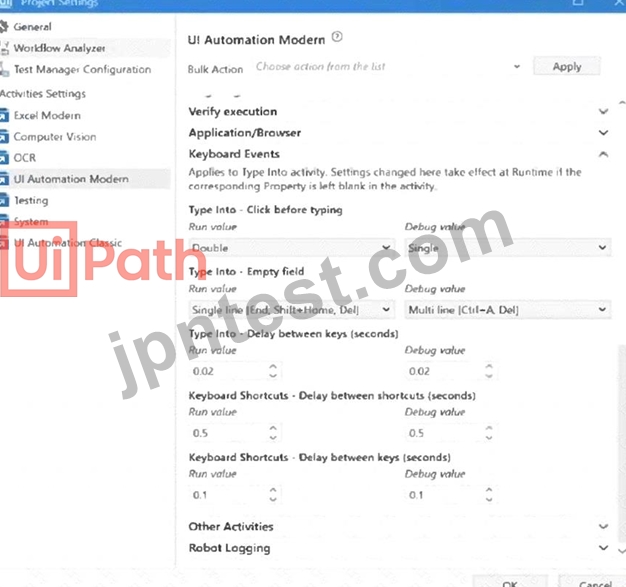
The developer has configured the properties of a Type Into activity as follows: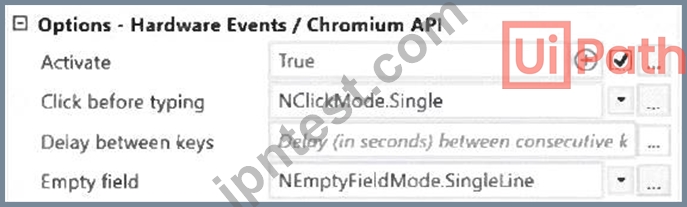
What is the behavior of the Type Into activity when executing the workflow?
- A. The activity will remove Multi Line in Run mode and a Single Line in Debug mode.
- B. The activity will remove a Single Line in Run mode and Multi Line in Debug mode.
- C. The activity will remove a Single Line in Run mode and in Debug mode.
- D. The activity will use only properties set in Activity Project Settings.
正解:B
解説:
The behavior of the Type Into activity when executing the workflow is that the activity will remove a Single Line in Run mode and Multi Line in Debug mode. This is because the activity has the Empty field property set to NEmptyFieldMode.SingleLine, which means that the activity will delete the existing content in the field by sending Ctrl+A and Delete keystrokes before typing the text. However, the activity also has the Debug mode property set to NEmptyFieldMode.MultiLine, which means that the activity will delete the existing content in the field by sending Ctrl+A, Shift+Home, and Delete keystrokes before typing the text. The Debug mode property overrides the Empty field property when the workflow is executed in Debug mode. Therefore, the activity will use different keystrokes to empty the field depending on the mode of execution. References:
[Type Into], [Empty Field], [Debug Mode]
質問 # 104
Data from an Excel file is read into a data table named "dtEmployee", as displayed in the following graphic: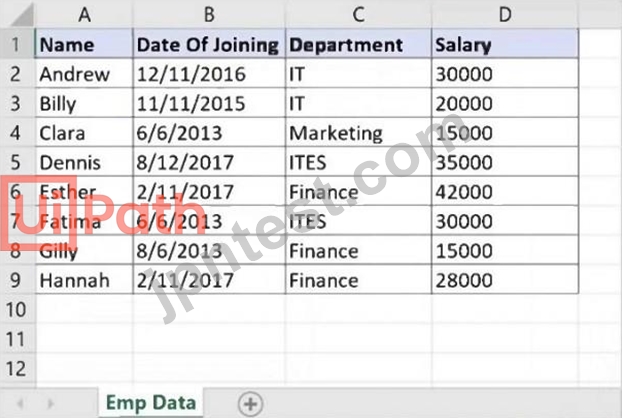
A developer needs to filter the data table to obtain all rows representing employees from the Finance and IT departments with a Salary under 30,000. Which expression yields the desired outcomes?
- A. dtEmployee.Select("([Department]='IT' OR [Department]='Finance') AND [Salary] < 30000")
- B. dtEmployee.Select("[Department]='IT' OR [Department]= 'Finance' AND [Salary] < 30000")
- C. dtEmployee.Select("[Department]='IT OR [Department]='Finance' OR [Salary] < 30000")
- D. dtEmployee.Select("([Department]='IT' AND [Department]='Finance') AND [Salary] < 30000")
正解:A
質問 # 105
What Information is provided in the Descriptor Coverage sub-panel of Test Explorer?
- A. Object Repository coverage
- B. Test data coverage
- C. Activity coverage
- D. Selector coverage
正解:D
解説:
The Descriptor Coverage sub-panel in the Test Explorer provides Selector coverage information. This coverage data is crucial for understanding how well the selectors in a project are being tested.
質問 # 106
Under what conditions will a trigger be automatically disabled upon failure in Integration Service?
- A. When the job is not able to start after 5 attempts for a single event or the job does not start for the last 50 events.
- B. When the job is not able to start after 3 attempts for a single event or the job does not start for the last 25 events.
- C. When the job is not able to start after 20 attempts for a single event or the job does not start for the last
200 events. - D. When the job is not able to start after 11 attempts for a single event or the job does not start for the last
100 events.
正解:B
解説:
In UiPath Integration Service, a trigger will be automatically disabled upon failure under specific conditions to prevent continuous failure and unnecessary resource consumption. This typically happens when the job associated with the trigger fails to start after a predefined number of attempts for a single event, or when it consistently fails to start across a series of events. The condition of failing to start after 3 attempts for a single event or not starting for the last 25 events is designed to safeguard against persistent issues that could disrupt the automation flow or lead to resource wastage.References:
UiPath Integration Service Documentation: Triggers and Events
質問 # 107
A developer designed a project in the REFramework. The "Config.xlsx" has me following Setting entry: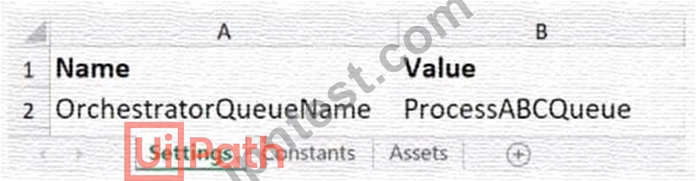
Assuming the default REFramework configuration, how can the developer reference the Setting in the Config variable to obtain the Setting value as a String from the dictionary?
- A. Config ("OrchestratorOueueName"." Process ABCQueue" )ToString
- B. Config ("OrchestratorOueueName ).ToString
- C. Config ("ProcessABCQueue"."OrchestratorQueueName").ToString
- D. Config ("ProcessABCOueue")ToString
正解:B
質問 # 108
Which one of the following expressions Is the equivalent of the If activity from the picture?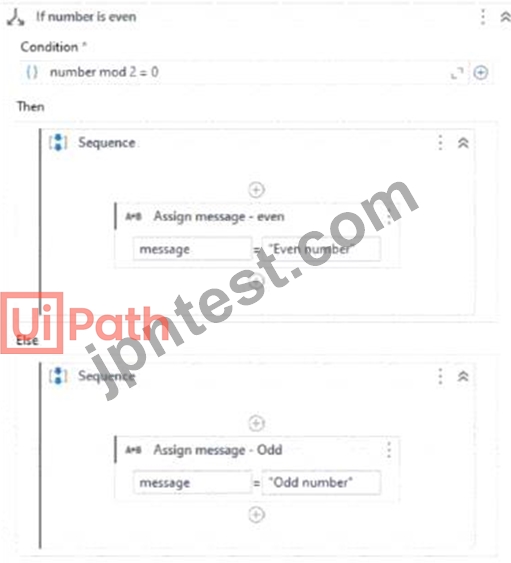
- A. message = lf(number mod 2 = 0. Odd number. Even number)
- B. message = lf(number mod 2 = 0. "Even number", "Odd number")
- C. message = lf(number mod 2 = 0 then "Odd number" else "Even number")
- D. message = lf(number mod 2 = 0 {"Odd number"} else {'Even number"})
正解:B
解説:
This expression evaluates if the number modulo 2 equals 0, which would mean it is even. If true, it assigns the string "Even number" to the variable message. If false (meaning the number is odd), it assigns "Odd number" to message
質問 # 109
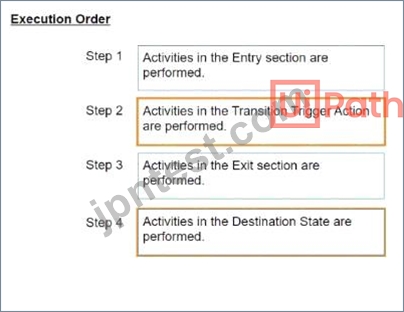
What is the correct execution order of the State activity sections?
instructions: Drag the Description found on the "Left" and drop on the correct Execution Order found on the
"Right"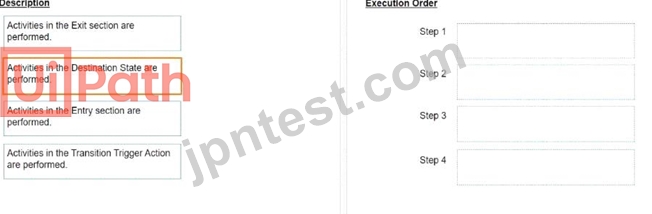
正解:
解説: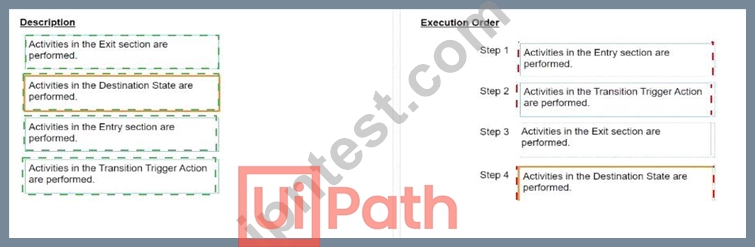
質問 # 110
......
UiPath-ADPv1問題集と試験テストエンジン:https://www.jpntest.com/shiken/UiPath-ADPv1-mondaishu
UiPath UiPath-ADPv1問題集にはリアル試験問題解答:https://drive.google.com/open?id=1dCEZjlkINs36heWfn7qYv8O1OBXFtN9l