

リアルUiPath UiPath-ADPv1試験問題 [更新されたのは2024年]
UiPath-ADPv1試験問題集で合格させるのは更新されたのは2024年年最新のUiPath (ADPv1) Automation Developer Professional
質問 # 72
A developer is building an automation which types text into a text file. The Activity Project Settings tor UI Automation Modern activities are set as follows:
The developer has configured the properties of a Type Into activity as follows:
What is the behavior of the Type Into activity when executing the workflow?
- A. The activity will use only properties set in Activity Project Settings.
- B. The activity will remove Multi Line in Run mode and a Single Line in Debug mode.
- C. The activity will remove a Single Line in Run mode and in Debug mode.
- D. The activity will remove a Single Line in Run mode and Multi Line in Debug mode.
正解:D
質問 # 73
The following table is stored in a variable called "dt".
Which query can be used to extract the table column names and store them in a list?
- A. dt.AsEnumerable.Select(function(x) x.ColumnName).ToList()
- B. dt.Columns.Select(function(x) x.ColumnName).ToList()
- C. dt.Columns.Cast(Of Datacolumn).Select(function(col) col).ToList()
- D. dt.Columns.Cast(Of Datacolumn).Select(function(x) x.ColumnName).ToList()
正解:D
解説:
The DataTable object in UiPath is a representation of a table with rows and columns that can store data of various types. It has a Columns property that returns a collection of DataColumn objects that describe the schema of the table1. To extract the column names from a DataTable and store them in a list, you can use the following query:
dt.Columns.Cast(Of Datacolumn).Select(function(x) x.ColumnName).ToList() This query does the following:
It casts the Columns collection to a generic IEnumerable(Of DataColumn) using the Cast(Of T) extension method2. This is necessary because the Columns collection is a non-generic IEnumerable that cannot be used with LINQ methods directly3.
It selects the ColumnName property of each DataColumn object using the Select extension method and a lambda expression4. The ColumnName property returns the name of the column as a string5.
It converts the resulting IEnumerable(Of String) to a List(Of String) using the ToList extension method6.
The other options are incorrect because:
Option B does not cast the Columns collection to a generic IEnumerable(Of DataColumn), which will cause a runtime error.
Option C uses the AsEnumerable extension method, which returns a collection of DataRow objects, not DataColumn objects7. Therefore, the ColumnName property will not be available.
Option D selects the whole DataColumn object instead of its ColumnName property, which will result in a list of DataColumn objects, not strings.
References:
DataTable Class (System.Data) | Microsoft Docs
Enumerable.Cast(Of TResult) Method (System.Linq) | Microsoft Docs
DataColumnCollection Class (System.Data) | Microsoft Docs
Enumerable.Select(Of TSource, TResult) Method (System.Linq) | Microsoft Docs DataColumn.ColumnName Property (System.Data) | Microsoft Docs Enumerable.ToList(Of TSource) Method (System.Linq) | Microsoft Docs DataTableExtensions.AsEnumerable Method (System.Data) | Microsoft Docs
質問 # 74
How should the computation of the signature be done for client apps that receive Orchestrator requests and need to check their authenticity?
Instructions: Drag the Description found on the left and drop on the correct Step Sequence found on the right.
正解:
解説:

質問 # 75
What can be verified in the InltAIISettlngsTestCase test case?
- A. Verify the variable type for the 'Config' dictionary.
- B. Verify the naming of a certain key present in the 'Config' dictionary.
- C. Verify If a certain key is present in the 'Config' dictionary.
- D. Verify If a certain application is open in the execution environment.
正解:C
解説:
In the InitAllSettingsTestCase test case, one of the verifications that can be done is to check if a certain key is present in the 'Config' dictionary. This ensures that necessary configurations are available for the process.
質問 # 76
Data from an Excel file is read into a data table named "dtEmployee", as displayed in the following graphic:
A developer needs to filter the data table to obtain all rows representing employees from the Finance and IT departments with a Salary under 30,000. Which expression yields the desired outcomes?
- A. dtEmployee.Select("([Department]='IT' OR [Department]='Finance') AND [Salary] < 30000")
- B. dtEmployee.Select("[Department]='IT OR [Department]='Finance' OR [Salary] < 30000")
- C. dtEmployee.Select("[Department]='IT' OR [Department]= 'Finance' AND [Salary] < 30000")
- D. dtEmployee.Select("([Department]='IT' AND [Department]='Finance') AND [Salary] < 30000")
正解:A
質問 # 77
When developing a process, you were provided with two data tables, "DT1" and "DT2", as shown below:
The process documentation specifies that the two data tables need to be manipulated in order to reflect the following "DT2":
How should the properties of the Merge Data Table activity be configured?
- A.

- B.

- C.

- D.
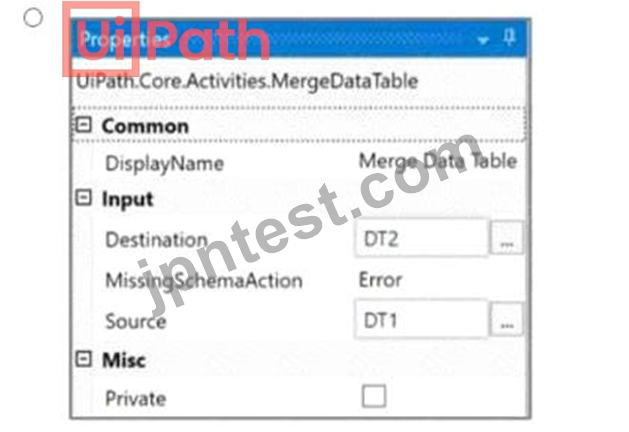
正解:A
解説:
Given the two data tables DT1 and DT2, to achieve the desired result where DT2 contains both the department and the names, the Merge Data Table activity should be configured to merge DT1 into DT2. This configuration requires specifying DT1 as the source table and DT2 as the destination table. The MissingSchemaAction should be set to AddWithKey which ensures that if the source table (DT1) contains columns that are not found in the destination table (DT2), they will be added to the destination table with the primary key information preserved.
Option A shows the correct configuration for the Merge Data Table activity to achieve this result:
Destination: DT1
Source: DT2
MissingSchemaAction: AddWithKey
This setup correctly adds the "Name" column from DT1 to DT2 based on the shared "ID" column, which acts as the key. Since both tables have an "ID" column with matching values, the names will be added to the corresponding IDs in DT2, resulting in a merged table with ID, Department, and Name columns.
質問 # 78
The Extract PDF Page Range activity is used to extract a specific set of pages from a PDF file. Which of the following statements correctly describes this activity?
- A. OutputFileName argument is optional.
- B. Password-protected PDF files cannot be processed with this activity.
- C. PageCount argument outputs the number of extracted pages.
- D. Range argument accepts complex range values or "All".
正解:D
解説:
The Extract PDF Page Range activity is used to extract a specific set of pages from a PDF file and save them as a new PDF file1. The activity has the following properties:
*Common
oDisplayName: The display name of the activity1.
*File
oFileName: The path of the PDF file you want to extract a range of pages from. This field supports only strings and String variables1.
oOutputFileName: The name you want to use for the file that is generated from the extracted range of pages.
This field supports only strings and String variables1.
oPassword: The password of the PDF file, if necessary. This field supports only strings and String variables1.
*Input
oRange: The range of pages that you want to retrieve. You can specify a single page (e.g. "7"), a range of pages (e.g. "7-12"), or a complex range, (e.g. "2-5, 7, 15-End" or "All"). Only string variables and strings are supported. By default, this field is cleared1.
*Misc
oPrivate: If selected, the values of variables and arguments are no longer logged at Verbose level1.
The statement that correctly describes this activity is B. Range argument accepts complex range values or
"All". This statement is true because the Range property allows you to specify the pages that you want to extract from the PDF file using different formats, such as single pages, ranges, or complex ranges1. You can also use the keyword "All" to extract all the pages from the PDF file1.
The other statements are incorrect because:
*A. Password-protected PDF files cannot be processed with this activity. This statement is false because the activity has a Password property that allows you to enter the password of the PDF file, if necessary1. This enables the activity to process password-protected PDF files1.
*C. OutputFileName argument is optional. This statement is false because the OutputFileName property is required for the activity to work1. This property specifies the name of the file that is generated from the extracted range of pages1. If this property is not provided, the activity will throw an exception1.
*D. PageCount argument outputs the number of extracted pages. This statement is false because the activity does not have a PageCount argument1. The activity does not output the number of extracted pages, but only the new PDF file that contains the extracted pages1.
質問 # 79
What do the percentages from the Test Explorer panel represent?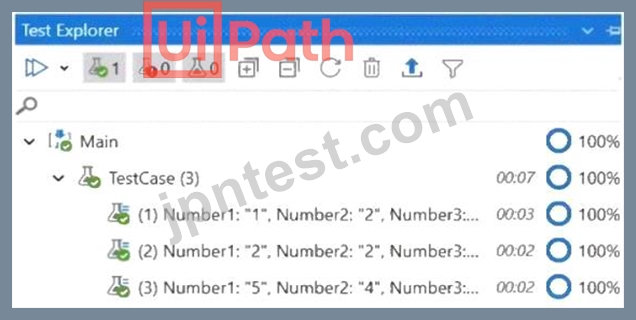
- A. Correctness of the code percent.
- B. Coverage percent.
- C. Passing percent.
- D. Percent of test data run.
正解:C
解説:
The percentages from the Test Explorer panel represent the passing percent of the test cases that are executed.
The Test Explorer panel shows the status of each test case, the total number of test cases, the number of passed test cases, the number of failed test cases, and the passing percent. The passing percent is calculated by dividing the number of passed test cases by the total number of test cases and multiplying by 100. For example, if there are 10 test cases and 8 of them pass, the passing percent is 80%. References: Test Explorer
質問 # 80
Based on the following exhibit, which output is displayed in the Output panel rt Step Out is clicked on the Debug ribbon tab of UlPath Studio?
- A. UiPath RPAAutomatlon
- B. Automation RPAUiPath RPA
- C. Automation
- D. UiPath RPA
正解:A
質問 # 81
Which of the following describes the correct hierarchy of the elements in the Object Repository tree structure?
- A. Version, Application, Screen, Ul Element.
- B. Application, Version, Screen, Ul Element.
- C. Application, Screen, Ul Element, Version.
- D. Screen, Application, Version, Ul Element.
正解:C
解説:
The Object Repository in UiPath organizes elements in a hierarchical structure that reflects the logical arrangement of user interfaces and elements as they are captured and used in automation projects.
The correct hierarchy for elements in the Object Repository tree structure is:
A: Version, Application, Screen, UI Element.
This hierarchy starts with the 'Version', which could refer to the specific version of the application you are automating. Under each version, there could be multiple 'Applications' that you have elements for. Within each application, you might have captured various 'Screens' or dialogs, and within each screen, there are individual
'UI Elements' like buttons, text fields, dropdown menus, etc., that the automation interacts with.
However, it's important to note that in practice, when you are working with UiPath Studio and its Object Repository, the hierarchy usually starts with the 'Application', then under it, you have different 'Screens' of the application, and under each screen, you have the 'UI Elements'. The 'Version' is typically managed separately and is not a level in the hierarchy tree but rather a property or attribute of the application or element.
Therefore, the most practical answer reflecting the usage in UiPath Studio would be:
C: Application, Screen, UI Element, Version.
The 'Version' here would be understood not as a layer in the hierarchy but rather as an attribute that can be associated with the 'Application' or 'UI Element'.
質問 # 82
What happens when closing a Remote Debugging Connection while a debugging execution is in progress?
- A. It is not possible to close the connection while debugging is in progress.
- B. Debugging execution ends in exception, then the connection is closed.
- C. Debugging execution stops gracefully, then the connection is closed.
- D. The remote robot continues the execution after Studio closes the connection.
正解:C
質問 # 83
Where is the TransactionNumber incremented in the REFramework?
- A. In the RetryCurrentTransaction.xaml workflow and in the SetTransactionStatus.xaml workflow.
- B. In the New Transaction transition.
- C. Only in the RetryCurrentTransaction.xaml workflow.
- D. Only in the SetTransactionStatus.xaml workflow.
正解:D
解説:
The TransactionNumber is incremented only in the SetTransactionStatus.xaml workflow, which is invoked at the end of each transaction. This workflow updates the status of the current transaction item in Orchestrator and increments the TransactionNumber by one. The TransactionNumber is used to keep track of the number of transactions processed by the robot and to get the next transaction item from the queue. References:
[SetTransactionStatus.xaml]
質問 # 84
Which of the following statements is true about the existing UiPath Studio installation packages?
- A. The Attended Robot installation package installs only UiPath Studio, and Robot.
- B. The Attended Robot installation package installs only the UiPath Robot.
- C. The Automation Developer installation package installs only UiPath Studio, Assistant, and Robot.
- D. The Unattended Robot installation package installs only UiPath Studio, Assistant, and Robot.
正解:B
解説:
The statement that is true about the existing UiPath Studio installation packages is that the Attended Robot installation package installs only the UiPath Robot. The UiPath Robot is the component that executes the automation workflows designed in UiPath Studio. The Attended Robot installation package is intended for scenarios where the Robot works on the same machine as a human user and requires human input or supervision. The Attended Robot installation package does not include UiPath Studio or UiPath Assistant.
UiPath Studio is the component that allows the developer to design and debug the automation workflows.
UiPath Assistant is the component that allows the user to manage and run the automation workflows on their machine. The Unattended Robot installation package and the Automation Developer installation package both include UiPath Studio, UiPath Assistant, and UiPath Robot, but they are intended for different scenarios. The Unattended Robot installation package is for scenarios where the Robot works on a dedicated machine and does not require human input or supervision. The Automation Developer installation package is for scenarios where the developer needs to create and test the automation workflows on their machine. References: [UiPath Installation Guide], [UiPath Robot], [UiPath Studio], [UiPath Assistant]
質問 # 85
When building an automation for a car rental company as part of a larger project initiative, a developer should follow the high-level steps:
1.log in to the company's desktop application.
2.For each Queue Item:
a.Navigate to the Reservations section from the Requests section.
b.Add the reservation data to the Reservations section.
c.Close the current reservation.
3.Log out and close the company's application.
What step should be mocked from the end-to-end test case in order to retrieve test data?
- A. SetTransactionStatus
- B. Process
- C. InitAIIApplications
- D. GetTransactionData
正解:D
解説:
The GetTransactionData step should be mocked from the end-to-end test case in order to retrieve test data. Mocking is a technique of substituting a part of the system with a fake counterpart, usually for testing purposes1. The GetTransactionData step is responsible for fetching the next transaction item from the queue and assigning it to the TransactionItem argument2. By mocking this step, the developer can avoid interacting with the actual queue and provide a predefined transaction item for testing. This can make the test more predictable, focused, and isolated from external dependencies.
Option A is incorrect, because the SetTransactionStatus step should not be mocked, as it is used to update the status of the current transaction item in the queue, which is an important part of the end-to-end test case2. Option C is incorrect, because the Process step should not be mocked, as it contains the core business logic of the automation, such as navigating to the Reservations section, adding the reservation data, and closing the current reservation2. Option D is incorrect, because the InitAllApplications step should not be mocked, as it is used to log in to the company's desktop application, which is a necessary precondition for the end-to-end test case2.
References: 1: When should I (not) use mocks in testing? 2: The UiPath ReFramework
質問 # 86
A developer configured the properties for a Click activity on an element inside a web page as shown in the following exhibit.
An animation on the web page never completely loads but the element indicated in the Click activity does load within the specified timeout duration. What occurs when this Click activity executes?
- A. Continues to the next activity after 30 seconds without clicking on the element.
- B. Waits 10 seconds before clicking on the element.
- C. Element is clicked once the element is fully loaded.
- D. Timeout error occurs without clicking on the element.
正解:C
解説:
Click activity has the following properties:
*ClickType: Single
*MouseButton: Left
*Target.Timeout: 30000 ms (30 seconds)
*Target.WaitForReady: Interactive
The Target.Timeout property specifies the amount of time (in milliseconds) to wait for the activity to run before the SelectorNotFoundException error is thrown1. The default value is 30000 milliseconds (30 seconds)2.
The Target.WaitForReady property determines how long the activity should wait for the target UI element to be ready before performing the action1. The following options are available:
*None: Does not wait for anything except the target UI element to exist before executing the action1.
*Interactive: Waits until only a part of the app is loaded1.
*Complete: Waits for the entire app to be loaded1.
The default value is Interactive2, which means that the activity will wait until the UI element is visible and can be interacted with3.
Therefore, based on these properties, the Click activity will wait for the element indicated by the selector to be loaded and clickable within 30 seconds. If the element is loaded before the timeout, the activity will click it and continue to the next activity. If the element is not loaded within the timeout, the activity will throw an error and stop the execution. The animation on the web page does not affect the Click activity, as long as the target element is loaded and visible. Hence, the correct answer is A. Element is clicked once the element is fully loaded.
質問 # 87
Based on the following exhibit, which output is displayed in the Output panel rt Step Out is clicked on the Debug ribbon tab of UlPath Studio?
- A. UiPath RPAAutomatlon
- B. Automation RPAUiPath RPA
- C. Automation
- D. UiPath RPA
正解:A
質問 # 88
What is the output type returned when using a Get Test Data Queue Item activity?
- A. Queueltem
- B. Dictionary
- C. Object
正解:A
質問 # 89
A developer is building an automation which types text into a text file. The Activity Project Settings tor UI Automation Modern activities are set as follows:
The developer has configured the properties of a Type Into activity as follows:
What is the behavior of the Type Into activity when executing the workflow?
- A. The activity will use only properties set in Activity Project Settings.
- B. The activity will remove Multi Line in Run mode and a Single Line in Debug mode.
- C. The activity will remove a Single Line in Run mode and in Debug mode.
- D. The activity will remove a Single Line in Run mode and Multi Line in Debug mode.
正解:D
解説:
The behavior of the Type Into activity when executing the workflow is that the activity will remove a Single Line in Run mode and Multi Line in Debug mode. This is because the activity has the Empty field property set to NEmptyFieldMode.SingleLine, which means that the activity will delete the existing content in the field by sending Ctrl+A and Delete keystrokes before typing the text. However, the activity also has the Debug mode property set to NEmptyFieldMode.MultiLine, which means that the activity will delete the existing content in the field by sending Ctrl+A, Shift+Home, and Delete keystrokes before typing the text. The Debug mode property overrides the Empty field property when the workflow is executed in Debug mode. Therefore, the activity will use different keystrokes to empty the field depending on the mode of execution. References:
[Type Into], [Empty Field], [Debug Mode]
質問 # 90
Which activity Is specific tor Ul synchronization in UlPath Studio?
- A. Check App State
- B. Use Applicationy/Browser
- C. Get Processes
- D. Process Start Trigger
正解:A
解説:
The Check App State activity is specifically designed for UI synchronization. It checks the state of a UI element, ensuring that subsequent actions are performed when the UI element is in the desired state.
質問 # 91
What are the primary functions of the UiPath Integration Service?
- A. Enables automation with API integration, manages connections with user-provided authentication, kicks off automations based on application-specific triggers, simplifies automation design with the help of third-party libraries.
- B. Enables automation with a library of connectors, manages connections easily with standardized authentication, kicks off automations with server-side triggers or events, provides curated activities and events, simplifies automation design.
- C. Automates Ul design, manages API connections, provides limited activities and events, simplifies automation design.
- D. Enables automation with Ul components, manages API keys, kicks off automations with client-side triggers, provides curated events.
正解:B
解説:
UiPath Integration Service is a component of the UiPath Platform that allows users to automate third-party applications using both UI and API integration. It has the following primary functions1:
* Enables automation with a library of connectors: Connectors are pre-built API integrations that provide a consistent developer experience and simplify the integration process. Users can browse and import connectors from the Connector Catalog or the UiPath Marketplace, or create their own connectors using the Connector Builder (Preview).
* Manages connections easily with standardized authentication: Users can create and manage secure connections to various applications using standardized authentication methods, such as OAuth 2.0, Basic, API Key, etc. Users can also share connections with other users, groups, or automations within the UiPath Platform.
* Kicks off automations with server-side triggers or events: Users can trigger automations based on events from external applications, such as webhooks, email, or schedules. Users can also configure parameters and filters for the events to customize the automation logic.
* Provides curated activities and events: Users can access a set of curated activities and events that are specific to each connector and application. These activities and events can be used in UiPath Studio or UiPath StudioX to design and execute automations.
* Simplifies automation design: Users can leverage the UiPath Integration Service Designer to create and test integrations in a graphical interface. Users can also import common API formats, such as Swagger, YAML, or Postman collections, to generate connectors automatically.
References:
1: Integration Service - Introduction - UiPath Documentation Portal
質問 # 92
A developer is working on an automation using the REFramework. Each transaction item represents a piece of client information. For each customer, the automated procedure must click the "Generate Shipment Details" button. This generates a table of shipment records for each customer.
What type of exception occurs when the data is not accessible, the created table displays only the header row, and processing for that client must be halted?
- A. BusinessRuleException
- B. ApplicationException
- C. NullReferenceException
- D. SystemException
正解:A
解説:
When the data is not accessible, the created table displays only the header row, and processing for that client must be halted, a BusinessRuleException occurs. A BusinessRuleException is a type of exception that indicates a business logic error or a validation error that cannot be resolved by retrying the transaction. For example, if the input data is incorrect, incomplete, or outdated, a BusinessRuleException should be thrown. A BusinessRuleException can be thrown by using the Throw activity with the following expression:
VB New BusinessRuleException("Message") where Message is a string that describes the error. A BusinessRuleException can be caught by using the Catch activity with the following expression:
VB ex As BusinessRuleException where ex is a variable that stores the exception object. A BusinessRuleException can be handled differently from other types of exceptions, such as SystemException or ApplicationException, depending on the logic of the automation. For example, in the REFramework, a BusinessRuleException sets the status of the transaction item to Failed and does not retry the transaction, whereas a SystemException sets the status of the transaction item to Retry and retries the transaction up to a specified number of times. References: [BusinessRuleException], [Throw], [Catch], [REFramework]
質問 # 93
Suppose you have the following workflow that verifies if the text value of an element is equal to "Work Items":
The configuration for the Verify Control Attribute and Get Text activities is shown below:
The element and its selector are highlighted in the image below:
Taking into consideration that the page shown above will be present on screen at execution time, what will be the result of the Verify Control Attribute activity?
- A. Verification will not be executed.
- B. Verification will be passed.
- C. An exception will be thrown because there is no variable set in the Save to property of the Get text activity.
- D. Verification will be failed because the actual value is different than expected value.
正解:B
解説:
The workflow in question uses a 'Verify Control Attribute' activity to check if the text value of a UI element is equal to "Work Items". The Get Text activity is used to retrieve the text from the specified UI element, and the result of this activity is compared against the expected value "Work Items".
From the provided information, the 'Verify Control Attribute' activity has been set up with the Expression
"Work Items" and the Operator set to Equality. The 'Get Text' activity is configured to extract the text from the UI element with the visible text "Work Items", as indicated by the selector shown in the image.
Since the actual value of the UI element's text is "Work Items" (which matches the expected value in the
'Verify Control Attribute' activity), and provided that the 'Get Text' activity successfully retrieves this value, the verification will pass. The configuration indicates that the activity should take a screenshot only if the verification fails (TakeScreenshotIfFailed is set to True), which will not be the case here.
Therefore, assuming that there are no other issues such as incorrect selectors or unexpected changes to the UI element at execution time, the result of the 'Verify Control Attribute' activity will be a pass.
References:
UiPath Documentation: Verify Control Attribute Activity
質問 # 94
What is the purpose of the Invoke Code activity in UiPath?
- A. Invokes VB.NET or C# code, optionally passing il a list of input arguments.
- B. Invokes Java code, optionally passing it a list of input arguments.
- C. Invokes VB MET or Java code optionally passing it a list of input arguments
- D. Invokes VB MET code optionally passing it a list of input arguments
正解:A
解説:
The purpose of the Invoke Code activity in UiPath is to invoke VB.NET or C# code, optionally passing it a list of input arguments. The Invoke Code activity allows the developer to write and execute custom code in VB.NET or C# within a UiPath workflow. The Invoke Code activity has a Code property, where the developer can enter the code to be executed. The Invoke Code activity also has an Arguments property, where the developer can specify the input and output arguments for the code. The Invoke Code activity can be useful for performing complex calculations, manipulating data, or integrating with external libraries or applications that are not supported by the existing UiPath activities. References: [Invoke Code]
質問 # 95
In order for a developer to utilize the default REFramework without relying on Orchestrator queues, what is the essential prerequisite to ensure that the project does not interact with Orchestrator?
- A. Exclude the Get Transaction Item activity from the project. Eliminate the three SetTransactionStatus activities from the SetTransactionStatus workflow & change the variable type.
- B. Omit the OrchestratorQueueName setting from the Config.xlsx file. Exclude the three SetTransactionStatus activities from the SetTransactionStatus workflow & change the variable type.
- C. Eliminate the Get Transaction Data state from the Main state machine. Exclude the Get Transaction Item activity from the project & change the variable type.
- D. Remove the Get Transaction Data state from the Main state machine. Remove the OrchestratorQueueName setting from Config.xlsx & change the variable type.
正解:A
解説:
To utilize the default REFramework without relying on Orchestrator queues, the essential prerequisite is to exclude the Get Transaction Item activity from the project, eliminate the three SetTransactionStatus activities from the SetTransactionStatus workflow, and change the variable type of the TransactionItem and TransactionData variables. The Get Transaction Item activity is used to retrieve a transaction item from the Orchestrator queue, which is not needed if the queue is not used. The SetTransactionStatus activities are used to update the status of the transaction item in the Orchestrator queue, which is also not needed if the queue is not used. The variable type of the TransactionItem and TransactionData variables should be changed to match the type of data that is used as input for the process, such as DataRow, String, or Object. These changes will ensure that the project does not interact with Orchestrator and can use other sources of data for the transactions. References: [The UiPath REFrameWork], [Get Transaction Item], [Set Transaction Status]
質問 # 96
......
UiPath-ADPv1試験問題集、UiPath-ADPv1練習テスト問題:https://www.jpntest.com/shiken/UiPath-ADPv1-mondaishu
無料UiPath-ADPv1試験問題集で合格させるお手軽に試験合格:https://drive.google.com/open?id=1k6EciJPKI8NK-_80qKzeqKvXDhHvEFqe