

[2025年12月]更新のCompTIA 220-1102問題集合格率を上げるなら220-1102試験問題集
あなたのゴールを成し遂げるための問題集!あなたのCompTIA A+ Certification Exam: Core 2の試験準備を合格するために実際のCompTIA 220-1102問題集をおすすめします
質問 # 454
A large organization is researching proprietary software with vendor support for a multiuser environment.
Which of the following EULA types should be selected?
- A. Corporate
- B. Perpetual
- C. Open-source
- D. Personal
正解:A
解説:
A corporate EULA is a type of end-user license agreement that is designed for a large organization that needs to use proprietary software with vendor support for a multiuser environment. A corporate EULA typically grants the organization a volume license that allows it to install and use the software on multiple devices or servers, and to distribute the software to its employees or affiliates. A corporate EULA also usually provides the organization with technical support, maintenance, updates, and warranty from the software vendor, as well as some customization options and discounts. A corporate EULA may also include terms and conditions that specify the rights and obligations of both parties, such as confidentiality, liability, indemnification, termination, and dispute resolution12.
A corporate EULA is a better option than the other choices because:
A perpetual EULA (B) is a type of end-user license agreement that grants the user a permanent and irrevocable license to use the software, without any time limit or expiration date. However, a perpetual EULA does not necessarily include vendor support, updates, or warranty, and it may not allow the user to install the software on multiple devices or servers, or to distribute the software to other users. A perpetual EULA may also be more expensive than a corporate EULA, as it requires a one-time payment upfront, rather than a recurring subscription fee34.
An open-source EULA © is a type of end-user license agreement that grants the user a license to use, modify, and redistribute the software, which is publicly available and free of charge. However, an open-source EULA does not provide any vendor support, maintenance, updates, or warranty, and it may impose some restrictions or obligations on the user, such as disclosing the source code, attributing the original author, or using a compatible license for derivative works. An open-source EULA may not be suitable for a large organization that needs proprietary software with vendor support for a multiuser environment56.
A personal EULA (D) is a type of end-user license agreement that grants the user a license to use the software for personal, non-commercial purposes only. A personal EULA may limit the number of devices or servers that the user can install the software on, and prohibit the user from distributing, copying, or reselling the software to other users. A personal EULA may also provide limited or no vendor support, maintenance, updates, or warranty, and it may have a fixed or renewable term. A personal EULA may not meet the needs of a large organization that needs proprietary software with vendor support for a multiuser environment7 .
References:
1: What is a Corporate License Agreement? - Definition from Techopedia1 2: Corporate License Agreement - Template - Word & PDF2 3: What is a Perpetual License? - Definition from Techopedia3 4: Perpetual vs. Subscription Software Licensing: Which Is Best for You?4 5: What is an Open Source License? - Definition from Techopedia5 6: Open Source Licenses: Which One Should You Use?6 7: What is a Personal License Agreement? - Definition from Techopedia7 : Personal License Agreement - Template - Word & PDF
質問 # 455
Which of the following device types would a technician consider a security concern?
- A. LC
- B. NIC
- C. IoT
- D. PoE
正解:C
解説:
IoT (Internet of Things) devices are often considered a security concern due to their typically weak security protocols and the fact that many IoT manufacturers do not prioritize security when designing these devices.
These devices often lack the capability to be regularly patched or updated, which leaves them vulnerable to exploitation by attackers. The multitude of IoT devices, such as smart thermostats, cameras, and even light bulbs, when connected to a network, can serve as entry points for cyberattacks if not secured properly. In contrast, NICs (Network Interface Cards), PoE (Power over Ethernet), and LC (a type of fiber optic connector) do not inherently pose the same level of security risk as IoT devices because they are more established technologies and typically have better security practices in place.
References:
CompTIA A+ Exam Objectives - 220-1102, Domain 2.7: Security (CompTIA) (ProfMesser)
質問 # 456
A user is configuring a new SOHO Wi-Fi router for the first time. Which of the following settings should the user change FIRST?
- A. Service set identifier
- B. Encryption
- C. Wi-Fi channel
- D. Default passwords
正解:D
質問 # 457
Which of the following statements describes the purpose of scripting languages?
* To access the hardware of the computer it is running on
- A. To compile the program into an executable file
- B. To automate tasks and reduce the amount of manual labor
- C. To abstract the complexity of the computer system
正解:C
解説:
Scripting languages are used to write small to medium-sized programs that perform specific tasks. Some common uses of scripting languages are: automating repetitive processes, web development, system administration, data processing, multimedia and games, report generation, document and text processing, writing plugins and extensions for existing programs and applications1.
References: 1 What is Scripting Language?: Introduction, Types, Uses & Career ...(https://leverageedu.com
/blog/scripting-language/)
質問 # 458
A bank would like to enhance building security in order to prevent vehicles from driving into the building while also maintaining easy access for customers. Which of the following BEST addresses this need?
- A. Motion sensors
- B. Guards
- C. Access control vestibule
- D. Bollards
正解:D
質問 # 459
A branch office suspects a machine contains ransomware. Which of the following mitigation steps should a technician take first?
- A. Remediate the system.
- B. Educate the system user.
- C. Disable System Restore.
- D. Quarantine the system.
正解:D
解説:
Explanation
The first mitigation step that a technician should take when a machine is suspected to contain ransomware is to quarantine the system. This means isolating the infected machine from the network and other devices, to prevent the ransomware from spreading and encrypting more data. The technician can quarantine the system by disconnecting the network cable, turning off the wireless adapter, or using firewall rules to block the traffic from and to the machine12.
This step is more important than the other options because:
Disabling System Restore (A) is not a priority, as it will not stop the ransomware from running or spreading. System Restore is a feature that allows users to restore their system to a previous state, but it may not work if the ransomware has encrypted or deleted the restore points. Moreover, disabling System Restore may prevent the user from recovering some data or settings in the future13.
Remediating the system (B) is the ultimate goal, but it cannot be done before quarantining the system.
Remediating the system means removing the ransomware, restoring the data, and fixing the vulnerabilities that allowed the attack. However, this process requires careful analysis, planning, and execution, and it may not be possible if the ransomware is still active and communicating with the attackers. Therefore, the technician should first isolate the system and then proceed with the remediation steps12.
Educating the system user is a preventive measure, but it is not a mitigation step. Educating the system user means raising awareness and providing training on how to avoid ransomware attacks, such as by recognizing phishing emails, avoiding suspicious links or attachments, and updating and patching the system regularly. However, this step will not help if the system is already infected, and it may not be effective if the user is not willing or able to follow the best practices. Therefore, the technician should focus on resolving the current incident and then educate the user as part of the recovery plan14.
References:
1: How to Mitigate Ransomware Attacks in 10 Steps - Heimdal Security1 2: 3 steps to prevent and recover from ransomware | Microsoft Security Blog3 3: How to use System Restore on Windows 10 | Windows Central5 4: Ransomware Mitigation | Prevention and Mitigation Strategies - Delinea4
質問 # 460
Which of the following filesystems supports journaling?
- A. NTFS
- B. exFAT
- C. ext2
- D. HFS
正解:A
解説:
Journaling is a feature that helps maintain the integrity of the filesystem by keeping a record of changes not yet committed to the main file system. This feature is supported by various filesystems, but not all.
* Option A: NTFSNTFS (New Technology File System) is a filesystem used by Windows that supports journaling. This makes it resilient to corruption from unexpected shutdowns or crashes by keeping a log of file changes.
* Option B: exFATexFAT (Extended File Allocation Table) does not support journaling. It is optimized for flash drives and large files but lacks advanced features like journaling.
* Option C: HFSHFS (Hierarchical File System) is an older filesystem used by Apple. HFS+ (also known as Mac OS Extended) supports journaling, but HFS itself does not.
* Option D: ext2ext2 (Second Extended File System) is a filesystem for Linux that does not support journaling. Its successor, ext3, introduced journaling.
References:
* CompTIA A+ 220-1102 Objective 1.8 (Explain common OS types and their purposes), particularly filesystems and their features.
質問 # 461
Which of the following Windows 10 editions is the most appropriate for a single user who wants to encrypt a hard drive with BitLocker?
- A. Home
- B. Enterprise
- C. Embedded
- D. Professional
正解:D
解説:
BitLocker is a Windows security feature that provides encryption for entire volumes, addressing the threats of data theft or exposure from lost, stolen, or inappropriately decommissioned devices1. BitLocker is available on supported devices running Windows 10 or 11 Pro, Enterprise, or Education2. Windows 10 Home does not support BitLocker3, and Windows 10 Embedded is designed for specialized devices and does not offer BitLocker as a feature4. Therefore, the most appropriate Windows 10 edition for a single user who wants to encrypt a hard drive with BitLocker is Professional.
References1: BitLocker overview - Windows Security | Microsoft Learn2: Device encryption in Windows - Microsoft Support3: Can You Turn on BitLocker on Windows 10 Home?4: How to enable device encryption on Windows 10 Home
質問 # 462
Which of the following is MOST likely used to run .vbs files on Windows devices?
- A. explorer.exe
- B. powershell.exe
- C. cscript.exe
- D. winmgmt.exe
正解:C
解説:
Explanation
A .vbs file is a Virtual Basic script written in the VBScript scripting language. It contains code that can be executed within Windows via the Windows-based script host (Wscript.exe), to perform certain admin and processing functions1. Cscript.exe is a command-line version of the Windows Script Host that provides command-line options for setting script properties. Therefore, cscript.exe is most likely used to run .vbs files on Windows devices. References:
https://docs.microsoft.com/en-us/windows-server/administration/windows-commands/cscript
質問 # 463
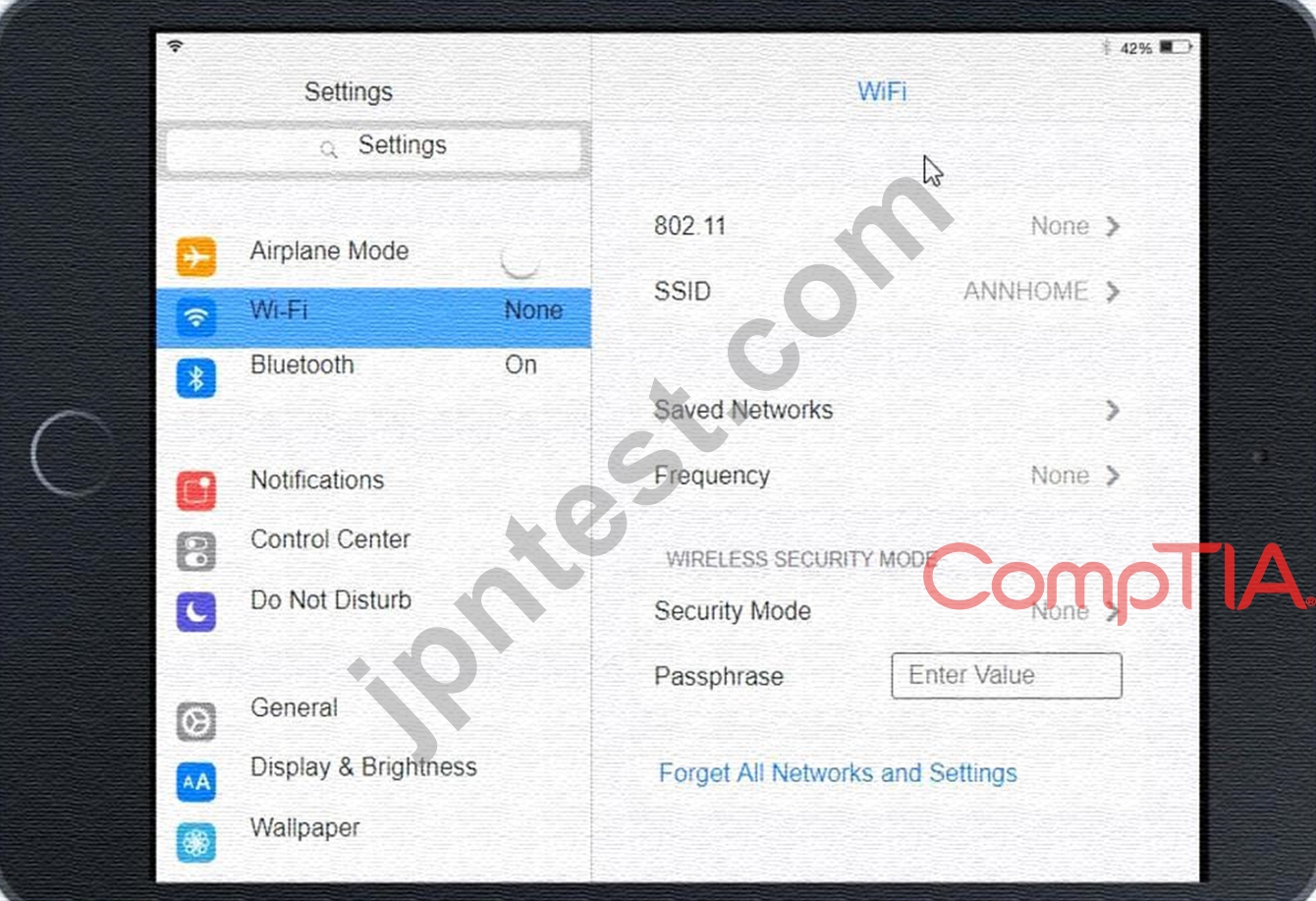
Ann, a CEO, has purchased a new consumer-class tablet for personal use, but she is unable to connect it to the company's wireless network. All the corporate laptops are connecting without issue. She has asked you to assist with getting the device online.
INSTRUCTIONS
Review the network diagrams and device configurations to determine the cause of the problem and resolve any discovered issues.
If at any time you would like to bring back the initial state of the simulation, please click the Reset All button.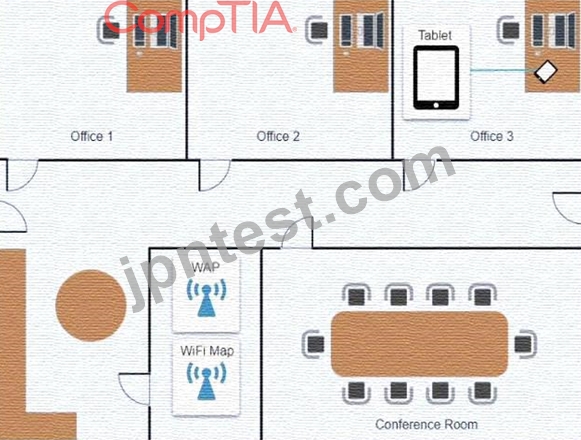
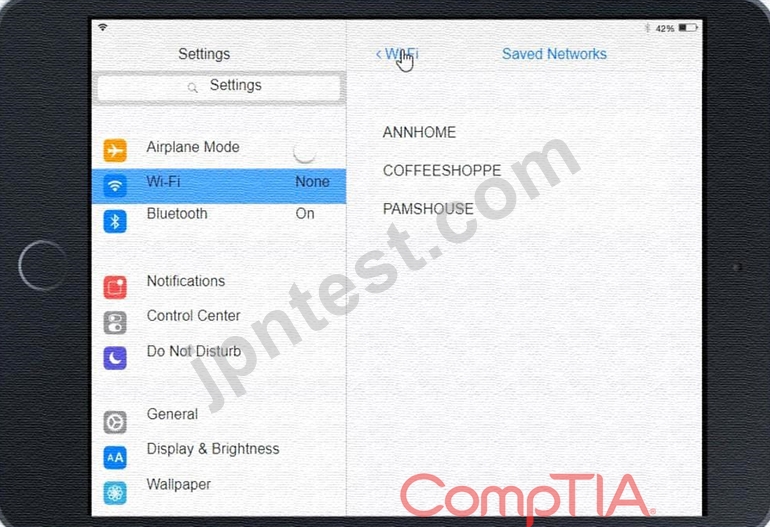
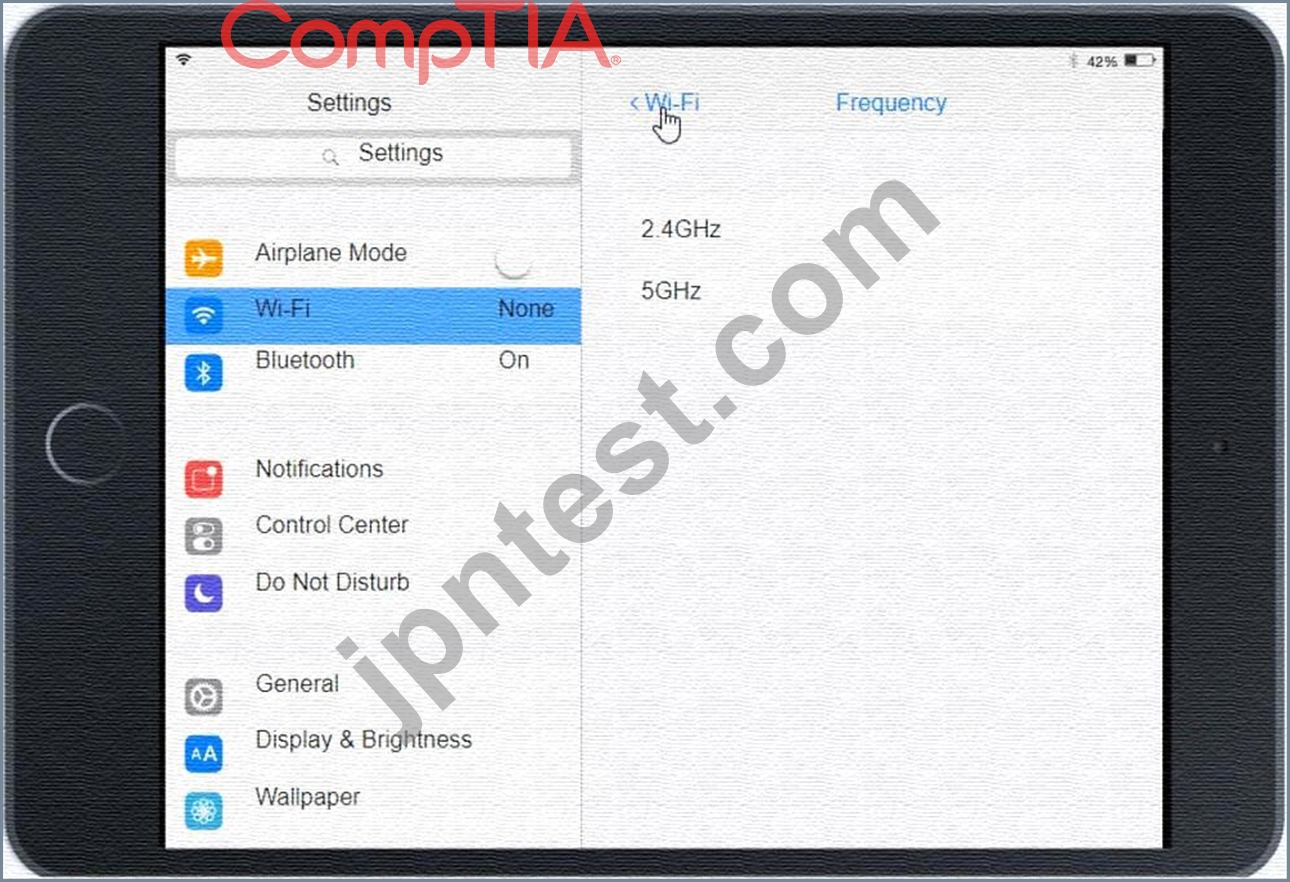
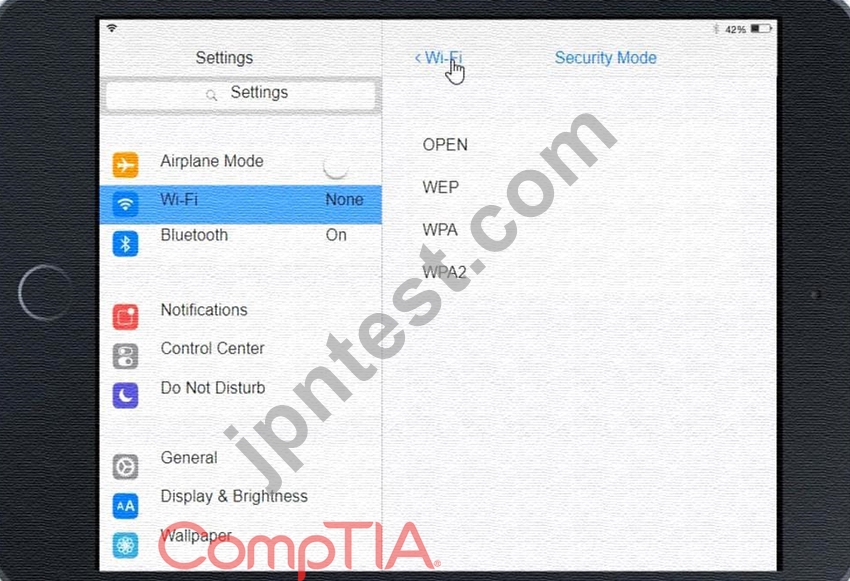
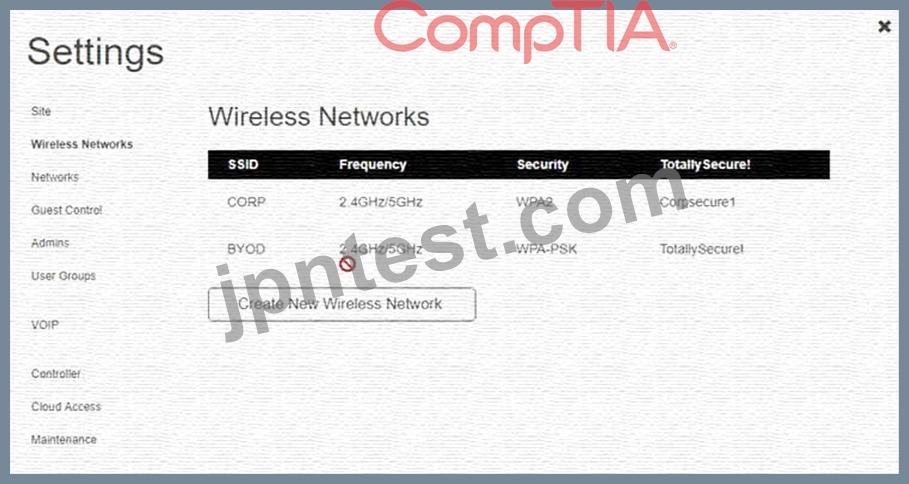
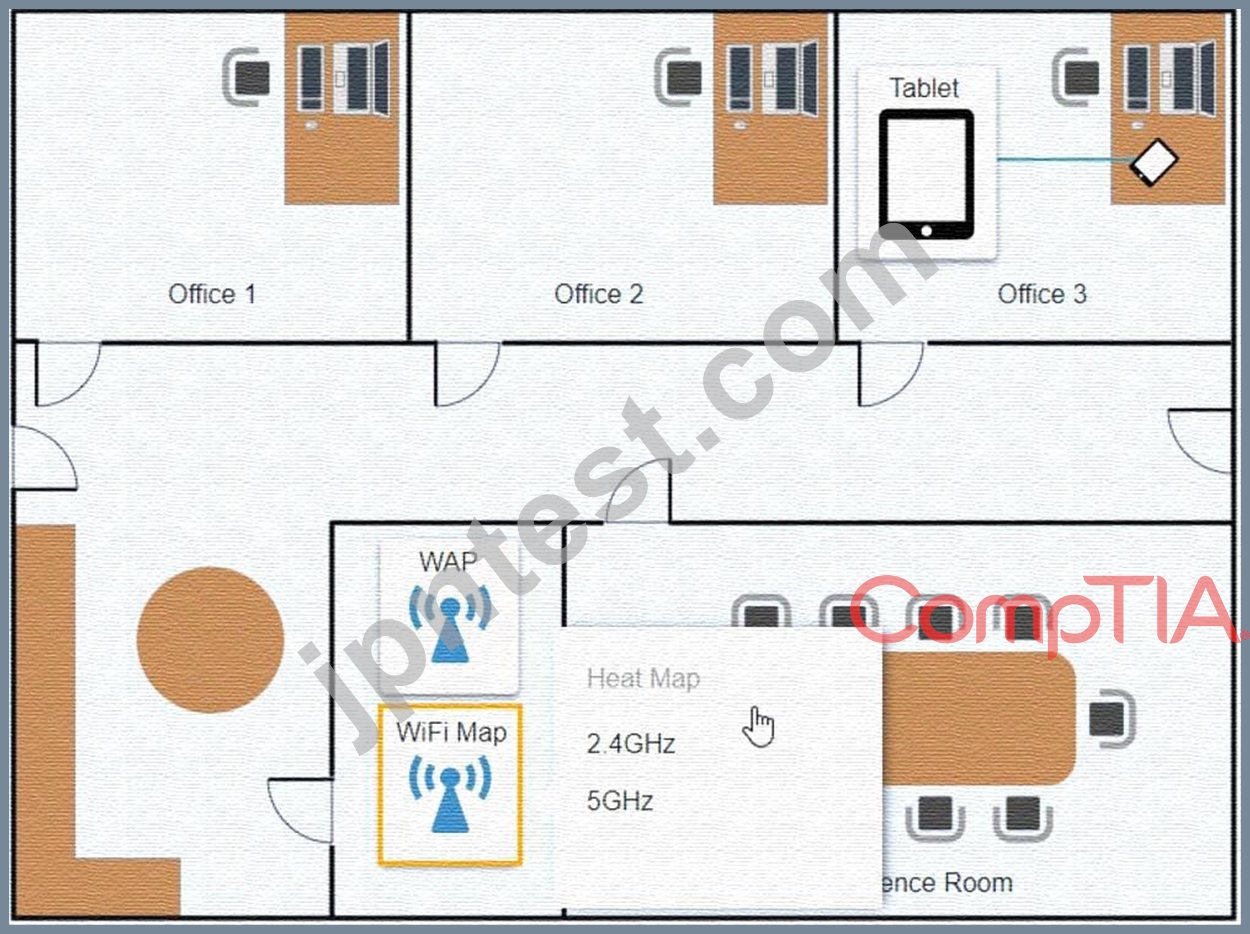
正解:
解説:
See the Explanation below:
Explanation:
Graphical user interface, application Description automatically generated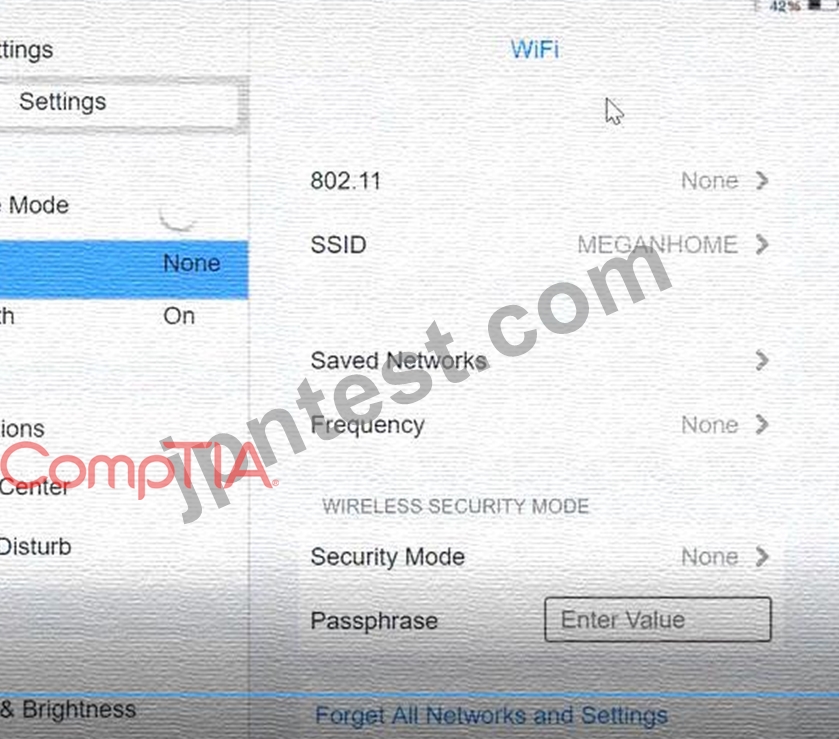
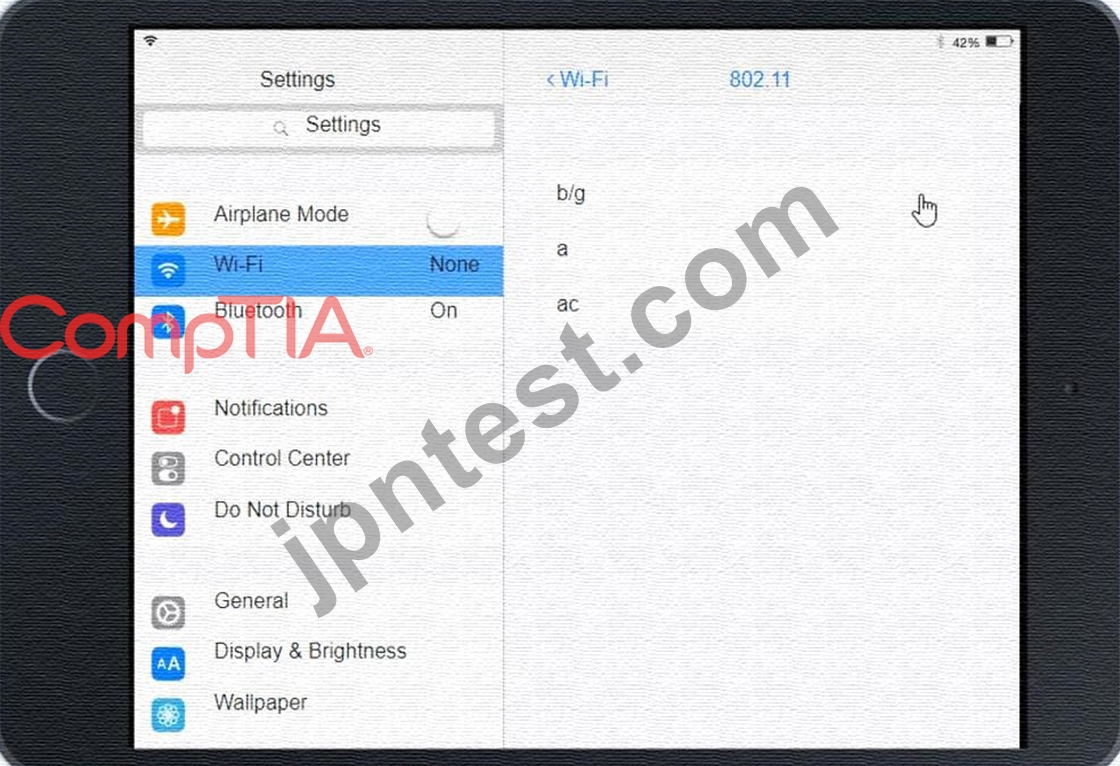
Click on 802.11 and Select ac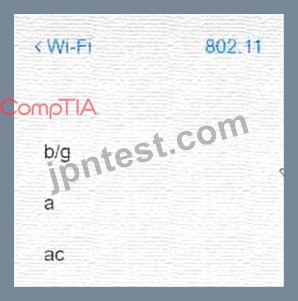
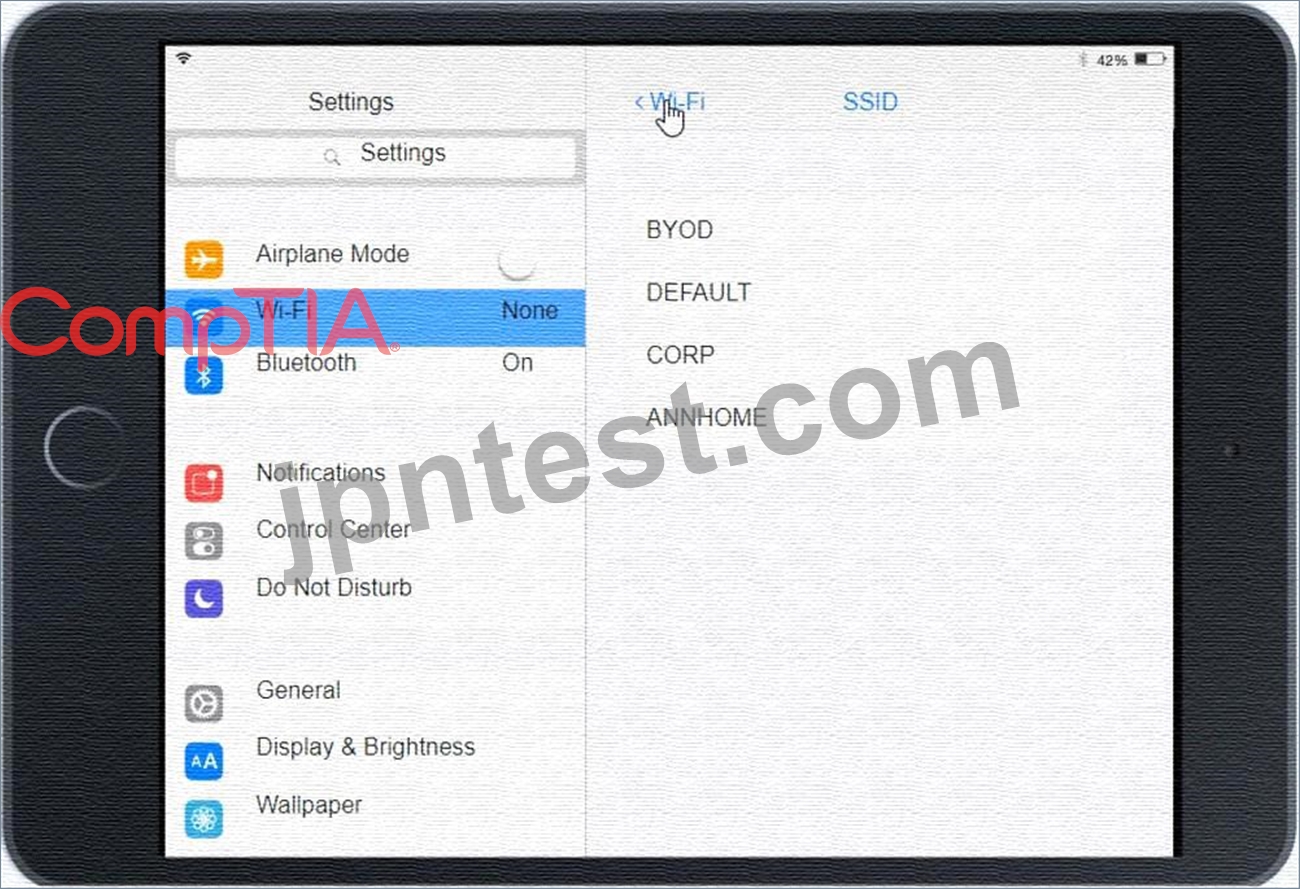
Graphical user interface, application Description automatically generated Click on SSID and select CORP Graphical user interface, text, application, Teams Description automatically generated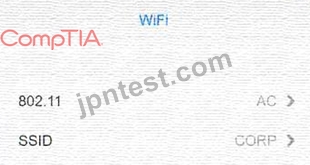
Click on Frequency and select 5GHz
A picture containing background pattern Description automatically generated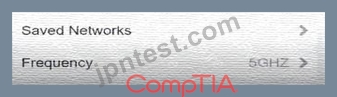
At Wireless Security Mode, Click on Security Mode
Graphical user interface, text, application Description automatically generated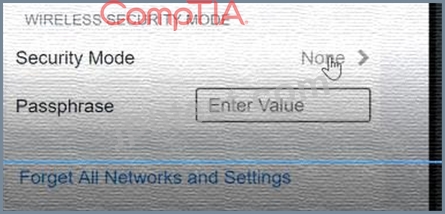
Select the WPA2
Graphical user interface, application, Teams Description automatically generated with medium confidence
Ann needs to connect to the BYOD SSID, using 2.4GHZ. The selected security method chose should be WPA PSK, and the password should be set to TotallySecret.
Graphical user interface, application Description automatically generated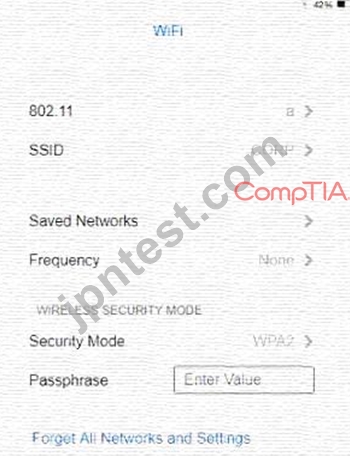
質問 # 464
A customer reported that a home PC with Windows 10 installed in the default configuration is having issues loading applications after a reboot occurred in the middle of the night. Which of the following is the FIRST step in troubleshooting?
- A. Install alternate open-source software in place of the applications with issues
- B. Check for any installed patches and roll them back one at a time until the issue is resolved
- C. Run both CPU and memory tests to ensure that all hardware functionality is normal
- D. Reformat the hard drive, and then reinstall the newest Windows 10 release and all applications.
正解:B
解説:
The first step in troubleshooting is to check for any installed patches and roll them back one at a time until the issue is resolved. This can help to identify any patches that may be causing the issue and allow them to be removed.
質問 # 465
A kiosk, which is running Microsoft Windows 10, relies exclusively on a numeric keypad to allow customers to enter their ticket numbers but no other information. If the kiosk is idle for four hours, the login screen locks.
Which of the following sign-on options would allow any employee the ability to unlock the kiosk?
- A. Requiring employees to use their fingerprints
- B. Using a PIN and providing it to employees
- C. Setting up facial recognition for each employee
- D. Requiring employees to enter their usernames and passwords
正解:B
解説:
The best sign-on option that would allow any employee the ability to unlock the kiosk that relies exclusively on a numeric keypad is to use a PIN and provide it to employees. A PIN is a Personal Identification Number that is a numeric code that can be used as part of authentication or access control. A PIN can be entered using only a numeric keypad and can be easily shared with employees who need to unlock the kiosk. Requiring employees to enter their usernames and passwords may not be feasible or convenient if the kiosk only has a numeric keypad and no other input devices. Setting up facial recognition for each employee may not be possible or secure if the kiosk does not have a camera or biometric sensor. Requiring employees to use their fingerprints may not be possible or secure if the kiosk does not have a fingerprint scanner or biometric sensor.
References: CompTIA A+ Core 2 (220-1002) Certification Exam Objectives Version 4.0, Domain 3.3
質問 # 466
A company has just refreshed several desktop PCs. The hard drives contain PII. Which of the following is the BEST method to dispose of the drives?
- A. Drilling
- B. Low-level formatting
- C. Degaussing
- D. Erasing/wiping
正解:D
解説:
Erasing/wiping the hard drives is the best method to dispose of the drives containing PII
質問 # 467
A company is looking lot a solution that provides a backup for all data on the system while providing the lowest impact to the network. Which of the following backup types will the company MOST likely select?
- A. Synthetic
- B. Full
- C. Off-site
- D. Differential
正解:A
解説:
Explanation
A synthetic backup is a backup type that provides a backup for all data on the system while providing the lowest impact to the network. It combines a full backup with one or more incremental backups to create a single backup set, without requiring access to the original data source. Off-site is a backup location, not a backup type. Full and differential are backup types, but they have a higher impact on the network than synthetic. Verified References: https://www.comptia.org/blog/what-is-a-synthetic-backup
https://www.comptia.org/certifications/a
質問 # 468
Following the latest Windows update PDF files are opening in Microsoft Edge instead of Adobe Reader.
Which of the following utilities should be used to ensure all PDF files open in Adobe Reader?
- A. Programs and Features
- B. Default Apps
- C. Add or Remove Programs
- D. Network and Sharing Center
正解:B
解説:
Explanation
Default Apps should be used to ensure all PDF files open in Adobe Reader1
質問 # 469
A client's device was recently used by multiple other users. The client reports their device is now running slower than usual. Which of the following steps should a technician take first? (Select two.)
- A. Disable the guest account
- B. Back up the data
- C. Reinstall the operating system
- D. Check the startup programs
- E. Update the firmware
- F. Perform a virus scan
正解:D、F
解説:
Comprehensive and Detailed In-Depth
The two best first steps are:
Perform a virus scan - Multiple users on a device increase the risk of malware, which can cause performance issues.
Check the startup programs - Unnecessary programs running at startup can slow down the system.
C . Back up the data - Important but not the first step for performance troubleshooting.
D . Disable the guest account - May prevent future unauthorized use but does not immediately fix the current issue.
E . Update the firmware - Firmware updates improve hardware stability but are unlikely to fix a sudden performance drop.
F . Reinstall the operating system - A last resort, as it erases data and takes significant time.
Reference:
CompTIA A+ 220-1102, Objective 2.4 - Malware and Security Threat Removal
質問 # 470
A user reports that after a recent software deployment to upgrade applications, the user can no longer use the Testing program.
However, other employees can successfully use the Testing program.
INSTRUCTIONS
Review the information in each tab to verify the results of the deployment and resolve any issues discovered by selecting the:
* Index number of the Event Viewer issue
* First command to resolve the issue
* Second command to resolve the issue
BSOD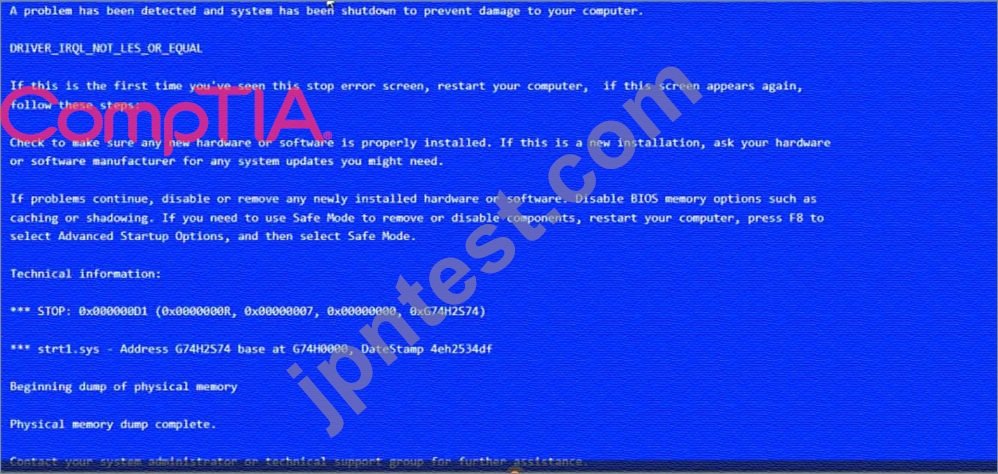
Commands: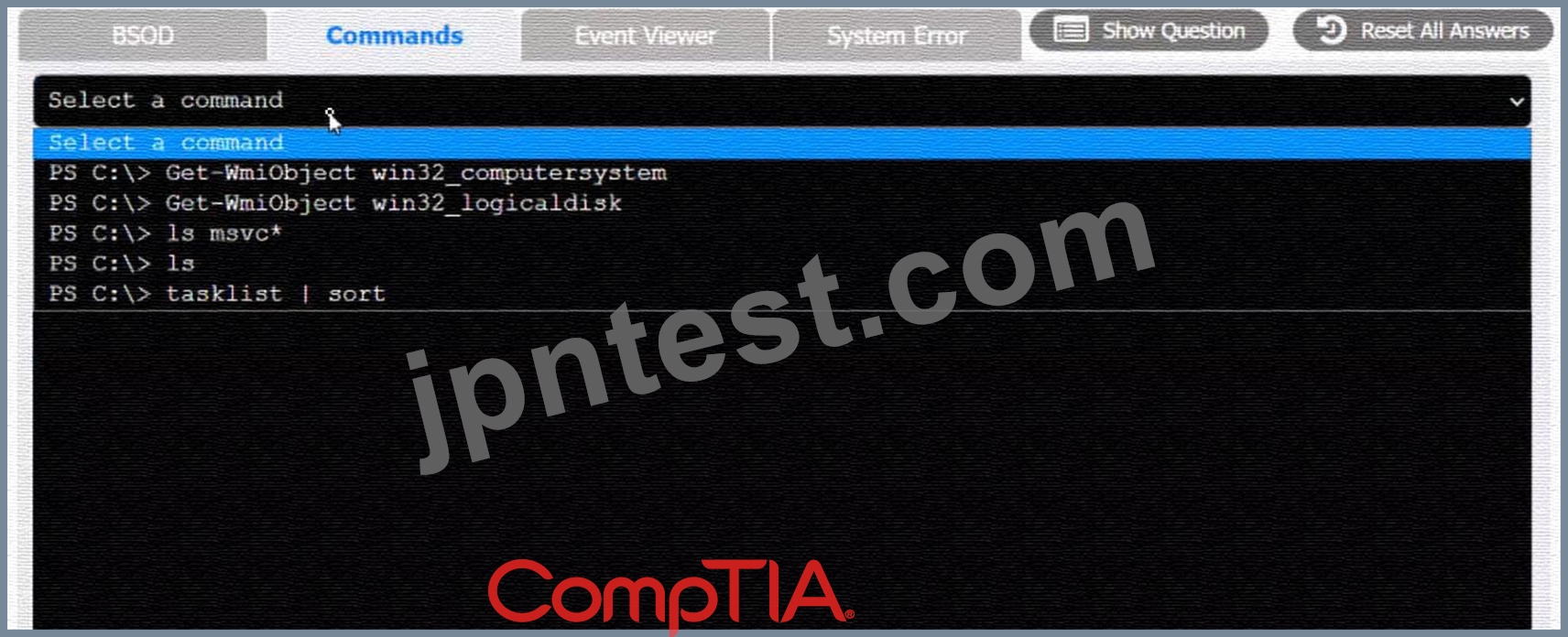
Event Viewer: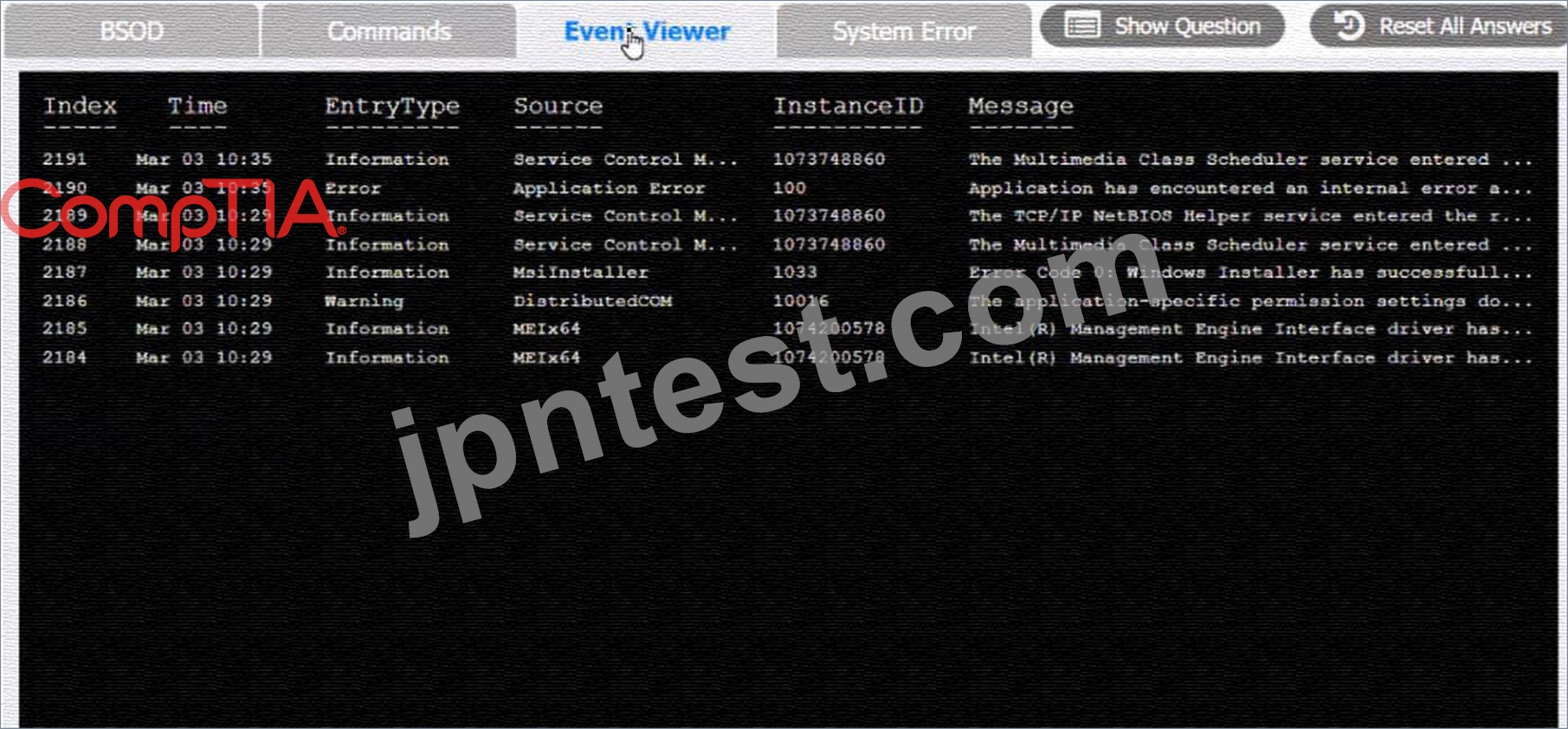
System Error: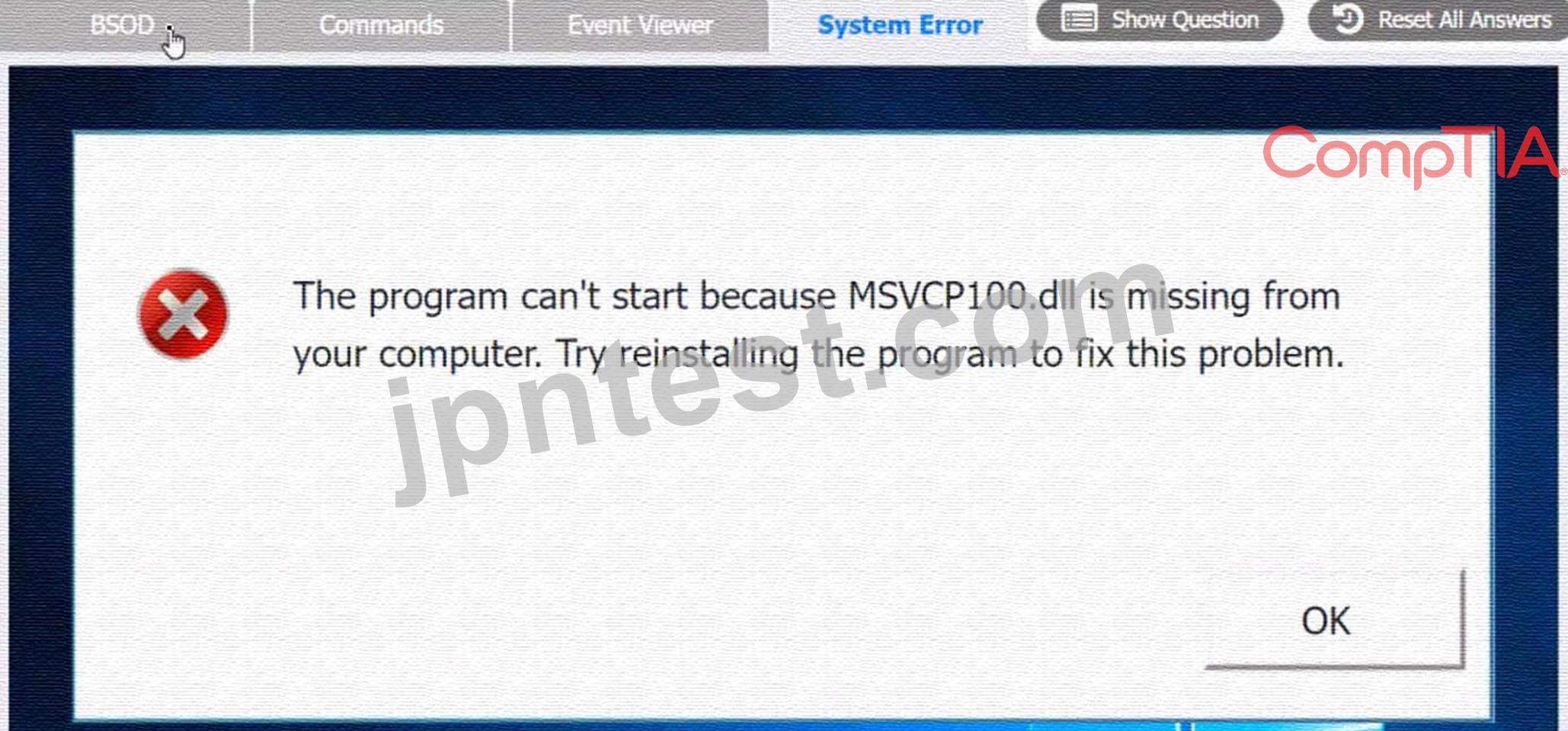

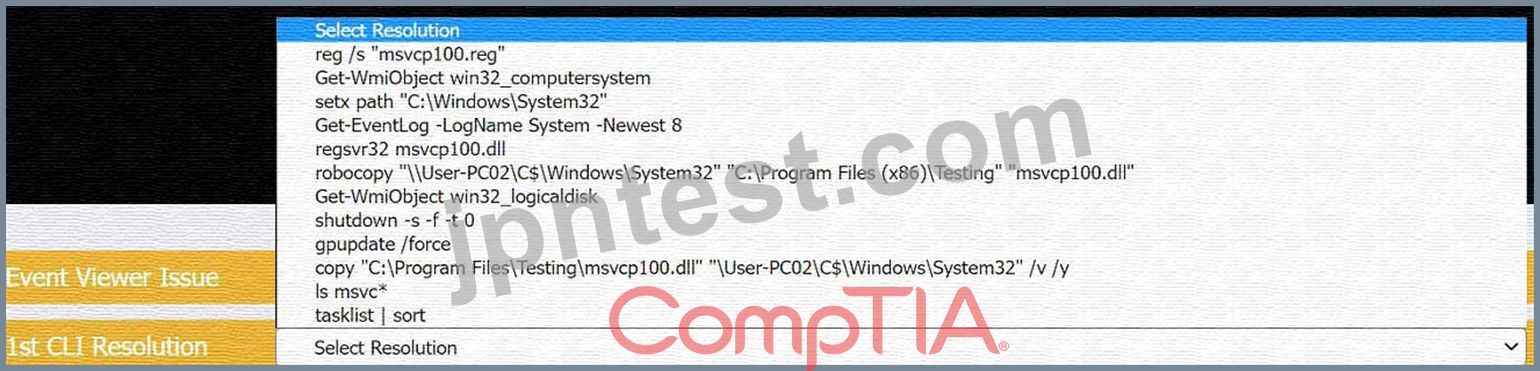
正解:
解説:
see the answer below in explanation.
Explanation:
The user is experiencing a system error that prevents them from using the Testing program. The error message indicates that the file MSVCP100.dll is missing from the computer. This file is part of the Microsoft Visual C++ 2010 Redistributable Package, which is required by some applications to run properly. The error may have occurred due to a corrupted or incomplete software deployment.
To resolve this issue, the user needs to restore the missing file and register it in the system. One possible way to do this is to copy the file from another computer that has the Testing program installed and working, and then use the regsvr32 command to register it. The steps are as follows:
* On another computer (User-PC02) that has the Testing program installed and working, locate the file MSVCP100.dll in the folder C:\Program Files\Testing.
* Share the folder C:\Windows\System32 on User-PC02 by right-clicking on it, selecting Properties, then Sharing, then Advanced Sharing, then checking Share this folder, then clicking OK.
* On the user's computer (User-PC01), open a command prompt as an administrator by clicking Start, typing cmd, right-clicking on Command Prompt, and selecting Run as administrator.
* In the command prompt, type the following command to copy the file MSVCP100.dll from User-PC02 to User-PC01: copy "C:\Program Files\Testing\msvcp100.dll" "\\User-PC02\C$\Windows\System32"
* After the file is copied, type the following command to register it in the system: regsvr32 msvcp100.dll
* Restart the user's computer and try to run the Testing program again.
Therefore, based on the instructions given by the user, the correct answers are:
Select Event Viewer Issue: 2187
Select First Command: copy "C:\Program Files\Testing\msvcp100.dll" "\\User-PC02\C$\Windows\System32" Select Second Command: regsvr32 msvcp100.dll
質問 # 471
A technician has been tasked with using the fastest and most secure method of logging in to laptops. Which of the following log-in options meets these requirements?
- A. Username and password
- B. Fingerprint
- C. SSO
- D. PIN
正解:D
解説:
Explanation
This is because a PIN is a fast and secure method of logging in to laptops, and it is more secure than a password because it is not susceptible to keyloggers.
質問 # 472
Which of the following is a reason why PII is regulated?
- A. To protect privacy rights
- B. To discourage anonymity
- C. To stop information leaks
- D. To establish a chain-of-custody
- E. To increase efficiency of databases
正解:A
質問 # 473
A user's corporate phone was stolen, and the device contains company trade secrets. Which of the following technologies should be implemented to mitigate this risk? (Select TWO).
- A. Remote wipe
- B. Device encryption
- C. Global Positioning System
- D. Antivirus
- E. Remote backup
- F. Firewall
正解:A、B
解説:
Explanation
Remote wipe is a feature that allows data to be deleted from a device or system remotely by an administrator or owner1. It is used to protect data from being compromised if the device is lost, stolen, or changed hands1
. Device encryption is a feature that helps protect the data on a device by making it unreadable to unauthorized users2. It requires a key or a password to access the data2. Both features can help mitigate the risk of losing company trade secrets if a corporate phone is stolen.
References: 1: How to remote wipe Windows laptop
(https://www.thewindowsclub.com/remote-wipe-windows-10) : Device encryption in Windows (https://support.microsoft.com/en-us/windows/device-encryption-in-windows-ad5dcf4b-dbe0-2331-228f-7925c2
質問 # 474
A Chief Executive Officer has learned that an exploit has been identified on the web server software, and a patch is not available yet. Which of the following attacks MOST likely occurred?
- A. Denial of service
- B. Brute force
- C. Zero day
- D. On-path
正解:C
質問 # 475
......
100% 無料220-1102デモ-試し読み [PDF]、今すぐゲットせよ:https://drive.google.com/open?id=1bLf4Gva6-TfWyPHNFPqzFLxwpAbJAz0K
正確でかつ完璧 アンサーはまるでリアル試験問題:https://www.jpntest.com/shiken/220-1102-mondaishu